The Asus ZenWiFi XT9 provides reliable coverage for large homes. (Image by Alejandro Medellin)
Meet Asus’s latest entry into the high-performance mesh Wi-Fi arena: Asus ZenWiFi XT9. On paper, it’s loaded with promise: tri-band Wi-Fi 6, expanded UNII-4 spectrum for cleaner backhaul, and a total throughput up to 7800 Mbps, and the XT9 looks like a serious contender for households juggling 4K streaming, gaming, and dozens of connected devices. But does it deliver the seamless whole-home performance it advertises? We got hands-on and ran it through our five-point review process — assessing its specs, setup, price, performance, and overall value. Here’s how it stacks up, and whether it earns its place at the center of your home network.
Pros
Sleek, modern design
Straightforward setup
Excellent app experience
Cons
High price tag
Limited stress testing
Asus ZenWiFi XT9 Review Rating
(4.8/5)
BroadbandNow Bottom Line
The Asus ZenWiFi XT9 is a sleek Wi-Fi 6 mesh system that delivers consistent performance across multiple devices and busy households, but its price tag ($299.67 at Amazon or $339 at Walmart) puts it in the premium tier for Wi-Fi 6. If you’re a streamer, gamer, or power user who wants reliable speeds, solid coverage, and the flexibility of AiMesh for future expansion, it’s a strong contender. For smaller homes or anyone looking to future-proof with Wi-Fi 6E or Wi-Fi 7, cheaper alternatives like the TP-Link Deco X90 or pricier next-gen systems may be a better fit. Check the latest price on Amazon to see if it fits your budget.
Our Asus ZenWiFi XT9 Video Review
Want to see our review hands-on? Check out our Asus ZenWiFi XT9 video review below.
Asus ZenWiFi XT9 at First Glance: Clean Aesthetics Meet Tri-Band Muscle
The Asus ZenWiFi XT9’s sleek design allows it to blend seamlessly into any home. (Photo by Alejandro Medellin)
The Asus ZenWiFi XT9 makes a strong first impression with its compact, modern design. Instead of the angular, antenna-heavy look of traditional Asus routers, the XT9 nodes are smooth, understated towers that fit easily into living rooms, offices, or shelves without dominating the space. At just 6.3 × 3.0 × 6.4 inches, they’re small enough to blend in while still feeling solid and well-built.
Asus has also focused on usability right out of the box. The packaging is simple, the app guides you through setup, and while the process does have a few quirks we’ll cover later, it’s approachable for most users. Plus, with support for Asus’s AiMesh technology, the XT9 isn’t confined to this kit alone. You can link it with other Asus routers to expand coverage and build a custom whole-home network over time.
AiMesh technology enables you to expand your coverage, a key feature of the Asus ZenWiFi XT9. (Photo by Alejandro Medellin)
At its core, the Asus ZenWiFi XT9 is a tri-band Wi-Fi 6 mesh system built for busy households with lots of devices. It promises up to 7,800 Mbps combined throughput across its 2.4 GHz and dual 5 GHz bands, with support for 160 MHz channels and the expanded UNII-4 spectrum that helps create a cleaner, more reliable wireless backhaul. Asus pairs this with its RangeBoost Plus technology and a flagship Broadcom Wi-Fi 6 chipset, which together extend coverage up to 5,700 square feet with a two-pack.
Each unit measures a compact 6.3 × 3.0 × 6.4 inches, and inside that footprint you’ll find a 2.5 Gbps WAN port, three 1 Gbps LAN ports, and support for LAN aggregation to push wired speeds up to 2 Gbps. It also supports Ethernet backhaul, which can be especially useful if wireless backhaul gets congested in larger or more challenging layouts.
Beyond raw hardware, the XT9 leans on Asus’s AiMesh technology, letting you expand coverage by pairing it with other compatible Asus routers. The Asus Router app handles setup and management, offering WPA3 encryption, parental controls, guest networks, and Alexa and Google Assistant integrations. Reviewers note the app strikes a good balance between simplicity for everyday users and depth for those who want more granular control.
Asus ZenWiFi XT9 Installation: Premium Unboxing, Clear App, but a Different Order of Operations
The Asus ZenWiFi XT9 is easy to set up thanks to the app. (Photo by Hanna Shemke)
Setting up the ZenWiFi XT9 was straightforward overall, but it didn’t follow the typical routine I’m used to with other mesh systems. The Asus Router app is clean and easy to follow, while the printed quick-start guide had me stopping to reread a couple of times. Because the XT9 relies on Asus’s newer AiMesh tech, the setup sequence works a little differently, and it took me a moment to adjust.
Once it clicked, though, the process was quick and painless. It’s more of a one-time learning curve than anything else, and for folks who like to stay future-proof and ahead of the curve, it’ll feel like a small trade-off for the flexibility AiMesh brings.
Unboxing and Initial Setup
Setting up the Asus ZenWiFi XT9 was quick and painless. (Screenshots by Hanna Shemke)
Unboxing the ZenWiFi XT9 feels premium right from the start. The box itself is sturdy and glossy, with chrome lettering on the front that gives it a top-shelf feel compared to most networking systems. Fold-out flaps make it easy to open without wrestling with tape or risking damage, and inside everything is laid out cleanly and logically. The two nodes sit right on top, while the compartments beneath hold the hardware: an Ethernet cable, two power adapters, and documentation. Asus even places a bold “STOP” support card right at the top, with phone numbers, email, and hours of operation clearly listed. It’s a nice reassurance that help is easy to reach if you ever need it. Personally, I’ve never had to call Asus support, but I liked knowing it was there if I needed to.
Another thoughtful touch: the main node is clearly marked with a sticker that says “Hi! I’m the main node, start with me,” and it includes a QR code to download the app. It’s a small detail, but it removes any guesswork about where to begin. Setup begins by placing both units within 1 to 3 meters of each other and connecting the main node to the modem via the WAN port. After plugging both nodes into the wall, you wait for the LED lights to glow solid blue — the signal that they’re ready for setup.
From there, everything moves to the Asus Router app. After you download the app and turn on Bluetooth, it guides you to select the ZenWiFi XT9, scan the QR code on the bottom of the unit, and create your network name and password. It also prompts you to create an admin account so you can manage settings later. Once applied, the system automatically builds the network. Adding the second node is seamless: just place it where you need better coverage, and the app will confirm the connection while the node’s LED turns white to indicate a strong link. You can even check the full network topology in the app once everything is online.
A couple of things stood out during my setup. First, I appreciated that both nodes could be initialized at once, so after the initial pairing, I could place the second unit wherever I wanted, and it would connect automatically. Second, enable Bluetooth before you start. It speeds up the pairing process considerably. The only hiccup I hit was practical: I didn’t have enough outlets in my home office near the modem, so squeezing both nodes into the same space for initial setup was a little tricky. And because the system uses Asus’ AiMesh tech, the order of operations is slightly different from more traditional mesh systems, so I had to pay closer attention to the printed instructions.
Still, once it all clicked into place, the process was easy, and within about ten minutes or so, the XT9 was fully online and ready to go.
Navigating the Mobile App
If you’re familiar with the Asus app, you’ll notice that it’s very sci-fi-themed. (Screenshots by Hanna Shemke)
The Asus Router app for the XT9 strikes a solid balance between power and simplicity. It brings together a clean dashboard that shows your network status at a glance: how many devices are connected, which node they’re using, and the strength of the connections between them.
One of the app’s best features is that it includes parental controls at no extra cost, and they’re easy to use. You can block content, set schedules for when devices can go online, and apply age-appropriate filtering through the Family tab. The app also includes tools like AiProtection, powered by Trend Micro, which monitors for threats, suggests security improvements, and helps with traffic analysis.
Admittedly, it’s not all perfect: Some users might find the number of settings overwhelming at first, especially if you’re more used to “set it and forget it” gear. But I found that once the terminology and layout made sense (thanks in part to Asus’ helpful labels, QR codes, and guide screens) everything became intuitive.
Beyond the basics, the app adds a few thoughtful extras. The network map view makes it easy to see how the nodes are connected and quickly spot weak links. You can also rename nodes by location, label devices, and check which band or node each device is using: a small detail that goes a long way when troubleshooting. Real-time traffic stats are also built in, so you can monitor what’s using bandwidth and identify potential slowdowns.
Whether you only need basic controls like guest networks and parental controls or want to dig deeper with security features, QoS, and network topology, the Asus app delivers. For those worried about complicated network settings, it may take a few minutes to learn, but once you do, it offers the kind of flexibility and transparency that satisfies both casual users and power users alike.
Asus ZenWiFi XT9 Performance: Consistent Wi-Fi 6 Speeds With Only Minor Dips Under Stress
Now for the fun part: performance. I tested the ZenWiFi XT9 in my two-floor home under both everyday and stressful conditions, from light web browsing to streaming across multiple smart devices at once. To get a balanced view, I ran checks at several points: a few feet from the main node, about 15 feet away with a wall between, and upstairs on the second floor, where signals can be tricky.
This gave me a clear picture of how the XT9 handled distance, interference, and simultaneous traffic in a real-world environment. With tri-band Wi-Fi 6, support for 160 MHz channels, and the expanded UNII-4 spectrum for cleaner backhaul, I was especially curious to see how Asus’ performance claims held up in day-to-day use.
Testing the Router
Performance improved 15 feet away compared to near the router. (Screenshots by Hanna Shemke)
Speeds were measured in three locations: 5 feet from the main node, 15 feet away with a wall between, and upstairs, under both calm conditions and a stress test where multiple 4K streams and downloads ran at once.
At 5 feet, downloads clocked in at 739 Mbps with uploads at 41 Mbps under calm conditions. When the network got busy (streaming Spotify on an iPhone 15 Pro Max, Peacock on a MacBook Air, YouTube in 4K on a smart TV, and a separate 4K download on a laptop), download speeds actually rose by about 7 percent, hitting 789 Mbps. Upload speeds, however, dipped by about 37 percent, falling to 26 Mbps.
At 15 feet with a wall in between, download speeds improved to 810 Mbps, and upload speeds came in at 41 Mbps in the calm environment. Under heavy load, downloads climbed another 3 percent to 833 Mbps, while uploads dropped roughly 12 percent to 36 Mbps. This balance shows the XT9’s ability to sustain throughput even with multiple devices competing for bandwidth.
As usual, wireless speeds suffered upstairs during busy conditions. (Screenshots by Hanna Shemke)
Upstairs, where the range usually takes a toll, the calm test reached download speeds of 691 Mbps and upload speeds of 41 Mbps. With traffic maxed out, downloads dropped about 14 percent to 597 Mbps, while uploads held steady, dipping just 2 percent to 40 Mbps.
Our team walks you through how the Asus ZenWiFi XT9 performed in a real-world setting.
Taken together, the XT9 delivered consistent high-end Wi-Fi 6 performance across my home. Even under stress, downloads stayed near or above 600 Mbps in every scenario, with uploads showing only minor losses apart from the close-range stress test. While upstairs speeds reflected the expected range loss, the system proved more than capable of handling simultaneous high-demand tasks without struggling. I do wish I had more devices to really push the network to its limits, but even with the setup I had, the XT9 impressed me with how smoothly it handled heavy traffic.
Comparing to Competitors
The Asus ZenWiFi XT9 is a premium Wi-Fi 6 mesh system. (Photo by Hanna Shemke)
The Asus ZenWiFi XT9 sits in the premium Wi-Fi 6 mesh category, offering tri-band performance up to 7,800 Mbps and features like UNII-4 spectrum support and AiMesh expandability. Compared to its predecessor, the XT8, the XT9 offers faster second 5 GHz band performance and higher overall throughput, making it a worthwhile upgrade for households with heavier traffic.
Compared with the TP-Link Deco X90, the XT9 has both strengths and trade-offs. The Deco X90 advertises AX6600 speeds and covers up to 6,000 square feet, with AI-driven mesh and tri-band Wi-Fi 6 under the hood. In raw numbers, the XT9 edges ahead with its higher 7,800 Mbps throughput and cleaner 160 MHz channel support, which can make a difference in busy networks.
Watch to see how we think the Asus ZenWiFi XT9 compares to similar router products.
Other contenders, such as the Netgear Orbi RBK852, are more expensive, especially if you want multi-gig WAN/LAN ports and a more premium finish. Asus’s own ZenWiFi ET9, meanwhile, adds a 6 GHz band with Wi-Fi 6E for households with newer devices, though it costs more and may be overkill for most users today.
That balance is what makes the XT9 appealing. It’s not the cheapest mesh system, and it’s not bleeding edge with Wi-Fi 6E or Wi-Fi 7, but it strikes a strong middle ground. You get strong tri-band Wi-Fi 6 speeds, a polished app experience, robust security features, and the flexibility of AiMesh, all at a price that stays competitive without pushing into Orbi or Wi-Fi 7 territory.
Our Verdict: Reliable Coverage and AiMesh Expandability With a Few Caveats
The Asus ZenWiFi XT9 is a solid choice for Wi-Fi 6 mesh systems. (Photo by Hanna Shemke)
The Asus ZenWiFi XT9 makes a solid case as one of the strongest Wi-Fi 6 mesh systems you can buy today. The design is sleek enough to fit comfortably into most spaces, the unboxing experience feels premium, and the Asus Router app offers both clarity and depth once you’re online. Performance in testing was consistently strong, with downloads regularly topping 700 Mbps and uploads holding steady even under strain. For households that want reliable coverage across multiple floors and the flexibility to expand with AiMesh, the XT9 delivers.
Still, the system isn’t without drawbacks. The setup process, while approachable, doesn’t follow the usual order of operations and takes a bit of extra attention the first time through. Relying on Wi-Fi 6 rather than Wi-Fi 6E or Wi-Fi 7 also makes it less future-proof in its class. And while the $299.67 Amazon price for a two-pack is competitive, it still costs more than some capable alternatives.
The XT9 is best suited for mid-to-large households with several connected devices, heavy streamers, and those who want the added flexibility of AiMesh for future expansion. If you’re in a smaller home, don’t plan to push your network too hard, or want the latest Wi-Fi 6E or Wi-Fi 7 technology, you may be better off saving money with a cheaper mesh kit or spending more on a more future-ready system.
Our Asus ZenWiFi XT9 Quick Recap
Looking for a quick recap of whether the Asus ZenWiFi XT9 is worth the upgrade? Our team shares our thoughts on this router.
Watch to see if we think the Asus ZenWiFi XT9 is worth it.
How We Assess Routers
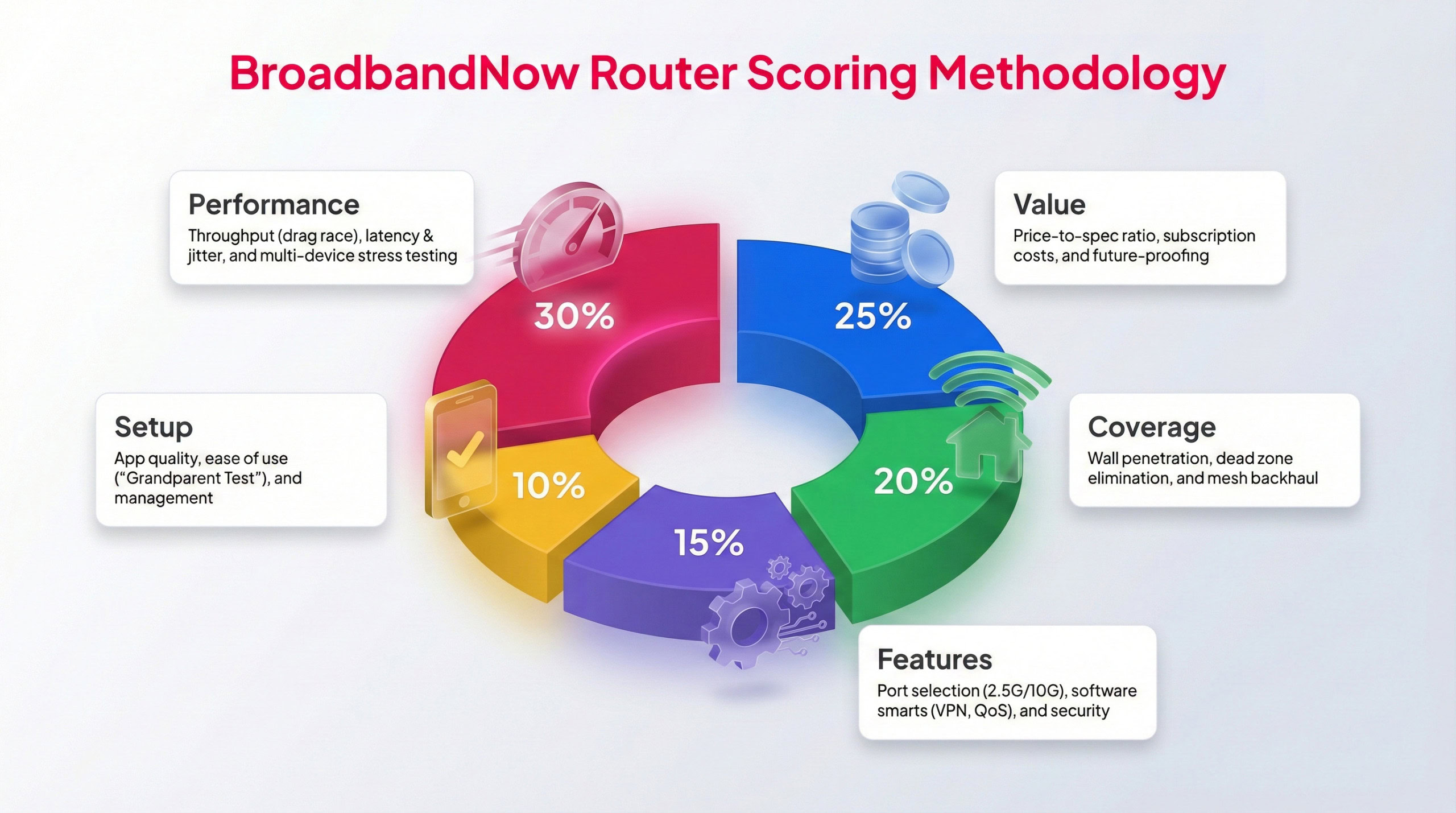
Each BBN expert tests routers following this methodology to provide a weighted score.
To ensure our reviews stay consistent and easy to compare, every router system is evaluated using the same hands-on testing methodology. The Asus ZenWiFi XT9 was tested in a real home environment for over one month to understand how it performs in everyday conditions. During that time, our broadband team focused on overall reliability, whether its features justify the price, and how well the mesh system maintains performance when multiple devices are active. Testing included peak evening usage, demanding tasks like 4K streaming and gaming, and speed measurements taken from several locations throughout the home.
Each category is graded on a weighted 1–5-star scale, with performance and value carrying the most influence on the final score. Below, you’ll find our ratings across five key categories, along with a breakdown of how the ZenWiFi XT9 performed during testing in my two-story home.
Performance – 5/5: I pushed the ZenWiFi XT9 to its limits, and it responded with overly impressive speeds that truly blew me away. I tested the mesh system under calm and busy conditions, and when met with heavy-bandwidth, the router actually clocked increases in download speed, which is quite rare to see even in a mesh network.
Value – 4.5/5: The ZenWiFi XT9 is slightly pricer compared to some similar Wi-Fi 6 mesh systems, but the price makes up for its performance. You really do get the bang for your buck with this system and the impressive speeds it can master under heavy usage. Plus, enhanced security features aren’t paywalled the same way systems like the eero are. That said, it doesn’t have the future-proofing capabilities that some users may be interested in.
Coverage – 5/5: The Asus ZenWiFi XT9 delivers coverage with ease, showing impressive speeds above 500 Mbps no matter where I was in my two-story house. Even on my second floor, which usually struggles with coverage, the system offered enough speed to handle high-bandwidth activities.
Features – 4.5/5: Heavy bandwidth users or large households can take full advantage of the features the ZenWiFi XT9 offers, from tri-band radios to multi-gigabit speeds. Out of the box, the system offers plenty of advanced features that other similar setups paywall. We docked half a point for the lack of futureproofing because this is a Wi-Fi 6 router and isn’t set up for Wi-Fi 6E or Wi-Fi 7, which could deter some users.
Setup – 4.5/5: Asus made setting up this mesh system as simple as could be, with clearly labeled nodes and instructions right out of the box. The app worked incredibly well in guiding me through setup and connecting each node. As someone who has set up many mesh systems and routers before, I did have a bit of a learning curve with the AiMesh technology, as the setup followed different steps than I’m used to. This could cause a hiccup for others as well, but the overall setup was fairly straightforward.
Frequently Asked Questions About the Asus ZenWiFi XT9
Does the Asus ZenWiFi XT9 work with existing routers from other brands?
No, the XT9 can only be paired with other Asus routers that support AiMesh. It won’t link into a mesh system built on Eero, TP-Link, or Netgear hardware.
How many devices can the XT9 support at once?
Asus doesn’t publish a hard number, but most Wi-Fi 6 mesh systems in this class handle well over 100 connected devices. Real performance will vary based on network activity and placement.
Can I wall-mount the XT9 nodes?
Yes, the XT9 units include notches on the bottom for wall mounting, though most people place them on shelves or desks for easier access.
Does the XT9 have USB ports for external storage or printers?
Yes, each unit includes a USB 3.0 port, which you can use for network-attached storage or to share a printer across your network.
What kind of internet speeds can the XT9 handle from my ISP?
The WAN port supports up to 2.5 Gbps, so if you have a multi-gig internet plan, the XT9 can take advantage of it. Standard gigabit and lower-speed plans will also work fine.
Does the XT9 require a subscription for security features?
No, AiProtection Pro, powered by Trend Micro, is included for free with Asus routers. This covers security scans, malicious site blocking, and parental controls without a paid plan.
Is there a single-node option, or do I need to buy the two-pack?
The XT9 is sold in both single-node and two-node packages. A single node covers a smaller area, but most households will want the two-pack for whole-home coverage.