Eero has turned up the power on its newest mesh system, with exceptional performance under testing. (Image by Alejandro Medellin)
Meet the Eero Max 7 — Amazon’s new flagship Wi-Fi 7 mesh system. Marketed as the ultimate home networking solution, it promises top-tier speed, cutting-edge smart-home integration, and expansive coverage designed to handle hundreds of devices with ease. The Max 7 builds on the Eero 7’s foundation, offering faster throughput, more bandwidth, and upgraded hardware to match. At a premium price, the Eero Max 7 is one of the most expensive consumer mesh systems on the market. But does its performance and feature set justify the cost? To find out, we put the Eero Max 7 through its paces and evaluate its specs, setup, price, performance, and value.
Pros
Sleek, minimalist design
Easy setup for new Eero users
Rock-solid performance
Cons
Setup hiccups for existing users
Premium pricing
Light on advanced controls
Eero Max 7 Review Rating
(4.5/5)
BroadbandNow Bottom Line
The Eero Max 7 is a premium Wi-Fi 7 mesh system that combines powerful multi-gig performance with minimalist design and effortless app control. At $1,149.99 on Amazon for a two-pack (it is mesh Wi-Fi after all), it sits firmly in flagship territory, offering tri-band connectivity, built-in Matter, Thread, Zigbee, and Alexa support, and the reliability Eero is known for. Its most significant drawbacks are its price and paywalled features, which require an Eero Plus subscription to unlock the full suite of parental controls and security tools. Still, for users who want top-tier speed, seamless smart home integration, and a router that simply works, the Eero Max 7 is one of the most capable and future-ready mesh systems available today.
Our Eero Max 7 Video Review
Interested in a step-by-step visual guide to the Eero Max 7? Check out our Eero Max 7 video review below.
Quad-core A73 processor, 2GB RAM, and 4GB flash storage
Dimensions
7.24 x 8.73 x 3.54 in
Eero Max 7 at First Glance: Minimalist Design Meets Powerful Multi-Gig Performance
The Eero Max 7 continues the minimalist design Eero users enjoy from this Amazon device. (Image by Alejandro Medellin)
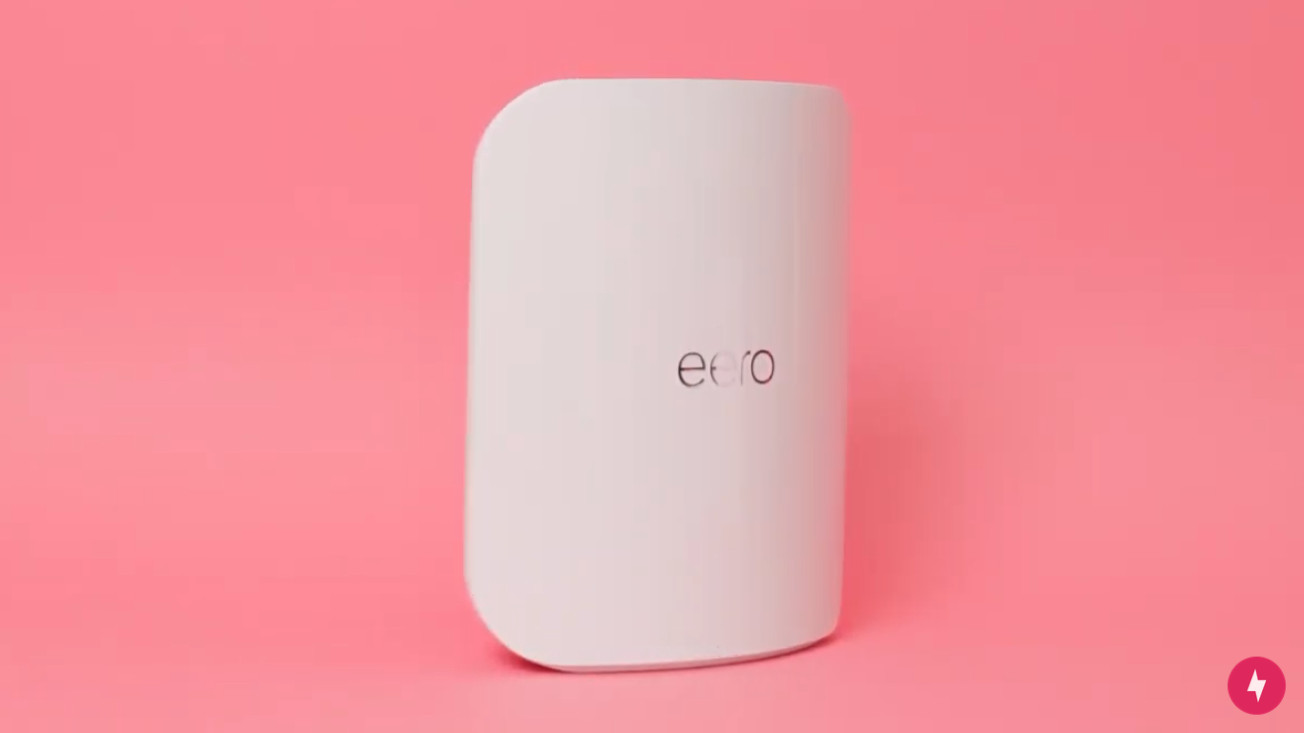
The Eero Max 7 makes a bold first impression — not with flashy lights or gamer-style flair, but with the same understated, minimalist design that defines the Eero brand. Each unit is smooth, all-white, and slightly larger than previous models, yet it still blends seamlessly into any room. It’s sleek enough to sit on a shelf or credenza without calling attention to itself, keeping with Eero’s philosophy that high-performance networking gear shouldn’t look like networking gear at all.
Beneath that clean exterior, the Max 7 is a serious powerhouse. This tri-band Wi-Fi 7 system (BE20800) packs support for 2.4 GHz, 5 GHz, and 6 GHz bands, delivering wireless speeds up to 10 Gbps, and is designed to future-proof your home for years to come. Dual 10 Gigabit Ethernet ports and two 2.5 Gigabit ports give users the flexibility to use multi-gig internet, wired backhaul, or connect bandwidth-hungry devices like gaming PCs or NAS drives. Each unit covers about 2,500 square feet — so even a single node can handle smaller homes, while multiple nodes scale easily for larger spaces. One router can support up to 250 connected devices, which is nothing short of impressive for a consumer system.
Eero Max 7 (Image by Hanna Shemke)
Under the hood, the Max 7 runs on a quad-core A73 processor with 2 GB of RAM and 4 GB of flash storage, giving it the horsepower to manage heavy traffic and simultaneous connections without stuttering. WPA2 and WPA3 security protocols keep things locked down, while built-in Matter, Thread, and Zigbee support transform it into a smart home hub that can seamlessly connect and control compatible devices with no extra bridges required.
Like other Eero systems, all tasks can be managed through the Eero app, which remains one of the cleanest, most intuitive network management tools available. From the app, you can monitor connected devices in real time, pause Wi-Fi for specific users, set up parental controls, and view activity insights. It’s quick, easy, and visual, making network management accessible even to non-techy users. Advanced users might still wish for deeper customization, but for most households, the streamlined approach is a win.
At $599.99 for a single unit on Amazon, the Eero Max 7 commands a serious premium. It’s positioned squarely for users who want the fastest speeds, best coverage, and full smart-home integration without compromise. The performance and polish are undeniable, but whether that price is justified depends entirely on how much you plan to push your home network.
Eero Max 7 Installation: Easy to Set Up, But Not Entirely Seamless for Upgrades
The Eero app features a user-friendly setup for first-time users. (Image by Hanna Shemke)
At first glance, the Eero Max 7 feels like the next evolution of Eero’s design philosophy. The packaging is sleek and minimal; easy to open, with the router presented cleanly and without fuss. The hardware itself mirrors that same simplicity. Smooth, rounded edges, a matte white finish, and a compact footprint make it easy to place in any open area throughout your home without clashing with your décor. It’s the kind of tech that feels right at home in any room, striking that familiar balance between form and function that Eero has nailed over the years.
Visually, the Max 7 doesn’t stray far from the Eero 7, but it feels more premium in scale and build. It’s slightly larger, with a more substantial presence that hints at the serious performance packed inside. Very polished, modern, and quietly powerful.
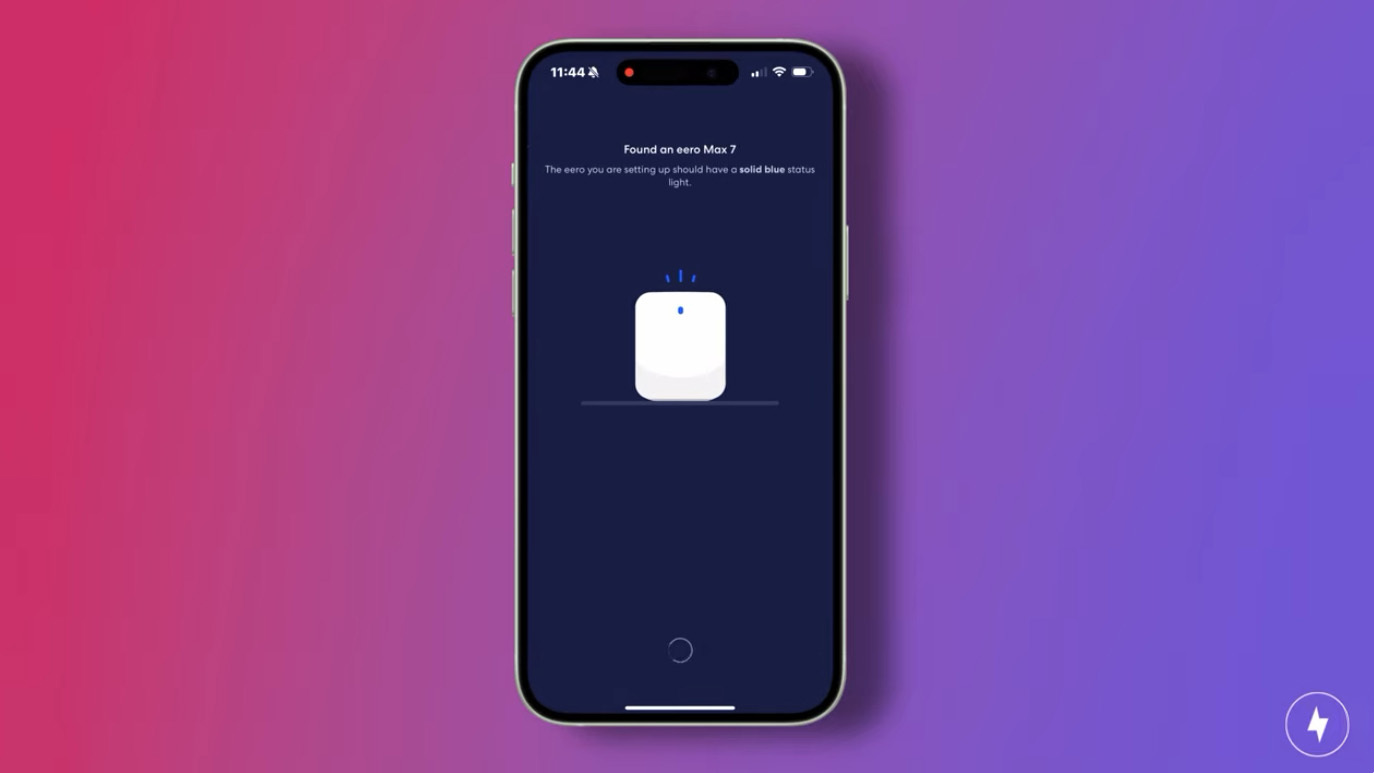
Setting up the Max 7 is straightforward, though not without a few hiccups. The Eero app remains one of the cleanest, most user-friendly platforms for network management, walking you through the essentials with visual prompts and clear guidance. If you’re new to Eero, getting online takes only a few minutes. Returning users may encounter a few extra steps, but once connected, the process smooths out quickly, and the system is ready to deliver the promised multi-gig speeds.
Even at first glance, the difference between the Max 7 and the standard Eero 7 is clear: the Max 7 is built for power users. With full tri-band Wi-Fi 7 support, 10 Gbps speed potential, and smart home integration baked in, it’s more than just a sleek router — it’s a statement piece for anyone serious about future-proofing their network. But I was curious to see if the Eero Max 7 lived up to its advertising.
Unboxing and Initial Setup
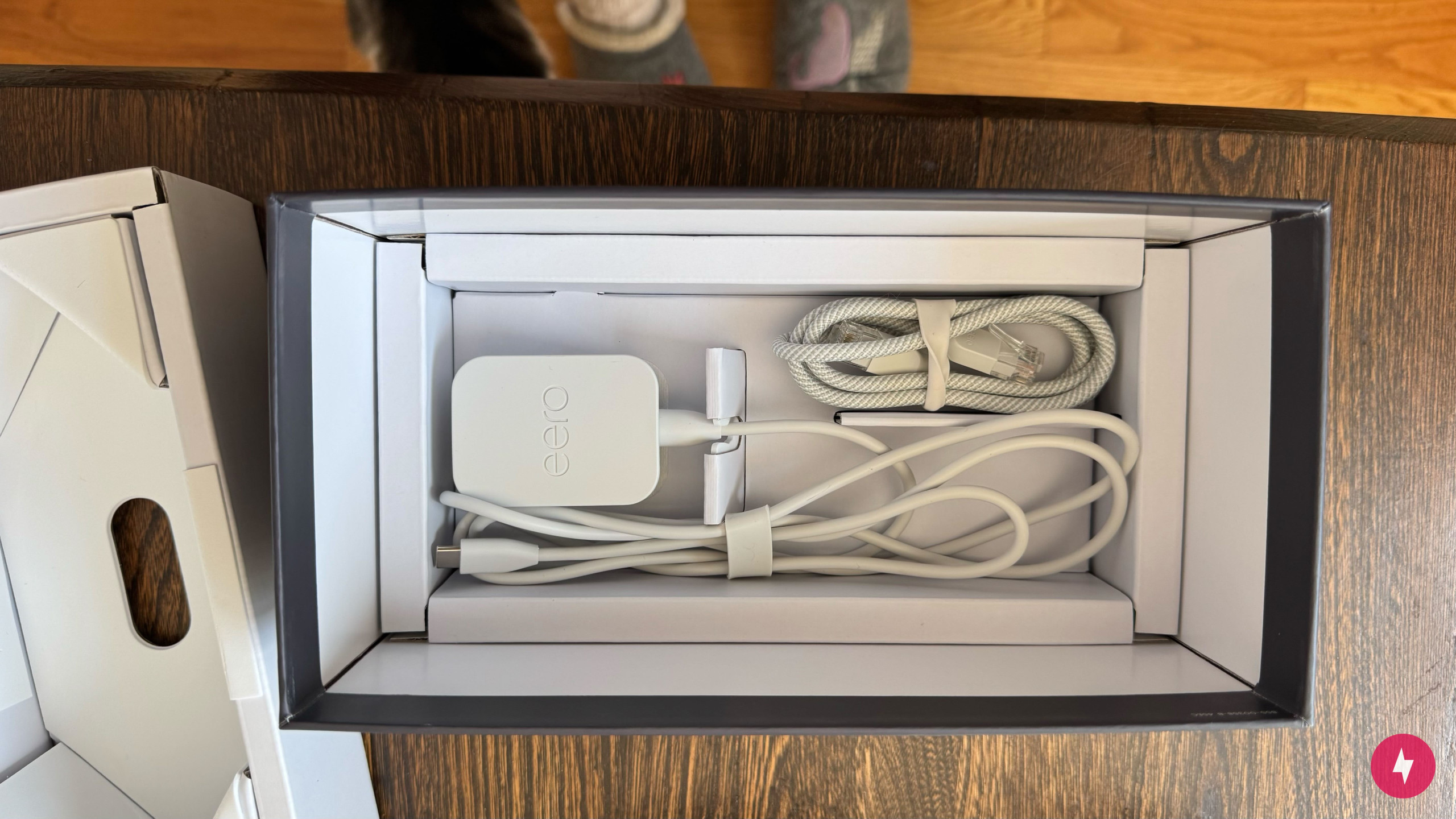
Unboxing the Eero Max 7 immediately reinforces its premium status. The packaging is simple and elegant, which feels more like a smartphone than a router. Inside, everything is neatly organized: the Eero Max 7 node sits right on top, followed by a compact power adapter and a single Ethernet cable tucked underneath. There’s no printed setup guide or documentation this time, just a QR code that directs you to the Eero app. It’s clean and modern, but for anyone upgrading from an older Eero system, a quick-start insert with upgrade-specific guidance would have been a nice touch.
The simple packaging with the system and cords made unboxing and setting up a breeze. (Image by Hanna Shemke)
The hardware itself keeps Eero’s signature minimalist style. The matte white finish, rounded corners, and subtle LED indicator give it that polished, high-end look that blends seamlessly into any room. On the back, the Max 7 has two 10 Gigabit Ethernet ports and two 2.5 Gigabit Ethernet ports, a welcome upgrade from the Eero 7’s dual 2.5 Gbps ports. This time around, there are no USB ports, keeping the design streamlined but slightly limiting for users who rely on USB connectivity for shared drives or printers. Power comes via a dedicated adapter rather than USB-C, which feels like a small step back from the Eero 7’s universal simplicity, but it does keep things tidy.
Once unboxed, installation is refreshingly simple. At least, once you know where to start. You’ll unplug your modem, connect it to the Max 7 with the included Ethernet cable, plug both into power, and let them do their thing. The Eero app handles the rest, walking you through creating your network, naming it, and setting a password. For most users, the process takes just a few minutes and doesn’t require any technical know-how.
Things get a little more nuanced for existing Eero users. Since I already had the Eero 7 system set up in the app, the QR code didn’t take me directly to installation. The app initially thought I was still operating on my previous system and kept prompting that my network was offline. The fix was simple enough by selecting “Replace my Eero” instead of “Add a new device”, but it’s the kind of detail that could trip up returning users during the upgrade process.
Once that hurdle was cleared, the Max 7 came online quickly. The app recognized the new hardware, connected automatically, and the network stabilized within minutes. From there, it was smooth sailing; the hallmark of Eero’s simplicity was in full effect, delivering the same “set it and forget it” experience that’s made the brand a favorite for effortless home networking.
Navigating the Mobile App
The user-friendly eero app made setting up the Max 7 a breeze, with easy walkthrough steps and setup tips. (Image by Hanna Shemke)
The Eero app remains one of the strongest parts of the entire ecosystem. It walks the line between simplicity and functionality with impressive precision, approachable enough for first-time users but polished enough to satisfy those who want more visibility into their network. The home screen gives you a snapshot of everything that matters: connection status, device count, and which node each device is linked to. Essential tools like renaming, pausing Wi-Fi, or running a quick speed test are just a tap away. It’s clean and visual, and it feels designed for people who want Wi-Fi that just works.
That ease of use carries through to ongoing management. Profiles make it easy to group devices by person or purpose, letting you pause internet access for one family member while keeping everyone else online. Real-time activity graphs show which devices are consuming the most bandwidth, and the network diagnostics feature offers a quick health check without digging through menus. It is all very plug-and-play in spirit, even once you’re past the setup phase.
However, with the Eero Max 7, some of that simplicity comes with strings attached. Many of the advanced features, including ad blocking, content filters, and deeper security controls, are available only with the Eero Plus subscription, which costs extra on top of the already premium router. For casual users, that paywall might not matter, but for those expecting full access to the Max 7’s capabilities out of the box, it can feel a bit restrictive.
Still, the Eero app sets a high standard for overall usability. It’s reliable, intuitive, and visually consistent, which complements the Max 7’s clean, modern design. Combined with built-in support for Matter, Thread, Zigbee, and Alexa, the app doubles as a smart home command center. Adding or managing connected devices feels effortless, and everything plays nicely within a single, unified ecosystem.
In the end, the Eero app delivers what most people want from a modern router interface: clarity, simplicity, and control without unnecessary complexity. It just leaves you wishing that a system as premium as the Max 7 didn’t require an extra subscription to unlock its full potential.
Eero Max 7 Performance: Everyday Reliability Over Benchmark Bragging Rights
Multiple speed tests proved the Eero Max 7 is here to deliver optimal performance. (Image by Hanna Shemke)
Now for the fun part: performance. I tested the Eero Max 7 in my two-floor bungalow, under both calm and chaotic conditions, from everyday browsing and work calls to streaming across multiple smart devices at once. To keep results consistent, I ran tests in three key areas of the house: about five feet from the primary node, fifteen feet away with one wall in between, and upstairs on the second floor.
This setup allowed me to see how the Max 7 handled distance, interference, and heavy traffic in a real-world environment. As a tri-band Wi-Fi 7 system, it runs on the 2.4 GHz, 5 GHz, and 6 GHz bands with support for 320 MHz channels and new Wi-Fi 7 features such as Multi-Link Operation and Multi-Resource Unit Puncturing. Together, these upgrades promise lower latency, higher throughput, and better performance under load than Wi-Fi 6E systems.
Rated for BE20800 speeds, the Max 7 is built to take full advantage of multi-gig internet connections, with theoretical wireless speeds up to 10 Gbps. Combined with dual 10 Gigabit Ethernet ports and two 2.5 Gigabit ports, it’s designed for homes that demand the fastest possible connections, whether for gaming, 4K streaming, or high-bandwidth smart home setups.
By running tests in different rooms and usage scenarios, I aimed to see not just how fast the Max 7 could go, but how consistently it could maintain that performance throughout the house.
Testing the Router
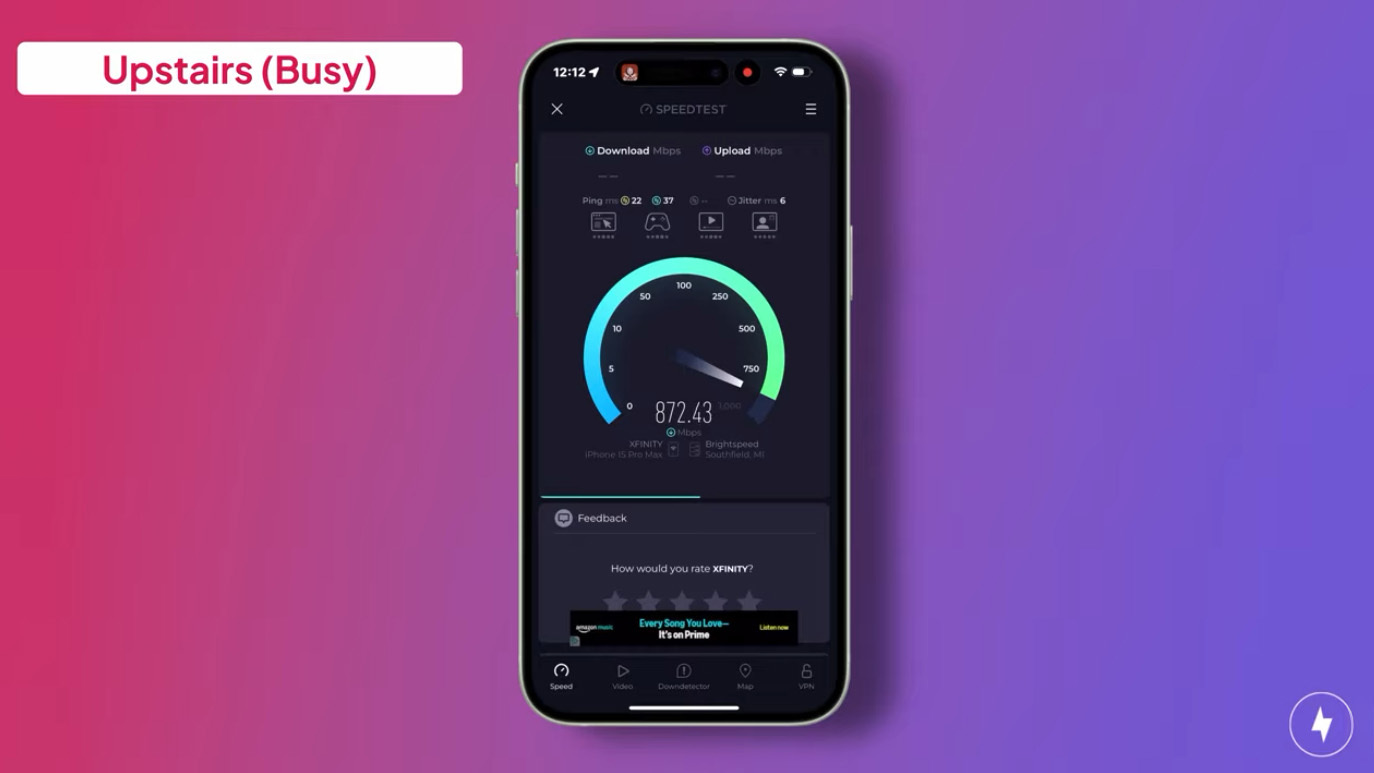
At the furthest point in the house under busy conditions, the eero Max 7 performed quite well. (Image by Hanna Shemke)
At five feet from the main Eero Max 7 node, speeds were strong and consistent. In calm conditions with only a few devices connected, downloads averaged 894 Mbps while uploads measured 41 Mbps. When the network was busy with 4K streaming, gaming, and smart devices running simultaneously, downloads dipped to 854 Mbps, a 4.5 percent decrease, while uploads remained steady at 41 Mbps, showing no measurable change.
At fifteen feet away, with a wall in between, speeds fluctuated. In calm conditions, downloads averaged 600 Mbps while uploads measured 38 Mbps. Under busy conditions, downloads climbed to 686 Mbps, a 14.3 percent increase from calm conditions at the same location, while uploads improved slightly to 41 Mbps, a 7.9 percent increase.
Upstairs, performance varied but remained solid. In calm conditions, downloads averaged 916 Mbps while uploads measured 39 Mbps. When the network was busy, downloads dropped to 872 Mbps, a 4.8 percent decrease, while uploads fell slightly to 38 Mbps, a 2.6 percent decrease.
Our team walks you through how the Eero Max 7 performed in a real-world setting.
Taken together, the Eero Max 7 demonstrated impressive stability and efficiency across environments. While short-range performance remained predictably strong, mid-range and upstairs tests showed how effectively the mesh network balanced traffic under load. Even with multiple devices competing for bandwidth, the Max 7 maintained high throughput and consistent uploads, proving its strength as a next-generation Wi-Fi 7 system capable of handling demanding real-world conditions without breaking a sweat. I would love to see how the Max 7 performs in a larger home with more rooms and more distance between nodes, since my smaller bungalow setup likely did not push the system to its full potential.
Comparing to Competitors
Watch to see how we think the Eero Max 7 compares to similar router products.
The Eero Max 7 sits at the top of the Wi-Fi 7 landscape, both in performance and price. At $599.99 for a single unit on Amazon, it costs significantly more than most consumer mesh systems, including the TP-Link Deco BE85, Netgear Orbi 970, and Linksys Velop Pro 7. Those competing models often deliver similar tri-band performance with 6 GHz support and multi-gig Ethernet ports.
Eero differentiates itself through simplicity and integration. While systems like the Orbi 970 or Deco BE85 lean into complex web interfaces and deep customization, the Max 7 prioritizes ease of use through the Eero app. It’s designed for users who want top-tier performance without the hassle of advanced configuration, and for households already invested in Amazon’s smart home ecosystem. Matter, Thread, Zigbee, and Alexa integration make the Max 7 feel more like a smart home hub than just a router.
That said, the premium positioning comes with trade-offs. Power users who expect granular control over network settings or prefer to avoid subscription-based features may find greater flexibility in systems like the Asus ZenWiFi BQ16 Pro or the TP-Link Archer GE800. Those routers offer similar Wi-Fi 7 speeds and multi-gig support, but with more traditional configuration tools and fewer paywalled features.
Ultimately, the Eero Max 7 targets a very specific audience: users who want flagship-grade performance and seamless app-driven simplicity in one package. It may not be the most customizable or cost-efficient option, but it delivers high-end stability and smart-home integration that few competitors can match.
Our Verdict: Effortless Performance Defines the Eero Max 7, but Its Paywalled Features May Deter Power Users
We were impressed with the exceptional performance of the Eero Max 7. (Image by Hanna Shemke)
The Eero Max 7 is not built to reinvent home networking; it is built to perfect it. With tri-band Wi-Fi 7, wide 320 MHz channels, and up to 10 Gbps of theoretical speed, it delivers the kind of performance that can handle anything a modern household throws at it. During testing, the system stayed fast, stable, and impressively consistent, maintaining smooth throughput even as multiple devices streamed, downloaded, and connected simultaneously. Eero clearly designed the Max 7 to be as dependable as it is powerful.
Setup was not entirely seamless, especially for existing Eero users navigating upgrades through the app. A few extra steps and some manual tweaks were needed to get everything online, but once the system connected, it performed flawlessly. From there, the Eero app did what it does best: simplify complex networking into something anyone can manage. Between real-time monitoring, parental controls, and smart home integration through Matter, Thread, Zigbee, and Alexa, the Max 7 functions as both a high-speed router and an all-in-one smart home hub.
At over $1,000 for a two-pack, the eero Max 7 is one of the most expensive mesh routers on the market, and that price will give many buyers pause. The competing Wi-Fi 7 system, Linksys Velop Pro 7, offers similar speeds and coverage at a lower price. And it’s still significantly less expensive than the TP-Link Deco BE85 and Netgear Orbi 970. Still, the Max 7’s appeal lies in its simplicity, design, and reliability. It’s for users who want multi-gig performance and next-generation connectivity without having to think about networking ever again.
The Eero Max 7 is ideal for:
Smart home households that want a single hub for Matter, Thread, Zigbee, or Alexa.
Multi-device users with high-speed internet who need consistent, whole-home coverage.
Design-conscious buyers who prefer minimalist hardware that blends into a space.
Families who value an intuitive app experience and hands-off reliability.
On the flip side, networking enthusiasts, gamers, and power users looking for deep customization or web-based controls will find more flexibility in systems such as the Asus ZenWiFi BQ16 Pro or TP-Link Archer GE800.
In the end, the Eero Max 7 represents the peak of Eero’s design and engineering philosophy. It is sleek, powerful, and thoughtfully simple, a future-ready mesh system that quietly delivers exceptional performance without demanding your attention.
Our Eero Max 7 Quick Recap
Want a quick rundown of whether the Eero Max 7 is worth it? Our team shares our thoughts on this router in 60 seconds.
Watch to see if we think the Eero Max 7 is worth it.
How We Assess Routers
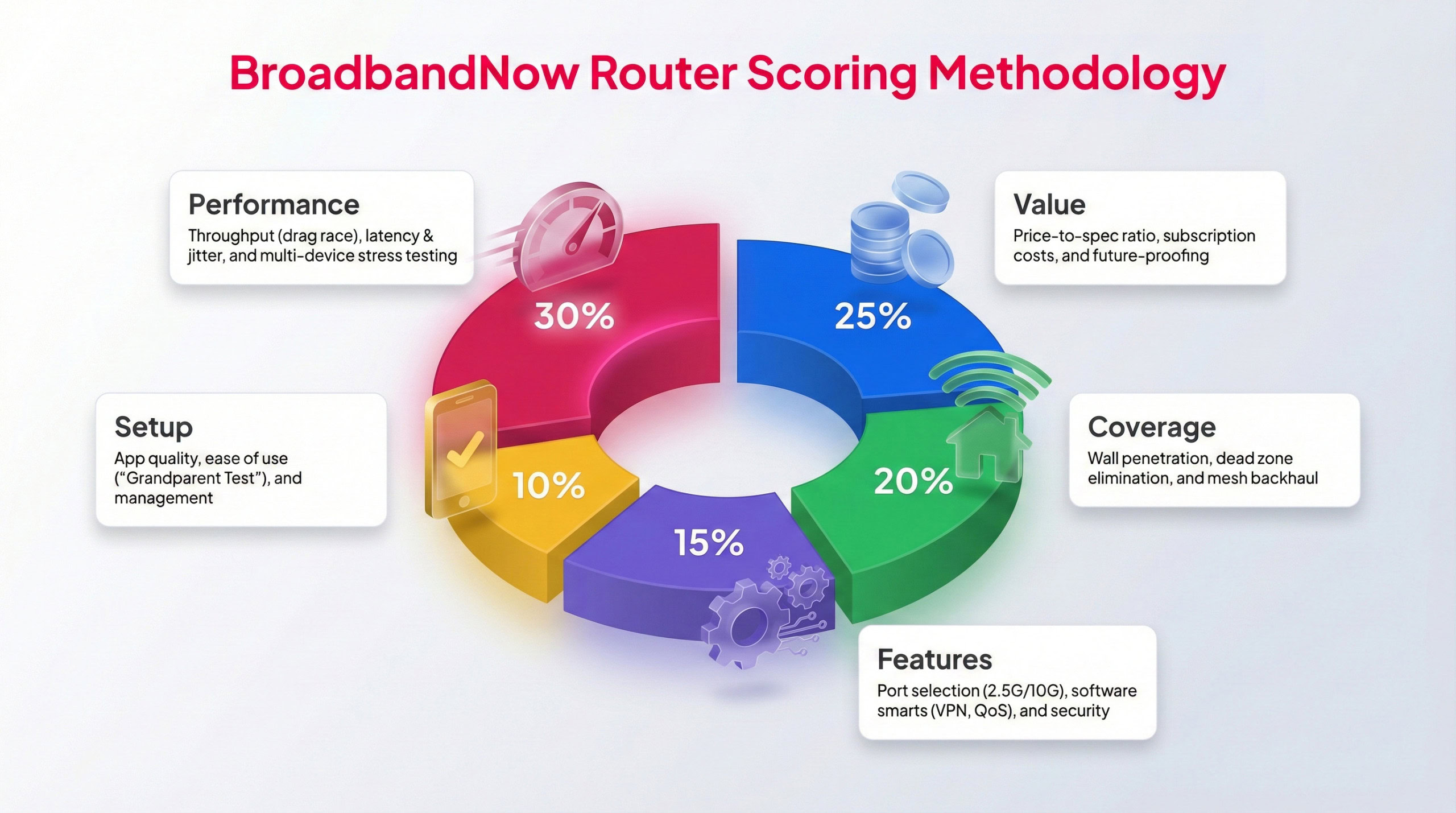
Each BBN expert tests routers following this methodology to provide a weighted score.
We use a standardized testing framework for every router we review, so our results stay fair and easy to compare. Our broadband experts test each device in real-world conditions over a full month. During that time, we closely evaluate day-to-day performance, how its features stack up against its price, and how it holds up under heavy use. That includes peak-hour usage, high-bandwidth activities, and speed tests taken from multiple spots throughout the home.
Each category is scored on a 1–5 star scale using a weighted rating system, with performance and overall value carrying the most influence. Below, you’ll find our rankings across five key categories, along with a breakdown of how the Eero Max 7 performed while being tested in my two-story home.
Performance – 5/5: I measured performance at several distances, from right next to the router to farther rooms and typical dead-zone areas in my house. Speeds held steady throughout, and latency remained low. To really stress-test the setup, I had multiple devices streaming, downloading, and working at the same time while running speed tests in the background. Even under that load, the system stayed stable, showing the Eero Max 7 performs just as powerfully as expected.
Value – 4/5: While the Eero Max 7 has a steep price point, its performance backs it up, especially compared with much pricier setups that offer similar features, such as Netgear’s Orbi 970. The Eero system includes basic security features and controls, but advanced options are paywalled, unlike similar systems. As pricey as the Max 7 is, it would offer better value with advanced features.
Coverage – 5/5: Coverage was strong across the entire house, including spaces where Wi-Fi usually drops off or becomes unreliable. The signal held up well through walls, and node placement didn’t result in the steep speed losses you sometimes see with mesh systems. Backhaul remained dependable even at greater distances, and the network stayed usable in areas that are typically frustrating to connect from.
Features – 5/5: Clearly built for multi-gig households, the Max 7 comes with port options that actually match today’s fastest internet plans. Wi-Fi 7 brings meaningful upgrades to speed, capacity, and latency, helping the network stay responsive even as more devices pile on. WPA3 support handles security, and everyday network controls are easy to find and manage without digging through overly complex menus.
Setup – 4.5/5: Eero’s intuitive app is easy to navigate, even for non-tech-savvy users. Setup couldn’t be simpler, and the box includes a quick QR code that makes each step a breeze. But for users like me who already use an Eero system, there wasn’t a clear path to upgrade my setup, which would have made for a better overall experience.
Frequently Asked Questions About the Eero Max 7
Does the Eero Max 7 work with older Eero systems?
Yes, the Eero Max 7 is backward compatible with previous Eero models, including the Eero 6, 6E, and Eero 7. However, mixing generations may limit performance to the older nodes' capabilities, so full Wi-Fi 7 speeds are available only when all devices in the mesh are Max 7 units.
Can the Eero Max 7 be used as a standalone router, or does it require a mesh setup?
The Max 7 can function as a single router or as part of a multi-node mesh system. One node provides up to about 2,500 square feet of coverage, while additional units seamlessly expand that range.
Does the Eero Max 7 support wired backhaul?
Yes, the Max 7 includes two 10 Gigabit Ethernet ports and two 2.5 Gigabit ports, which can be used for wired backhaul between nodes or to connect high-bandwidth devices such as gaming consoles, PCs, or network storage drives.
Is there a web interface for managing the Eero Max 7?
No, all network management is handled exclusively through the Eero mobile app. While the app is user-friendly and well-designed, advanced users who prefer a browser-based interface will not find one here.
Does the Eero Max 7 require a subscription to use its core features?
No, the Max 7 functions fully without a subscription, but some advanced features, such as ad blocking, enhanced parental controls, and advanced security tools, are available only through the Eero Plus subscription.
Can the Eero Max 7 replace a modem?
No, the Eero Max 7 is a router only, not a modem. You still need a compatible modem from your internet service provider to connect to the internet, after which the Max 7 handles your Wi-Fi distribution and management.