Starlink is the next-gen satellite internet solution for residents without high-speed, wired internet access. (Image by BroadbandNow Design)
Launched with the promise of bringing reliable internet to places other providers can’t reach, Starlink has quickly become the go-to option for rural and remote households. The service is undeniably pricey, and for someone like me who doesn’t live off the beaten path, it’s not something I’d personally invest in. Still, I can see why it’s appealing: the connection is steady, the speeds are decent, and for many people, it’s the only alternative to spotty cellular data. The tradeoff is a setup that requires some creative mounting since the dish lives outdoors and the power station isn’t weatherproof. So rather than leaving folks in remote areas to launch their own trial-and-error mission, we grounded Starlink for a closer look. In this review, I put it through the wringer across five key factors: availability, speed, value, reliability, and reputation.
Based on our hands-on testing, Starlink’s equipment proved easy to set up, steady under load, and strong enough for streaming, gaming, and work calls — even during stormy weather. Starlink outperforms legacy satellite providers like Hughesnet and Viasat, but can’t compete with the price-to-speed value of fiber or 5G home internet. If you’re beyond the reach of traditional ISPs, Starlink is a lifeline; if you’re not, it’s an expensive backup plan at best.
Why You Can Trust BroadbandNow
Independent, unbiased reviews based on real data
Extensive database of internet providers and plans
Committed to transparency and consumer trust
Our Starlink Gen 3 Review Video
Before you climb on the roof and drill holes for the cables, see if Starlink’s equipment is really worth it. This review focuses on the hardware (the dish, router, and setup experience), not just the ISP itself. Watch our full breakdown below:
Watch our review video on Starlink Gen 3!
Starlink Plans at a Glance
As with all ISPs, it’s important to consider that availability, pricing and speeds vary by location. What you see below is the general pricing and speed for personal plans, but it’s best to navigate to Starlink’s website and input your address for a more accurate overview.
Anyone who wants a quick connection for gaming and streaming, no matter where they live
Residential 200 Mbps
$85 per month
80-200 Mbps
None
None
Rural households with casual to moderate internet needs
Residential 100 Mbps
$55 per month
80-100 Mbps
None
None
Rural homeowners, students, and anyone who lacks access to traditional internet services
Roam – 100 GB (mobility)
$55 per month
65-300 Mbps
100 GB (can add more as needed)
None
RV goers, nomads, wilderness explorers, and those working on the go
Roam – 300 GB (mobility)
$80 per month
65-300 Mbps
300 GB (can add more as needed)
None
RV goers, nomads, wilderness explorers, and people working on the go
Roam – Unlimited (mobility)
$175 per month
65-300 Mbps
None
None
RV goers, nomads, wilderness explorers, and those working on the go who need more data
Starlink Equipment Cost
Starlink’s equipment and internet service go hand in hand — you can’t use a different ISP’s satellite dish to connect to Starlink. Two Starlink kits are typically offered for personal use, but the Standard is only for fixed locations.
Equipment
Upfront cost (shipping fee not included)
Starlink Standard Kit
$349 or $10 per month
Starlink Mini
$199
Starlink Availability: High Demand, High Charges
Ideally, you want to elevate the Starlink dish, but having a clear view of the sky is more important for the service to work. (Photo by Alejandro Medellin)
Starlink’s residential plan is designed to fill the gap where traditional broadband falls short, beaming internet to places other providers won’t cover. For fixed, ground-to-home use, Residential is the go-to option. At the same time, the Roam plan caters to folks who want flexibility, whether taking Starlink on the road in an RV or temporarily setting up service outside their main address. Roam usually costs more and gets lower priority on the network (meaning possible slowdowns in busy areas), but it has the advantage of being available almost anywhere Starlink has coverage.
What’s so special about Starlink? Starlink uses low-Earth orbit (LEO) satellites only a few hundred miles above Earth, dramatically reducing latency to around 30-60 ms compared to the 600+ ms typical with traditional geostationary satellites. That lower latency makes real-time activities like Zoom calls, online gaming, and streaming more reliable, while the app’s obstruction scans help keep speeds stable by guiding you to optimal dish placement. While it still can’t match the speed ceilings of fiber, Starlink’s LEO network makes satellite internet viable for everyday use in rural and off-grid areas.
That said, availability across the U.S. isn’t perfectly uniform. Before, the Starlink map showed areas where the service was “sold out,” such as Austin, Seattle, Sacramento, Portland, and parts of Florida and the Carolinas. This left new Residential customers stuck on waitlists with no firm timeline for activation. In these areas, Roam was easier to snag since it doesn’t compete for fixed-address slots, though you trade some speed reliability for flexibility. As of early 2025, Starlink has removed the waitlist and now incorporates a demand surcharge for new customers who live in high-demand areas.
Here in Madison Heights, Michigan, where I live, the picture looks a little different. Local broadband options are plentiful: Xfinity blankets nearly 100 percent of the city with multi-gigabit speeds, AT&T Fiber reaches about half the city with plans faster than cable internet providers, and both T-Mobile and Verizon offer 5G home internet coverage. Against that backdrop, Starlink feels less essential in Madison Heights than in rural Michigan. Still, its Residential service is broadly available here, delivering up to 400 Mbps under ideal conditions — respectable, though not on par with fiber or top-tier cable.
So if you’re lucky enough to live on a street wired for fiber or high-speed cable, those are faster and usually cheaper bets. But if you fall in one of those frustrating dead zones or simply want guaranteed coverage regardless of local infrastructure, Starlink remains a strong alternative. Just remember that with demand comes the surcharge.
Starlink Speed: Stress to Impress
Download speeds aren’t as impressive as wired internet options but they still meet the FCC’s benchmark. (Screenshots by BroadbandNow Editorial)
Everyone wants to know if Starlink is fast, so I ran speed tests in two different environments: a calm setup (just my smart TV streaming and my iPhone 15 Pro Max connected) and a busy one (six devices running simultaneously, from 4K streaming to a large game download). This approach gave me a clearer picture of how Starlink holds up under real-world household demands.
In the calm environment, Starlink performed solidly at short range, hitting 117 Mbps at five feet from the router. At 20 feet, speeds dipped to 34.4 Mbps; at 50 feet, results landed at 30.1 Mbps. That means at five feet, Starlink easily cleared the FCC’s broadband benchmark of 100 Mbps for download speed. In the busy environment, I expected Starlink to buckle under the load, but the opposite happened. At five feet, downloads slid to 62.7 Mbps, about a 46 percent drop compared to the lighter-use test. At 20 feet, performance surged, with downloads nearly doubling to 66.8 Mbps — a 94 percent jump over the calm baseline. And at 50 feet, Starlink clocked in at 67.2 Mbps, more than doubling downloads.
Check out how Starlink performed in real time!
Overall, these results show that Starlink not only holds its own under stress but, in some cases, actually performs better with multiple devices pulling bandwidth at once. While it doesn’t consistently meet the FCC’s 100 Mbps benchmark, especially at longer distances, it still delivered a reliable experience across every test. Not bad for a Wi-Fi signal that had to phone home from orbit.
Starlink Value: Last Resort Where Traditional Broadband Falls Short
Starlink isn’t for the budget-conscious. (Photo by Alejandro Medellin)
When it comes to price-to-performance, Starlink is a mixed bag. At roughly $120 per month plus the initial $349 upfront hardware cost, you’re paying a premium for service that, in my tests, consistently delivered speeds between 60-120 Mbps, with latency hovering around 30-60 ms. For many rural users, that trade-off is worth every penny — reliable internet where no cable or fiber dares to tread is a game-changer. But in a place like Madison Heights, where I can get gigabit cable or even multi-gigabit fiber internet for less money, Starlink’s value proposition is harder to justify. By comparison, Xfinity offers a 500 Mbps plan for just $45 per month. So, if you’re in an area where cable providers are available, it’s best to stick with a wired internet provider rather than going with satellite.
Find out if you can play games online or stream with Starlink.
The reality is that Starlink isn’t designed to compete head-to-head with cable or fiber in suburban neighborhoods — it’s meant to serve people who would otherwise be stuck with DSL, spotty fixed wireless, or nothing at all. You’re essentially paying extra for coverage and reliability rather than raw speed or bargain pricing. If that’s your situation, the investment makes sense. If not, traditional ISPs will almost always give you more bandwidth for less.
Starlink Reliability: Keep Your Eyes to the Sky
If you can afford it and don’t have other viable options, Starlink is your best bet. (Photo by Alejandro Medellin)
In my day-to-day use, Starlink proved surprisingly stable. Even during the busiest times in my household — two people working from home, both on Teams calls, plus the TV running in the background — it held up without noticeable lag or drops. Latency felt steady, and I didn’t experience peak-hour slowdowns that sometimes plague traditional ISPs. Streaming, browsing, and video calls all worked as expected, even when several devices were in play.
Take a look at our unboxing and setup video for the Starlink Gen 3.
Setting up my Starlink device couldn’t have been easier, and I was pleasantly surprised at how simple it was as someone who has tested dozens of routers. I made sure the dish had a clear sky view and used the app’s obstruction scans to fine-tune placement. The app gives you real-time feedback if trees or buildings interfere, making it easy to optimize reliability. From there, the setup is plug-and-play, and the entire process from start to finish took less than 15 minutes.
The weather is often the wild card with satellite service. Still, even during a heavy thunderstorm, Starlink didn’t flinch — I could stream “Harry Potter and the Half-Blood Prince” while playing “Animal Crossing: New Horizons” on my Switch simultaneously. Peak cozy vibes with no buffering in sight.
Starlink Reputation: Room for Growth
Starlink’s customer service can’t solve every issue you might have, but you can always find answers within the community. (Photo by Alejandro Medellin)
I didn’t need to contact Starlink support during my testing, which, let’s be honest, is the best-case scenario. No news is good news when it comes to customer support, and everything from setup to daily use worked smoothly enough that I never had to open a ticket or track down a representative.
That said, Starlink’s broader reputation is more complicated. Most users report that support is handled through the app or email, with response times that range anywhere from impressively quick to “Did they forget about me?” On the bright side, plenty of customers have shared wins after working with support to optimize dish placement or resolve performance hiccups. But in high-demand areas, complaints about capacity issues, plan restrictions, and slow resolution times keep cropping up. So while my own time with Starlink didn’t require any help, the general consensus is that support is serviceable but still has room to grow — much like its satellite network overhead.
How Starlink Compares to Competitors
Find out how Starlink stacks against the competition.
Starlink outpaces traditional satellite ISPs like Viasat and Hughesnet on speed, latency, and data flexibility, offering faster speeds, lower lag, and truly unlimited data. This makes it the strongest satellite option for streaming, gaming, and high-demand usage. But compared to terrestrial alternatives like Xfinity or AT&T Fiber, Starlink often loses on raw speed, price, and consistent performance. While Xfinity and AT&T Fiber can offer gigabit-level speeds for lower monthly costs, Starlink’s value lies in serving areas where those wired or wireless options simply don’t reach. Check out the following for a side-by-side table comparison of Starlink against Viasat and Hughesnet:
Starlink Yay or Nay: Reliable Internet Where Others Won’t Go — but You’ll Pay for It
Starlink is a yay if you live in a rural or underserved area where cable or fiber doesn’t exist. It delivers stable speeds, steady latency, and unlimited data, which older satellite providers (and sometimes even DSL) can’t match. It’s also easy to set up, and the app does most of the heavy lifting for optimizing reliability. That said, it’s a hard nay if you have access to affordable cable, fiber, or 5G home internet. In those cases, you’ll get more speed for less money without the weather-sensitive hardware or steep upfront equipment costs.
Check out our verdict on Starlink!
Rural households, remote workers, digital nomads, off-grid living setups, and campers/RVers who need reliable internet anywhere should consider Starlink. Anyone with access to fiber, cable, or 5G home internet should avoid Starlink — you’ll get more speed and save money.
Starlink isn’t cheap, but it’s the internet that follows you where the pavement ends. For everyone else, stick with fiber or 5G if you can, because while Starlink is groundbreaking, it’s still not the best bang for your buck unless you’re truly beyond the grid.
How We Tested Starlink for This Review
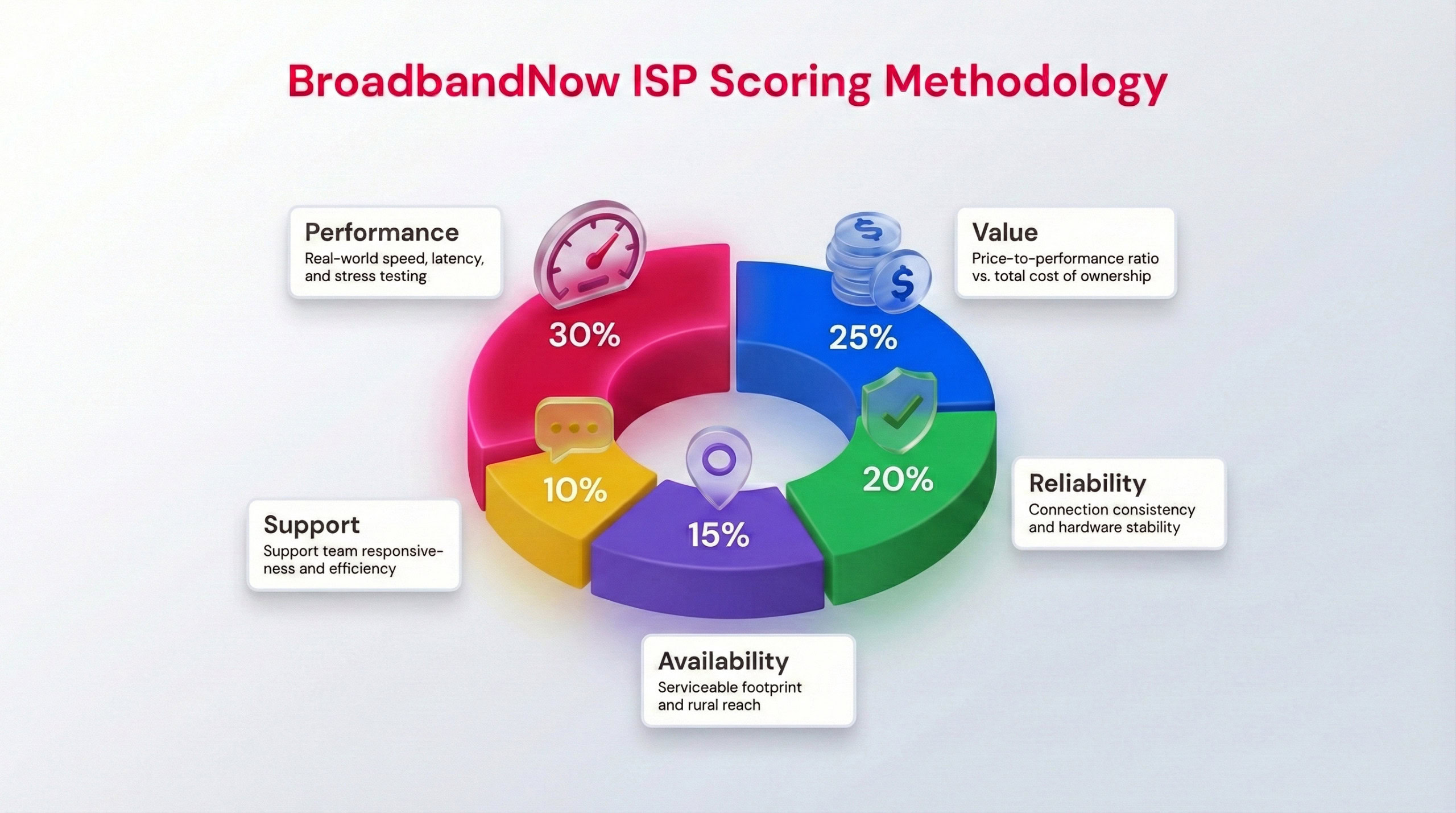
We use a weighted scoring system to take into account each ISP factor when creating our final score.
When reviewing ISP services and equipment, we follow a consistent methodology to make sure it gets a fair, thorough evaluation. Our broadband experts spend at least one month with the service, looking at both the specs on paper and the hands-on experience to see how the hardware holds up in everyday use. That means performing tests during peak times, regular periods, and at varying distances from the equipment to gain a complete understanding of how the service performs. Tests are performed in each location, with varying distances from the router, up to 3 times using a third-party testing tool.
We use a comprehensive star rating (on a scale of 1–5) that’s calculated using a weighted formula, prioritizing what matters most to users: performance and value. Below are our five category rankings and how we determined these scores for Starlink during my test in Michigan.
Performance – 4/5: During my speed test, Starlink reached 117 Mbps, clearing the FCC’s 100 Mbps broadband benchmark. Even so, 117 Mbps is considered low when compared to the value of a gigabit plan from fiber or cable providers, so it didn’t earn top marks.
Value – 4/5: The service and equipment cost of Starlink is undeniably high, but value can be relative, especially for rural users who previously had very few options for internet services. Starlink’s performance is worth every penny, though the high price can’t be discounted.
Reliability – 4.5/5: I was impressed by the reliability of Starlink, considering satellite services aren’t always known for being the most reliable. I deducted half a point because the satellite requires a completely clear sky view and doesn’t include a weatherproof power station, which could cause issues in certain conditions.
Availability – 5/5: Because Starlink uses Low Earth Orbit (LEO) satellites, it can reach almost anywhere, from rural and remote areas to large cities, and even my corner of Michigan. Even with high-demand surcharges in certain areas, its ability to serve underserved markets where cable and fiber aren’t available gives it a perfect score in this category.
Customer Support – 4.5/5: Starlink’s equipment features a seamless setup that didn’t require contact support during my time testing the ISP. That’s tough for any other internet provider to beat. That said, the company’s support model could use some work, as it doesn’t offer a customer service line for users who need assistance.
Frequently Asked Questions About Starlink
Can I pause or cancel Starlink service?
Yes. Starlink doesn’t lock you into long-term contracts, which makes it more flexible than traditional ISPs. Residential service can be canceled at any time, and the Roam plan is even more user-friendly — it allows you to pause service when you don’t need it, so you aren’t paying for months you’re not using.
Can Starlink replace my home Wi-Fi router?
Starlink ships with its own Wi-Fi router, but it’s basic compared to premium routers you can buy separately. While it will get you online without much hassle, the coverage range and advanced features (QoS settings, parental controls, mesh networking) aren’t on par with higher-end equipment. You can disable Wi-Fi on the Starlink router and connect it to your own third-party router or mesh system for stronger coverage throughout your home.
How portable is Starlink really?
Portability depends on your plan. The Residential plan is locked to your home address, so if you move it somewhere else, your speeds may be deprioritized — or you may not get service at all. The Roam plan is built for flexibility: you can take it camping, on the road in an RV, or set it up temporarily at another property. The trade-off is that Roam users get lower priority on the network, which can mean slower speeds in congested areas.
How much does Starlink cost long-term compared to traditional internet?
Starlink’s upfront cost is higher than most ISPs, with a standard equipment fee of around $349 and monthly service running about $120. Over the course of a year, that works out to roughly $1,800. By comparison, cable or fiber options in urban areas might cost half that while delivering faster speeds. But in rural or underserved regions, where the only alternatives are sluggish DSL or data-capped satellite from Hughesnet or Viasat, Starlink’s higher price is often justified by the jump in performance and unlimited data.
How does Starlink handle network congestion?
Because Starlink is still building out its satellite constellation, network congestion can happen in high-demand areas. Residential users get higher priority on the network than Roam users, which helps ensure consistent speeds at home, but some customers in dense service zones report slowdowns during peak evening hours.