Starlink Roam vs Residential: Costs, Speeds, and Who Should Choose Each Plan
Your choice between Starlink Residential and Roam depends on your traveling habits, equipment needs, and budget.

- Starlink Roam is an extension of Starlink’s Personal plans that lets you take consistent satellite internet on the road.
- While you can use the same equipment from a Residential plan for Starlink Roam, you will need to purchase additional equipment to use the internet while driving.
- Starlink Roam is best for people who live and work on the road.
Few internet providers have generated as much excitement as Starlink in recent years. That’s because Starlink’s Low Earth Orbit (LEO) satellite technology is reaching more areas than ever, providing high-quality internet access where other providers struggle. With this access, Starlink features two main plans: Starlink Roam and Starlink Residential. Choosing between these two plans can be challenging, especially when you are considering your budget, speed needs, and flexibility. To help you choose, we break down what you need to know before selecting the right Starlink plan for you.
Watch: Is Starlink Roam Right For You?
If you’re considering satellite internet from Starlink, you’ll want to ensure you get the best plan for you. In this video, our team shares which customers are best suited for a Starlink Roam plan.
What Is Starlink Roam?

Starlink Roam is a new generation of the company’s LEO satellite technology that expands internet access options worldwide. It is under the larger umbrella of Starlink’s Personal division, whose other subcategories are Residential and Priority internet access.
Roaming Speeds: Depending on where you are, you may experience slower speeds with Starlink Roam than with Starlink Residential, as speeds are location-specific. You’re more likely to experience the lower end of that spectrum in connectivity dead zones and extremely rural areas. Even so, that range is plenty to perform most everyday online activities that you already do at home.
Starlink Roam offers immense flexibility compared to Starlink Residential. You can upgrade your service immediately, pack up your equipment, and watch Netflix in a tent under the stars the same night. For example, if you’re traveling around in an RV over the summertime, you can pay between $50 and $165 per month for Starlink Roam and take internet access wherever you go.
Why Would Starlink Roam Be Right for Me?
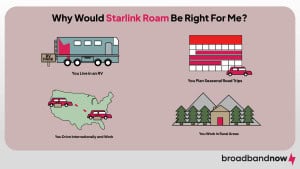
Starlink Roam is an excellent option for individuals who live, work, or spend significant time off the beaten path in places with little internet access. It’s especially applicable if you fit into one of the following categories:
- You live in an RV. If you primarily live in an RV year-round and move with the seasons, Starlink Roam guarantees you will always have reliable internet access, no matter what the newest RV park offers.
- You plan seasonal trips on the road. Starlink Roam is ideal if you have a flexible schedule and want to turn your internet service on and off. For example, if you live an RV lifestyle only a couple of months a year but return to a home base, you can pause your Starlink service when your trip ends. The start-up costs can be high, but that flexibility is worth it.
- You drive internationally and work. Starlink Roam offers both Mobile Regional and Global plans, which cover either an entire continent or any country, respectively. Let’s say you want to drive to Baja, California, for a few months each year. The $50-per-month Starlink Roam 100 GB plan gives you peace of mind that you already have an internet plan and don’t need to set up a temporary solution for a continental trip.
- You work in an extremely rural area that requires internet access. Many parts of the country are simply internet and cell service deserts, but people like emergency responders and police officers still need to communicate. Starlink Roam may be a steep investment for a larger team, but it can solve this internet connectivity problem on the go.
How Much Does Starlink Roam Cost?
There are two tiers to Starlink Roam service: Roam 100 GB or Roam Unlimited.. Starlink also offers a Global Priority level plan that you can tap into with either Roam or Residential.
| Details | Roam 100 GB | Roam Unlimited | Global Priority |
|---|---|---|---|
| Cost | $50 per month | $165 per month | $250-$2,150 per month |
| Speeds | 65-300 Mbps | 65-300 Mbps | 135-310 Mbps |
| Location | International | International | International |
| Ideal customer | In-continent travelers and campers | International travelers spanning continents | High-usage customers anywhere |
| Stipulations | Deprioritized during peak congestion hours; may experience throttling | Must change origin country if spending 2+ months in a foreign country | Required service tier for internet while driving |
One place where you won’t have to shell out some extra dough is for the equipment. Starlink Roam subscriptions primarily function with the same Standard equipment as Starlink Residential plans, which is included with residential plans. The Starlink Mini is another option for Roam users that would also qualify for plan inclusion. This Standard equipment provides stationary internet access at a campsite and includes an antenna, base, router, Starlink cable, and AC cable.
However, if you want internet access while driving, Starlink recommends upgrading to the Performance (Gen 3) Kit, which comes with additional cables and an independent power supply for $1,999. With a sturdier design than the regular Starlink equipment, the Performance Kit includes advanced GPS capabilities that help it stay consistently connected while you’re on the move.
Not So Fast: While Starlink Roam doesn’t exactly throttle service, your service during the peak usage hours of 6 p.m. to 9 a.m. may be slowed to accommodate other customers who pay for premium plans.
How Does Starlink Roam Differ From Other Starlink Plans?
Starlink offers both Personal and Business internet solutions. Personal Starlink services include subscriptions for Residential and Roam customers. The Business side includes Local Priority (Fixed Site and Land Mobility) and Global Priority (Maritime, Aviation, and Direct to Cell service). Each Business category comes with its own plans, specifications, and stipulations. However, if you need internet for boats, you’ll fall under the Global Priority plan. These are the most common Starlink plans the average customer may need depending on their satellite internet needs.
| Details | Residential | Roam | Boats |
|---|---|---|---|
| Cost | $55–$175 per month | $50–$165 per month | $250–$2,150 per month |
| Equipment fee | $349 (waived on new plans) | $249–$349 (waived on new plans) | $1,999 |
| Speeds | 80–400 Mbps | 65–300 Mbps | 135–310 Mbps |
| Recommended equipment | Standard | Standard or Performance | Performance |
| Ideal customers | Rural households without a quality internet connection | Digital nomads, travelers, and the RV community | Regular recreational or professional sailors |
Additionally, Starlink offers a different type of internet plan: Starlink Residential. The main difference between Roam and Residential is where the internet connection will be hosted. In contrast to Roam, where the connection is more mobile and therefore suited for those on the go, the Residential network is established at a fixed location, making it ideal for households.
What Are the Differences Between Starlink Roam and Starlink Residential?
Of course, if you aren’t going anywhere with your Starlink service, you probably want to go with Starlink Residential. However, before you lock yourself into that decision, consider these differences between the two services on paper:
| Feature | Starlink Roam | Starlink Residential |
|---|---|---|
| Service plans |
|
|
| Starting price | $50 per month | $55 per month |
| Max download speeds | 300 Mbps | 400 Mbps |
| Max upload speeds | 35 Mbps | 35 Mbps |
| Data cap | 100 GB soft cap or Unlimited | Unlimited |
| Weather resistance | Yes | Yes |
| Portability | Dynamic Location | Fixed Location |
| Use case | RVs, digital nomads, traveling workers | Households |
| Pausing service | Yes | Yes, with a $5 per month Standby fee |
Should You Switch to Starlink Roam?

Switching to Starlink Roam largely depends on your lifestyle and the type of internet you’re already using, and it may or may not be successful. A Starlink Roam subscription may make sense if you live in an area with no internet providers beyond satellite or DSL and want to take your equipment on the road regularly.
The service is ideal for travelers who need a consistent home base or are driving from place to place enough to need an independent internet source. If you live full-time in an RV or take months-long trips throughout portions of the year, Starlink Roam is an excellent solution.
However, unless you have extenuating circumstances where you need global access or an uncongested network in the evenings, Roam or Priority plans may not be necessary. You can work around not being online during peak service hours, and most travelers aren’t driving across continents.
At the end of the day, Starlink Roam’s flexibility means current Starlink customers can hop online, upgrade their service, and cancel it when needed for those extended once-in-a-lifetime trips. It just may not be applicable as an everyday ISP unless you’re a full-time traveler who thrives off the beaten path.
Frequently Asked Questions About Starlink Roam vs Residential
Is Starlink Roam slower than Starlink Residential?
Starlink Roam isn’t any slower than Starlink Residential in a traditional sense. However, if you are traveling to a region with slower or faster speeds, your speeds may vary compared to the Residential plan, which is more consistent.
Can you pause your Starlink Roam subscription?
Starlink Roam lets customers pause their subscription as needed and reactivate it for a trip. This flexibility is ideal for people who take annual RV trips nationwide during specific seasons but eventually return to a home base.
Does Starlink Roam require special equipment?
Starlink Roam requires Standard equipment to function from fixed locations. If you already own that equipment from your Starlink Residential plan, you don’t need to purchase anything else. However, if you want internet access while driving in your car or RV, you must invest $1,999 in the Performance equipment.
Can you upgrade to Starlink Roam at any time?
Yes, you can upgrade to Starlink Roam at any time.
Can you use Starlink Roam while moving in an RV or truck?
You can use Starlink Roam while driving, but it requires a $1,999 investment in the Performance dish to enable this capability. If you do not need to use the internet while driving, the included standard equipment will work just fine in a stationary location.
Does Starlink Roam work in remote areas?
Yes, Starlink Roam can be used even if you’re in a remote area, thanks to its countrywide and coastal coverage.
Is Starlink Roam worth it compared to Residential?
It ultimately depends on when and how you’ll be using the internet. If you use the internet primarily at home or may not travel as much, Starlink Residential is the better option. However, if you’re consistently on the go or frequently outdoors, it’s best to stick with Starlink Roam.