The TP-Link Archer BE230 performs just as well as high-end models without the high price tag. (Image by BroadbandNow Writer Hanna Shemke)
Meet the TP-Link Archer BE230, a dual-band Wi-Fi 7 router built for users who want next-generation speed and efficiency without the high price tag. The goal of the BE230 is to deliver faster speeds, lower latency, and smoother performance across multiple devices without the complexity (or cost) of a full mesh setup. To see how the BE230 performs in the real world, we tested every aspect of it, from setup and day-to-day usability to raw speed, coverage, and consistency. Learn how it performed in our testing and whether it truly delivers based on its specs, setup, price, performance, and value.
What We Like
Fast and simple setup
Strong performance under pressure
User-friendly app experience
What We Don't Like
Frustrating packaging
Bulky design with visible antennas
TP-Link Archer BE230 Review Rating
(4.8/5)
BroadbandNow Bottom Line
The TP-Link Archer BE230 is an affordable dual-band Wi-Fi 7 router that delivers impressive performance for its price. At $86.98 at Amazon or $134 at Walmart, it offers up to 3.6 Gbps of combined speed, dual 2.5 Gbps ports, and an easy, app-based setup that takes just minutes. It handles streaming, gaming, and multitasking with steady reliability, making it a strong fit for smaller homes and apartments. Its design and limited customization options may not appeal to power users, but for most households, the Archer BE230 nails the essentials. It’s fast, consistent, and refreshingly simple, a standout value for anyone ready to step into Wi-Fi 7 without overspending.
Our TP-Link Archer BE230 Video Review
Looking for our quick thoughts on the TP-Link Archer BE230? Watch our complete video review.
Check out our full video review of the TP-Link Archer BE230.
HomeShield, SPI Firewall, WPA3, loT Network, and Guest Network
Ports
2.5 Gbps WAN (1), 2.5 Gbps LAN (1), 1 Gbps LAN (3), and USB 3.0 (1)
Processor, memory, and storage
2.0GHz quad-core CPU, 512MB of RAM, and 128MB of flash storage
Dimensions
10.7 x 5.8 x 1.6 in.
TP-Link Archer BE230 at First Glance: Built for Performance, Not for Show
The TP-Link Archer BE230 isn’t much for looks, but is built to deliver exceptional Wi-Fi performance. (Image by BroadbandNow Writer Hanna Shemke)
The TP-Link Archer BE230 sits below TP-Link’s high-end BE900 and BE800 models, offering accessible performance for smaller homes, apartments, and average users ready to upgrade from Wi-Fi 5 or 6. The router makes its first impression with a familiar TP-Link look: upright, angular, and unapologetically utilitarian. This isn’t the kind of router designed to disappear into your decor, and it doesn’t try to be. With four adjustable antennas and a sturdy matte finish, the BE230 feels built for performance first and aesthetics second. It’s compact enough to fit on a desk or console, but its visible hardware reminds you it’s here to work, not blend in.
Still, the BE230 carries a quiet confidence. It’s clear this router was designed to bring Wi-Fi 7 technology to everyday homes without the complexity or price of flagship systems. That balance between power and practicality is what makes its first impression stand out. Even before diving into setup or performance testing, the BE230 feels approachable, efficient, and ready to deliver next-generation internet speed in a more down-to-earth form.
Under the hood, the TP-Link Archer BE230 runs on a 2.0 GHz quad-core processor with 512 MB of RAM and 128 MB of flash storage. That’s plenty of power for managing multiple devices, HD streaming, and online gaming without noticeable slowdowns. It’s a dual-band Wi-Fi 7 router with a BE3600 speed rating, capable of reaching up to 3.6 Gbps across the 2.4 GHz and 5 GHz bands combined.
The BE230 includes one 2.5 Gbps WAN port, one 2.5 Gbps LAN port, three Gigabit LAN ports, and a single USB 3.0 port for connecting external drives or printers. WPA3 encryption, SPI firewall protection, and TP-Link’s HomeShield suite help keep your network secure, while built-in parental controls and guest network support make it easy to manage household access.
Like other modern TP-Link routers, everything runs through the Tether app. It’s clean, fast, and simple to navigate, letting you view connected devices, set up parental controls, or enable guest Wi-Fi in seconds. You don’t need to be a networking expert to manage it, but advanced users can access more detailed settings if they want to fine-tune their setup.
At $86.98 on Amazon, the Archer BE230 delivers impressive specs for the price. It’s designed for users who want the benefits of Wi-Fi 7 performance and reliability without paying flagship prices, making it one of the most affordable ways to upgrade to the latest wireless standard.
TP-Link Archer BE230 Installation: From Overwrapped Antennas to Effortless Installation
Installing the TP-Link Archer BE230 took a quick five minutes with the user-friendly Tether app. (Image by BroadbandNow Writer Hanna Shemke)
Unboxing the TP-Link Archer BE230 is not exactly a premium experience. The router arrives well-protected, but every antenna is tightly wrapped in plastic that takes patience and a pair of scissors to remove. It’s not a dealbreaker, but it feels unnecessary and adds a bit of frustration to what should be a quick setup process. Once freed from the packaging, the BE230 feels light but sturdy, with a thin base that keeps it stable on a desk or shelf.
Visually, the router doesn’t make much of a statement. It’s functional and straightforward, sticking to TP-Link’s familiar design language with four adjustable antennas and a matte black finish. It’s not exactly something you’ll want to showcase, but it’s built with performance in mind. Every design choice here seems to serve a purpose, even if it sacrifices a bit of aesthetic appeal.
The setup itself is simple and approachable. The Tether app does most of the heavy lifting, guiding you step by step with clear instructions. Within minutes, the router is online and ready to handle daily streaming, gaming, and smart home traffic. It’s the kind of plug-and-play simplicity that makes it easy for anyone to get the router up and running fast.
The BE230 may not look like much at first glance, but that’s part of its charm. It’s built for consistency and reliability rather than style, making it a great fit for smaller homes or bungalows where stable coverage matters most.
Unboxing and Initial Setup
Unboxing the TP-Link Archer BE230 is a mixed experience. The packaging itself is neat and minimal, with the router sitting right on top and the Ethernet cable, power adapter, and documentation tucked neatly underneath. It feels organized and straightforward, which is what you want in a product at this price point. What isn’t ideal is the heavy use of plastic wrap. Each antenna is tightly sealed in its own layer of plastic that requires scissors or something sharp to remove. It feels unnecessary and risky, as one wrong move could scratch the router before you even plug it in. Not cool, TP-Link.
TP-Link includes easy-to-follow instructions right underneath the router in the box (Image by BroadbandNow Writer Hanna Shemke)
Once you get past that, the hardware itself feels light but well-built. The base is slim, keeping the router stable, while the four antennas give it a more traditional TP-Link look. Around the back, you’ll find one 2.5 Gbps WAN port, one 2.5 Gbps LAN port, three Gigabit LAN ports, a USB 3.0 port, and buttons for power, Wi-Fi, and reset. Everything is clearly labeled and easy to access, which makes setup much simpler.
Getting the BE230 online is refreshingly simple. I followed the included installation guide, which clearly walks through the basics. All you need to do is unplug your modem, connect the router to it with the supplied Ethernet cable, plug your modem back in, and then plug in the BE230. A series of LED indicators on the top light up to show status, with a legend in the guide explaining what each color and blinking pattern means. If the 2.4 GHz or 5 GHz lights don’t appear, you can press and hold the Wi-Fi button on the back to activate them. In my case, everything powered up smoothly on the first try.
Once the hardware is ready, the TP-Link Tether app takes over. The app guides you through the final steps: selecting your router, naming your network, and setting a password. The interface is intuitive, fast, and well-designed, making setup nearly effortless. From unboxing to a live connection took less than five minutes, and I didn’t encounter a single issue.
Overall, the Archer BE230 may not deliver a premium unboxing experience, but the setup process more than makes up for it. It’s fast, simple, and beginner-friendly, which is exactly what most users will want in a budget-friendly Wi-Fi 7 router.
Navigating the Mobile App
The TP-Link Tether app remains one of the most approachable and well-designed router management tools available. It strikes a strong balance between clarity and control, making it ideal for households that want reliable Wi-Fi without navigating complex networking menus. From the first launch, the app’s interface feels intuitive and thoughtfully organized. The home screen provides a clear overview of your network’s status, including active devices, connection type, and signal strength, with large icons that make navigation simple.
Each connected device is listed by name, allowing you to view details such as signal strength, connection type, and data usage. You can easily rename devices, prioritize them for bandwidth, or pause internet access when needed. It’s visual, responsive, and designed to make everyday management straightforward, even for users who aren’t technically inclined.
For parental control and security, the Tether app integrates TP-Link’s HomeShield features. Through it, you can create user profiles, filter content by category, set time limits, and monitor online activity across devices. While HomeShield’s basic features are free, more advanced tools, such as detailed reports and stronger filtering, require a subscription. Even so, the included options are more than enough for most households and are presented in a clean, easy-to-understand layout.
Unlike some competing apps that hide key features behind layers of menus, TP-Link keeps everything within reach. Firmware updates, guest network setup, and basic diagnostics are all accessible with just a few taps. Power users might find the feature set limited compared with higher-end systems, but the Archer BE230 targets the average user, who likely doesn’t need ultra-advanced features. This router and its app are built for simplicity, efficiency, and dependable performance rather than deep customization.
Overall, the Tether app complements the Archer BE230 perfectly. It is polished, stable, and user-friendly, turning what could be an intimidating setup process into something anyone can handle with confidence. For users who want to spend more time online and less time managing their network, it delivers exactly what it promises.
TP-Link Archer BE230 Performance: Performance That Punches Above Its Price
The TP-Link Archer BE230 offered optimal performance in both calm and demanding conditions during our tests. (Image by BroadbandNow Writer Hanna Shemke)
Now for the fun part: performance. I tested the TP-Link Archer BE230 in my two-floor bungalow under both calm and demanding conditions. That included everyday work-from-home tasks, streaming across multiple smart devices, and stress tests with several active connections at once. To keep things consistent, I ran tests at three key spots: about five feet from the router, 15 feet away with a wall between, and upstairs on the second floor.
This setup offered a clear view of how the BE230 handles distance, interference, and busy network traffic in a real-world home environment. As a dual-band Wi-Fi 7 router, it operates on the 2.4 GHz and 5 GHz bands and supports 320 MHz channel width, 4K-QAM modulation, and Multi-Link Operation. These Wi-Fi 7 upgrades help improve speed, efficiency, and overall responsiveness compared with Wi-Fi 6 and 6E systems.
The BE230 carries a BE3600 speed rating, which translates to combined wireless throughput up to 3.6 Gbps under ideal conditions. It also includes one 2.5 Gbps WAN port and one 2.5 Gbps LAN port, giving users flexibility for multi-gig internet connections or wired devices that demand more bandwidth.
What I wanted to see wasn’t just how fast this router could go, but how well it could hold up in everyday use. Could it juggle a video call, a 4K stream, and a few smart home devices all at once without skipping a beat? That is where the BE230 surprised me. It may not be a router powerhouse, but it punches well above its price range, keeping connections steady and smooth across rooms and floors.
Testing the Router
Learn how fast the TP-Link Archer BE230 is.
To see how the TP-Link Archer BE230 held up under real-world conditions, I tested it in both calm and busy environments. In calm conditions, all my devices were connected but idle, giving the router a chance to operate without extra strain. In busy conditions, I made sure it had plenty to handle. My iPhone 15 Pro Max streamed Spotify, my Nintendo Switch ran Animal Crossing: Live, my smart TV played a 4K YouTube video of the Alaskan wilderness, my PC streamed a Hallmark movie on Netflix (a no-brainer while performing this test during the holiday season), and my desktop live-streamed Little Nightmares on Discord. It was the kind of chaotic home network that can bring lesser routers to their knees.
At five feet from the router, performance stayed impressively strong. In calm conditions, downloads averaged 941 Mbps while uploads held steady at 41 Mbps. Under heavy use, downloads dipped slightly to 900 Mbps, a 4.4 percent decrease, while uploads stayed consistent at 41 Mbps. Even with several streams running simultaneously, there were no hiccups or latency spikes.
At 15 feet away with a wall in between, speeds dropped slightly but remained stable. In calm conditions, downloads averaged 556 Mbps with uploads at 41 Mbps. When things got busier, downloads to 503 Mbps, a 9.5 percent dip from calm conditions, while uploads stayed at 41 Mbps. Noticing a trend in upload speeds? That’s to be expected. Upload speeds tend to hover around the same number, while download speeds fluctuate the most. Despite the decrease, every device stayed connected and responsive.
Upstairs, the BE230 proved it could handle distance without losing its rhythm. In calm conditions, downloads averaged 700 Mbps with uploads at 41 Mbps. During the busy test, downloads measured 643 Mbps, an 8.1 percent decrease, while uploads stayed steady at 41 Mbps. Even with multiple floors and walls between the router and devices, the connection never felt sluggish.
Across every test, the Archer BE230 showed a level of stability that outperforms its modest price tag. It handled a house full of devices, high-resolution streams, and online gaming without breaking a sweat. While it will not compete with premium tri-band systems on raw speed, it delivers what most homes need: fast, steady Wi-Fi that just works, even when life gets a little chaotic.
Comparing to Competitors
We give you the rundown on how the router compares to other Wi-Fi 7 routers.
At a cool $86.98 on Amazon, the TP-Link Archer BE230 sits in the entry-level Wi-Fi 7 category, targeting users who want faster, more reliable connectivity without the complexity or cost of a premium router. In this space, it competes with models like the Asus RT-BE92U, Netgear Nighthawk RS300, and Linksys Velop Pro 6E. Each takes a different approach to next-generation performance, but few match the BE230’s balance of simplicity, speed, and day-to-day reliability.
The Asus RT-BE92U leans into advanced customization, offering detailed control through a full web interface. It caters to power users who like to fine-tune every aspect of their network, though that complexity can make setup less intuitive. Netgear’s Nighthawk RS300 focuses on high-end performance and gaming optimization, but its app interface can feel busy, and its layout caters more to experienced users. The Linksys Velop Pro 6E, while technically a Wi-Fi 6E system, performs well in terms of stability and coverage, though it cannot match the efficiency and low latency that Wi-Fi 7 brings to the table.
The Archer BE230 stands out by doing the opposite. Instead of chasing maximum throughput or adding layers of advanced settings, it focuses on accessibility and ease of use. The Tether app keeps setup simple, and its dual 2.5 Gbps ports are a rare find in this price range. It delivers steady, efficient performance that suits smaller homes and everyday networks without overcomplicating the process.
Ultimately, the Archer BE230 knows its audience. The router is built for households that want dependable Wi-Fi 7 speed and stability without paying for extras they will never use. At just over $100, it delivers impressive value and performance, making it one of the most practical entry points into the Wi-Fi 7 generation.
Our Verdict: An Easy Win for Everyday Wi-Fi 7 Performance
The TP-Link Archer BE230 is ideal for the average internet user looking to improve their Wi-Fi performance. (Image by BroadbandNow Writer Hanna Shemke)
The TP-Link Archer BE230 is not trying to reinvent home Wi-Fi, and that is exactly what makes it great. It focuses on the essentials: fast speeds, reliable coverage, and an experience that feels effortless from setup to daily use. With dual-band Wi-Fi 7 support, 320 MHz channels, and up to 3.6 Gbps of combined speed, it delivers next-generation performance that smaller homes will actually benefit from. During testing, it stayed quick and consistent across floors and devices, handling streaming, gaming, and multitasking without a single hiccup.
Unboxing could use some improvement. The over-the-top plastic wrap around each antenna feels unnecessary and could scratch the router before you even get to experience all it has to offer. But once that part is over, everything else shines. The included setup guide is clear, the hardware feels sturdy, and the TP-Link Tether app makes installation and management about as easy as it gets. Within five minutes, I had the network up and running, and navigating the app afterward was simple and frustration-free.
The Archer BE230 is one of the most affordable ways to step into Wi-Fi 7 at $86.98 on Amazon. It doesn’t have tri-band connectivity or power-user customization like some of its pricier competitors, but that’s not a priority for this user-friendly router. Instead, it focuses on delivering smooth, consistent performance that just works day after day. Compared with routers like the Asus RT-BE92U, Netgear Nighthawk RS300, and Linksys Velop Pro 6E, the BE230 stands out for how approachable and balanced it feels.
The Archer BE230 is best suited for:
Smaller homes, condos, or apartments that need fast, stable Wi-Fi 7 coverage
Families and casual users who want easy setup and simple app-based control
Anyone looking to upgrade from Wi-Fi 5 or 6 without spending a fortune
Power users and gamers who want deep customization or advanced tuning tools may want to look elsewhere. But for everyone else, the Archer BE230 nails what matters most. It’s fast, reliable, and refreshingly straightforward—a no-fuss router that delivers real Wi-Fi 7 performance at a price that makes sense.
Our TP-Link Archer BE230 Quick Recap
Looking for a quick video recap of whether we think the TP-Link Archer BE230 is worth it? We break down our thoughts in 60 seconds.
Learn whether we think the TP-Link Archer BE230 is worth it.
How We Assess Routers
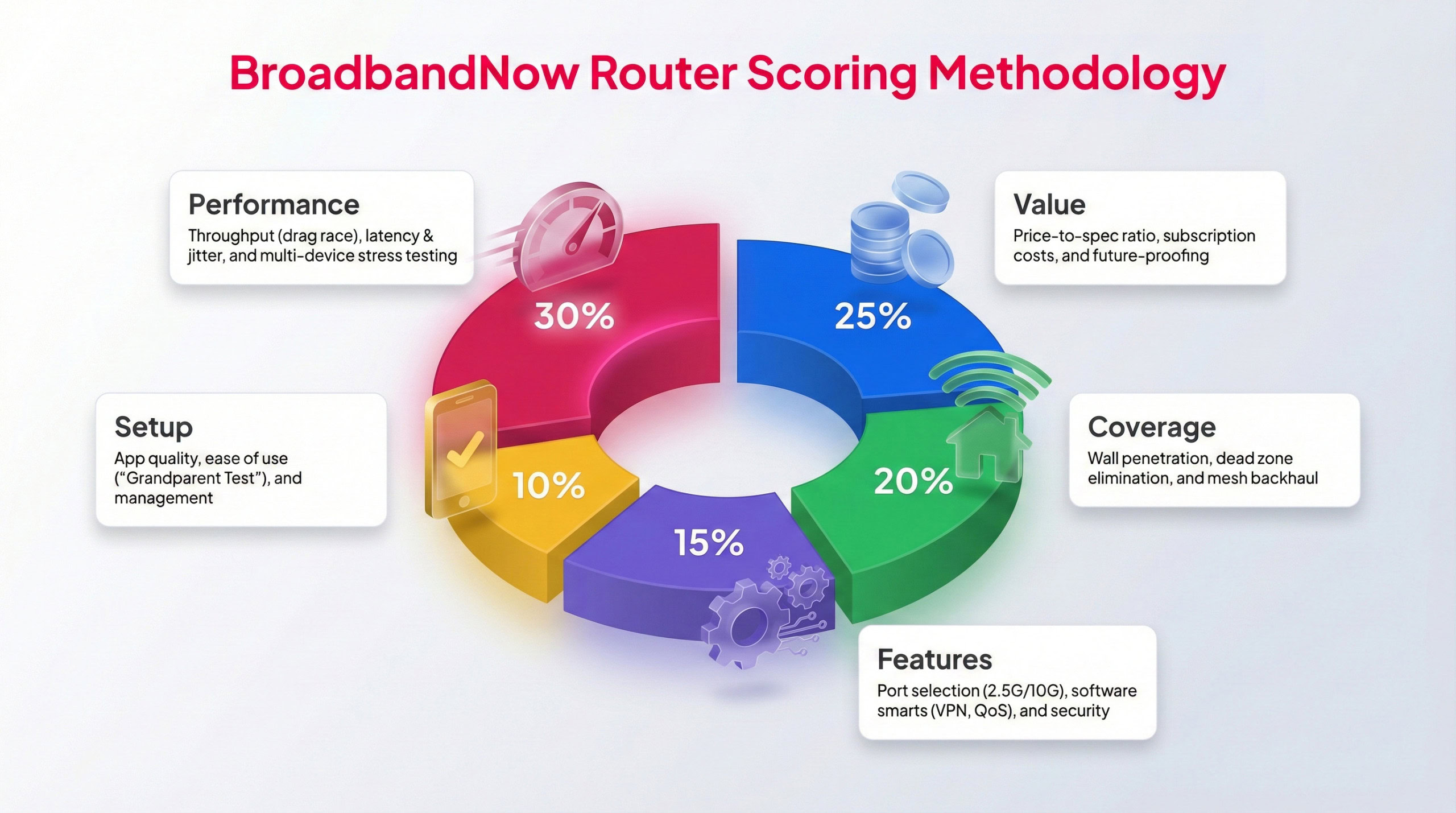
Each BBN expert tests routers following this methodology to provide a weighted score.
To ensure consistency across all of our router reviews, we apply the same standardized testing process to every device. Our broadband testing team evaluated the TP-Link Archer BE230 at home over 30 days, analyzing everyday reliability, whether its features justify the price, and how it performs under high-demand conditions. Our testing included busy evening hours, bandwidth-heavy activities like streaming, gaming, and video calls, and speed tests conducted in multiple locations throughout the home.
Each category is graded on a 1–5 star scale using a weighted scoring model. Performance and value carry the most influence in this model. Below, you’ll find our ratings across five key categories, along with details on how the TP-Link Archer BE230 performed during testing in my two-story bungalow.
Performance – 5/5: I was incredibly impressed with how well the TP-Link Archer BE230 performed during each of my tests. Whether I was close to the router or far away, in both busy and calm conditions, the system remained steady and delivered impressive speeds. Even walls and other barriers couldn’t slow this system down during high-bandwidth activity.
Value – 5/5: At under $100 for the entire system, the TP-Link Archer BE230 puts other similar systems to shame. With exceptional performance at such a low price, this system makes future-proofing your home with Wi-Fi 7 accessible to any household.
Coverage – 5/5: The TP-Link Archer BE230 was built for solid coverage. It’s natural to have slight dips in speed the further I moved from the router, but even those speeds proved impressive during my tests. The system didn’t slow down as I pushed it to its coverage limits.
Features – 4.5/5: This system offers all the notable features you can expect from a Wi-Fi 7 device: solid coverage, gigabit speeds, enhanced security options, and extra features that aren’t paywalled. The one noticeable feature this system lacks is a tri-band radio that’s included with other similar devices. With a 6GHz band, I’d be interested to see just how much better this system could perform.
Setup – 4/5: TP-Link is known for its user-friendly app, which makes setup and everyday router management easy to navigate. Even users who don’t consider themselves tech-savvy won’t find using the app challenging. However, I did struggle with the unboxing process, as each antenna was tightly wrapped in plastic. Beyond being time-consuming, removal required scissors, which could easily damage the system before I even set it up.
Frequently Asked Questions About the TP-Link Archer BE230
Does the TP-Link Archer BE230 support mesh networking with other TP-Link routers?
Yes, the Archer BE230 supports TP-Link’s EasyMesh technology, which allows it to link with other EasyMesh-compatible routers or extenders. This lets you expand coverage throughout your home without replacing your existing network.
How many devices can the Archer BE230 handle at once before performance starts to drop?
TP-Link rates the BE230 to handle more than 100 connected devices at once. In real-world use, it comfortably supports dozens of active devices, including phones, laptops, streaming devices, and smart-home gadgets, without major slowdowns.
Can you wall-mount the Archer BE230, or does it need to sit flat on a surface?
The BE230 is designed to sit upright on a desk, shelf, or entertainment center. It does not include built-in wall-mounting hardware, and given the antenna placement, it performs best in an open, elevated spot with good airflow.
Does the BE230 support WPA3 encryption by default, or does it need to be enabled manually?
WPA3 security is supported out of the box, but it may not be enabled automatically depending on your setup preferences. You can confirm and adjust your security settings in the TP-Link Tether app under Wireless Settings.
How much range can you expect from the BE230 in an average two-story home?
During testing, the Archer BE230 provided strong, stable coverage across a two-floor bungalow, maintaining solid speeds up to about 2,000 square feet. For larger homes, pairing it with another EasyMesh device can help extend coverage, if needed.
Can the Archer BE230 be managed through a web interface, or is the Tether app required?
Yes, you can manage the router through either method. The Tether app is designed for ease of use and covers most settings, but advanced users can access the web interface for more detailed configuration options. For users who aren't terribly tech-savvy, the Tether app is the way to go.
Does the Archer BE230 include Quality of Service (QoS) settings for gaming or streaming prioritization?
Yes, the Tether app includes basic QoS controls that let you prioritize specific devices or activities such as gaming, streaming, or work applications. While not as advanced as what you find on gaming routers, it offers enough flexibility for most home networks.