Understanding Internet Speeds (Kbps, Mbps, Gbps)
Learn the difference between connection metrics and how they impact your daily browsing experience.

- Internet speed is measured in bits per second, with Gbps (gigabits) being faster than Mbps (megabits), which are faster than Kbps (kilobits).
- Most residential internet connections are asymmetrical, meaning download speeds are significantly faster than upload speeds.
- Your advertised speed is a maximum capacity, often affected by Wi-Fi interference, hardware limitations, and network congestion.
Choosing an internet service provider can feel like learning a new language. With acronyms like Mbps and Gbps and promises of “blazing fast” speeds, it’s easy to feel lost. Yet understanding these metrics is key to avoiding overpaying for speed you don’t need — or enduring buffering on a plan that’s too slow. Whether you’re moving into a new home or troubleshooting a laggy connection, knowing how internet speed works empowers you. This guide breaks down the jargon, explains how speed is measured, and helps you find the right plan for your household.
Watch: Bits vs. Bytes
If you’ve seen terms like megabits or megabytes related to your internet speed and wondered if there’s really a difference, this video is for you. We break it down so you can understand how your internet speed works.
What is Internet Speed?
At its most basic level, “internet speed” refers to the rate at which data travels from the web to your device (download) or from your device to the web (upload). When you see a number advertised by a provider, such as 300 Mbps, it represents the maximum bandwidth available to your home connection. Think of it like a pipe bringing water into your house: a wider pipe (higher bandwidth) lets more water flow through at once, filling your bucket faster.
However, it’s critical to understand that bandwidth is not exactly the same as speed in the physics sense; it’s actually capacity. When you buy a higher “speed” tier, you’re essentially buying a wider lane on the highway so more data can travel side-by-side without traffic jams. While providers advertise the maximum potential of this connection, real-world performance often varies based on how many devices are using that capacity simultaneously.
Beyond just the raw download numbers, your experience is also shaped by upload capability and latency (or ping). Latency is the time it takes for a signal to travel to a server and back. High latency causes lag in gaming even if your download speed is fast. Additionally, if you use Wi-Fi rather than a wired connection, your speed will naturally degrade as you move further from the router.
Download Speed vs Upload Speed
Download speed determines how fast your connection can pull data from the server to you. This is the metric most people care about because it affects loading web pages, streaming Netflix, and downloading files. If your video buffers, you likely lack sufficient download speed.
Upload speed measures how fast you can send data from your device to the internet. This is crucial for video conferencing on Zoom, posting large files to social media, or backing up photos to the cloud. If you freeze while talking on a video call, low upload speed is often the culprit.
How Internet Speeds Are Measured
Internet speed is measured in bits per second. A “bit” is the smallest unit of digital information, represented as a 0 or a 1. Because a single bit is tiny, we use prefixes like Kilo, Mega, and Giga to represent larger groups of bits, much like measuring distance in meters versus kilometers.
Don’t Get Bitten by the Byte: Internet speeds are measured in bits (lowercase “b”), while file sizes are usually measured in Bytes (uppercase “B”). There are 8 bits in 1 Byte, which is why downloading a 100 MB file takes longer than one second on a 100 Mbps connection.
Here’s the hierarchy of speed metrics you will encounter when shopping for internet service:
- Kbps (Kilobits per second): An older standard rarely seen in broadband today, except in dial-up or throttled mobile data.
- Conversion: 1,000 bits = 1 Kbps.
- Mbps (Megabits per second): This is the standard for most modern residential connections like cable, DSL, and LTE.
- Conversion: 1,000 Kbps = 1 Mbps.
- Gbps (Gigabits per second): Currently the gold standard for residential speed, typically offered via fiber-optic networks.
- Conversion: 1,000 Mbps = 1 Gbps.
To visualize this, dial-up internet operated at roughly 56 Kbps. Today, a basic cable plan might offer 100 Mbps (almost 2,000 times faster than dial-up), while a gigabit fiber plan offers 1 Gbps (10 times faster than that basic cable plan).
If you’re confused about the conversion between data limits (often in GB) and speed (Gbps), you can learn more in our explanation of Mbps vs Gbps and MB vs GB.
Different Internet Connection Types
The type of infrastructure bringing the internet to your house plays the biggest role in determining whether your speeds are measured in mere Kbps or blazing-fast Gbps. Different internet technologies have different physical limitations regarding how much data they can transmit.
- Fiber: Uses light signals through glass strands. It offers the fastest speeds, typically ranging from 1 Gbps (1,000 Mbps) up to 5 or 10 Gbps in select areas. Critical for high upload needs.
- Cable: Uses coaxial cables (like cable TV). Widely available with download speeds reaching 1 Gbps, though upload speeds are usually much slower (often capped around 35 to 50 Mbps).
- DSL (Digital Subscriber Line): Uses standard copper phone lines. Generally older technology with speeds ranging from 1 Mbps to 100 Mbps, depending on your distance from the provider’s hub.
- Satellite: Beams data from space. Speeds have improved with newer LEO (Low Earth Orbit) satellites like Starlink, offering 100–200 Mbps, but traditional geostationary satellite is slower and suffers from high latency.
What Affects the Internet Speed You Actually Experience?
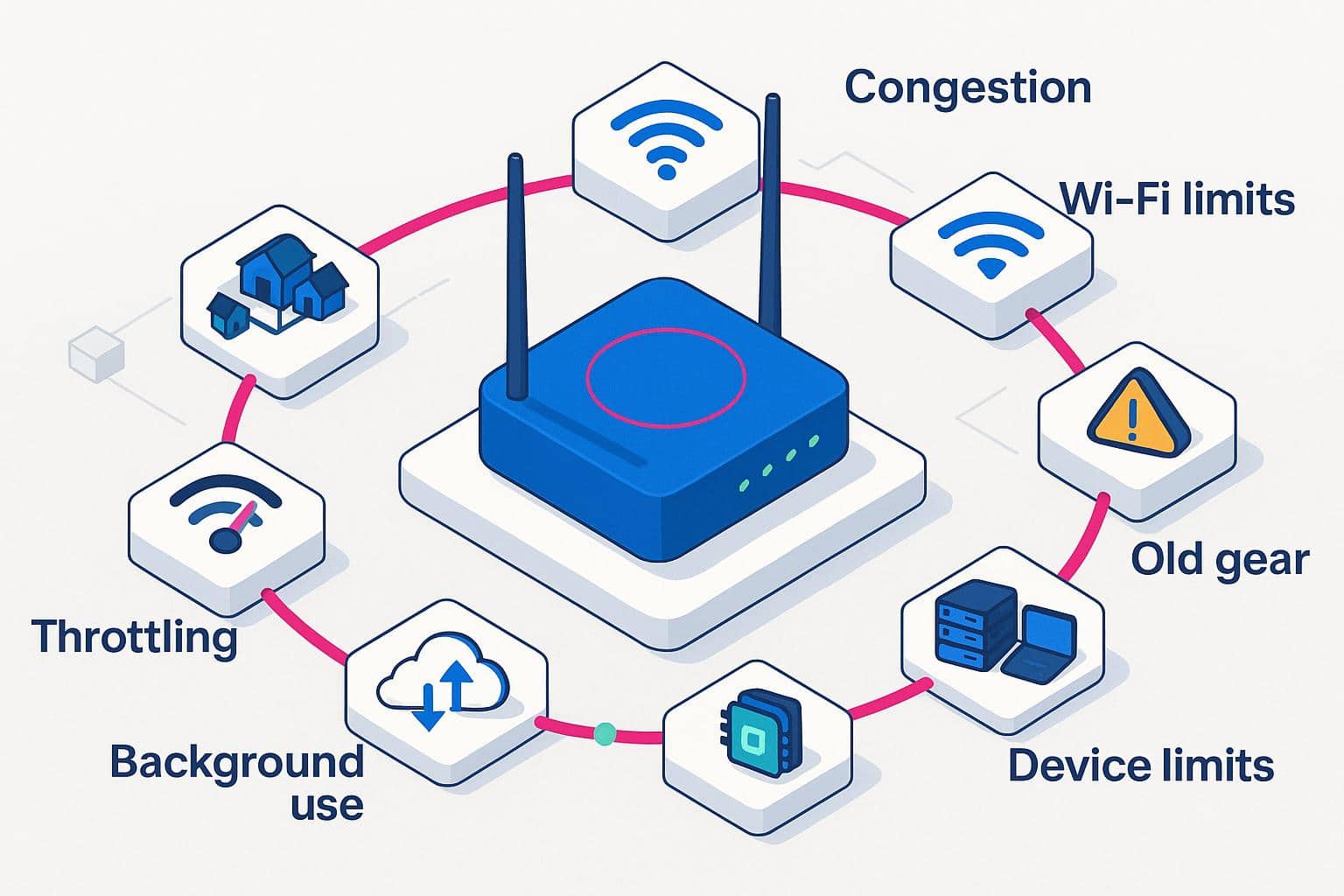
It’s a common frustration: you pay for 500 Mbps, but your speed test only shows 200 Mbps. Why does this happen? Real-world internet performance is rarely a perfect match for the “up to” speeds advertised in marketing materials because several variables can create bottlenecks in your data pipeline.
- Wi-Fi interference: Wireless signals degrade as they pass through walls, floors, and furniture. Distance from the router is the number one killer of speed.
- Network congestion: Cable internet is a shared network. If all your neighbors are streaming 4K movies at 7 p.m., the local node may get congested, slowing everyone down.
- Outdated hardware: If you’re paying for Gigabit speed but using a router from 2015, the hardware physically cannot process the data fast enough.
- Background applications: Devices on your network downloading game updates or backing up phones to the cloud will eat up bandwidth without you noticing.
Checking Your Internet Speed

Before you call customer service to complain, it’s helpful to run a diagnostic test to see what speeds you’re actually receiving. However, to get an accurate reading, you need to eliminate variables that might skew the results.
- Use a wired connection:If possible, plug a laptop directly into the router via an Ethernet cable. This tests the speed coming into your house and rules out Wi-Fi issues.
- Close bandwidth-hogging apps: Ensure no one is streaming video or downloading large files on other devices during the test.
- Restart your modem: Sometimes a fresh reboot clears out cache errors that temporarily slow down connections.
Ready to verify your performance? You can run a free test right now with our BroadbandNow Speed Test.
Calculating Your Bandwidth Needs
How much speed is enough? Paying for 1 Gbps is a waste of money if you only check email and read the news. Conversely, a 50 Mbps plan will likely cause frustration for a family of four who all game and stream simultaneously. To help you find the sweet spot, use our Bandwidth Calculator.
Frequently Asked Questions About Internet Speeds
What is internet speed measured in?
Internet speed is primarily measured in bits per second. The most common units you will see on ISP bills are Megabits per second (Mbps) and Gigabits per second (Gbps). Older connections may still reference Kilobits per second (Kbps).
How many kilobits are in a megabit?
There are 1,000 kilobits (Kbps) in one megabit (Mbps). Similarly, there are 1,000 megabits in one gigabit (Gbps). This simple base-1000 metric makes it easy to compare different service tiers.
What’s faster, Kbps or Mbps?
Mbps is significantly faster than Kbps. A connection measured in Kbps is generally considered too slow for modern internet usage like video streaming. Mbps is the standard for broadband, suitable for nearly all residential applications.
Why do my internet speeds fluctuate?
Speeds fluctuate due to network congestion (peak usage times), interference with your Wi-Fi signal from walls or other electronics, and occasionally ISP throttling. Using a wired Ethernet connection can help stabilize these fluctuations.
What’s the difference between Mbps and MBps?
Mbps stands for megabits per second and measures internet speed, while MBps (with a capital “B”) stands for megabytes per second and measures file size or transfer speed on your devices. Since 1 byte equals 8 bits, a 100 Mbps internet connection can transfer data at a maximum of about 12.5 MBps.