Upgrade and future-proof your Wi-Fi mesh system with the TP-Link Deco BE63. (Image by Alejandro Medellin)
Meet the TP-Link Deco BE63: a Wi-Fi 7 mesh system that promises to skyrocket your home network straight into the future. Its blistering BE10000 speeds, tri-band Wi-Fi 7 with 320 MHz channels, and multi-gig wired options are designed to keep every corner of your home fast and stable. But can the BE63 actually back up its cutting-edge spec sheet where it counts? To find out, we set it up and pushed it to its limits to see how it stacked up based on its specs, setup, price, performance, and value.
What We Like
Sleek design
Clean app interface
Tri-band
What We Don't Like
Initial setup issues
Costly
BroadbandNow Bottom Line
The TP-Link Deco BE63 is a sleek, Wi-Fi 7 mesh system that delivers strong performance across multiple devices and busy households, but its $449.99 Amazon price tag for 3 routers ($289.27 at Walmart for 1 router) makes it a premium buy. If you’re a gamer, streamer, or power user looking to future-proof your home with faster speeds and reliable coverage, it’s a compelling choice. For smaller homes or lighter needs, though, a less expensive Wi-Fi 6E system will likely get the job done just as well.
Our TP-Link Deco BE63 Video Review
Not into reading? Check out our TP-Link Deco BE63 video review below.
SPI Firewall, Access Control, and HomeShield Security
Ports
2.5 Gigabit Ethernet port (4), USB port (1), and WAN/LAN auto-sensing per TP-Link Deco BE63
Processor, memory, and storage
1.5 GHz quad-core processor, 1 GB of RAM, and 128 MB of flash storage
Dimensions
4.23 × 4.23 × 6.93 inches
TP-Link Deco BE63 at First Glance: A Smart Speaker Look With Serious Networking Power
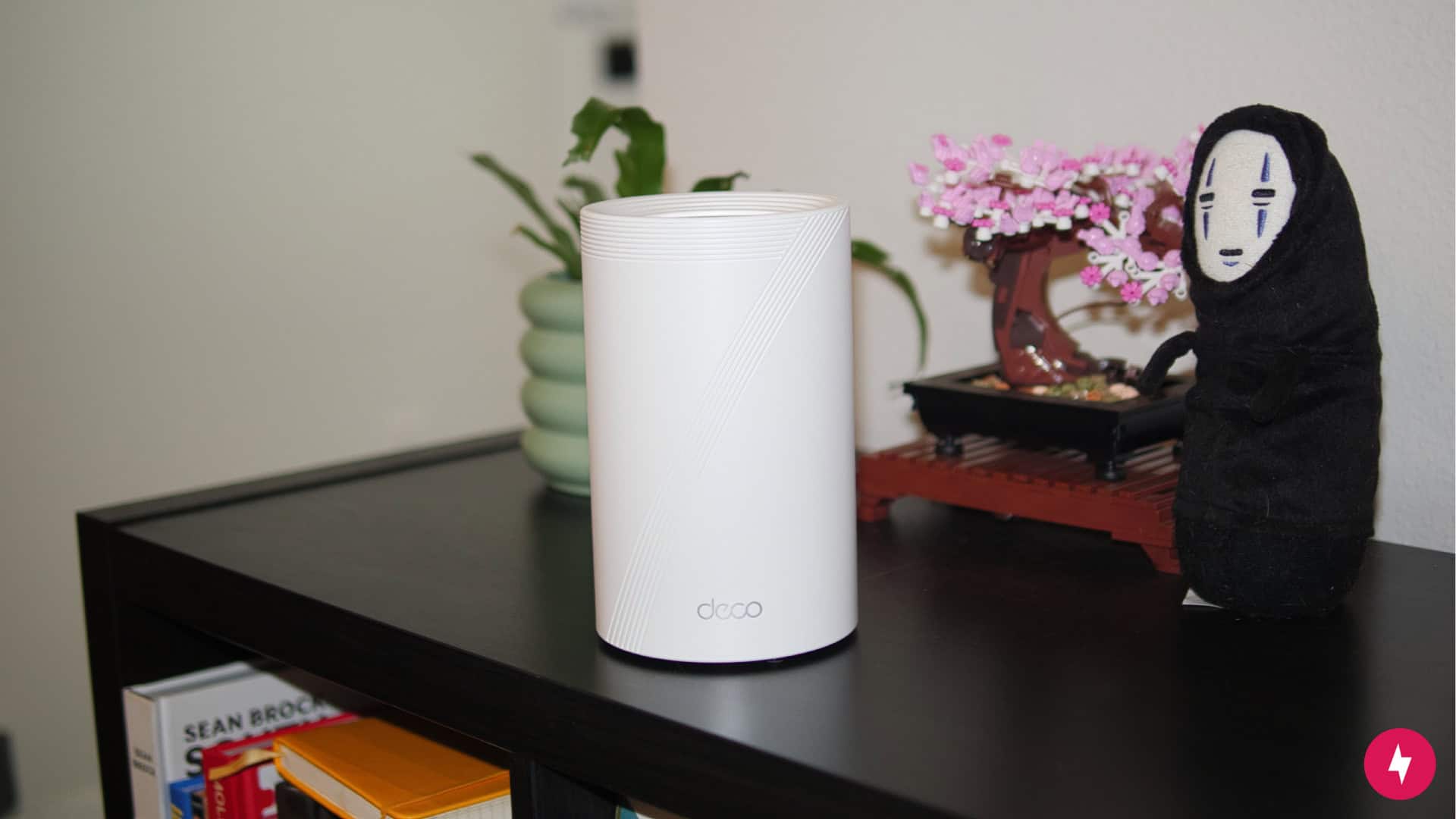
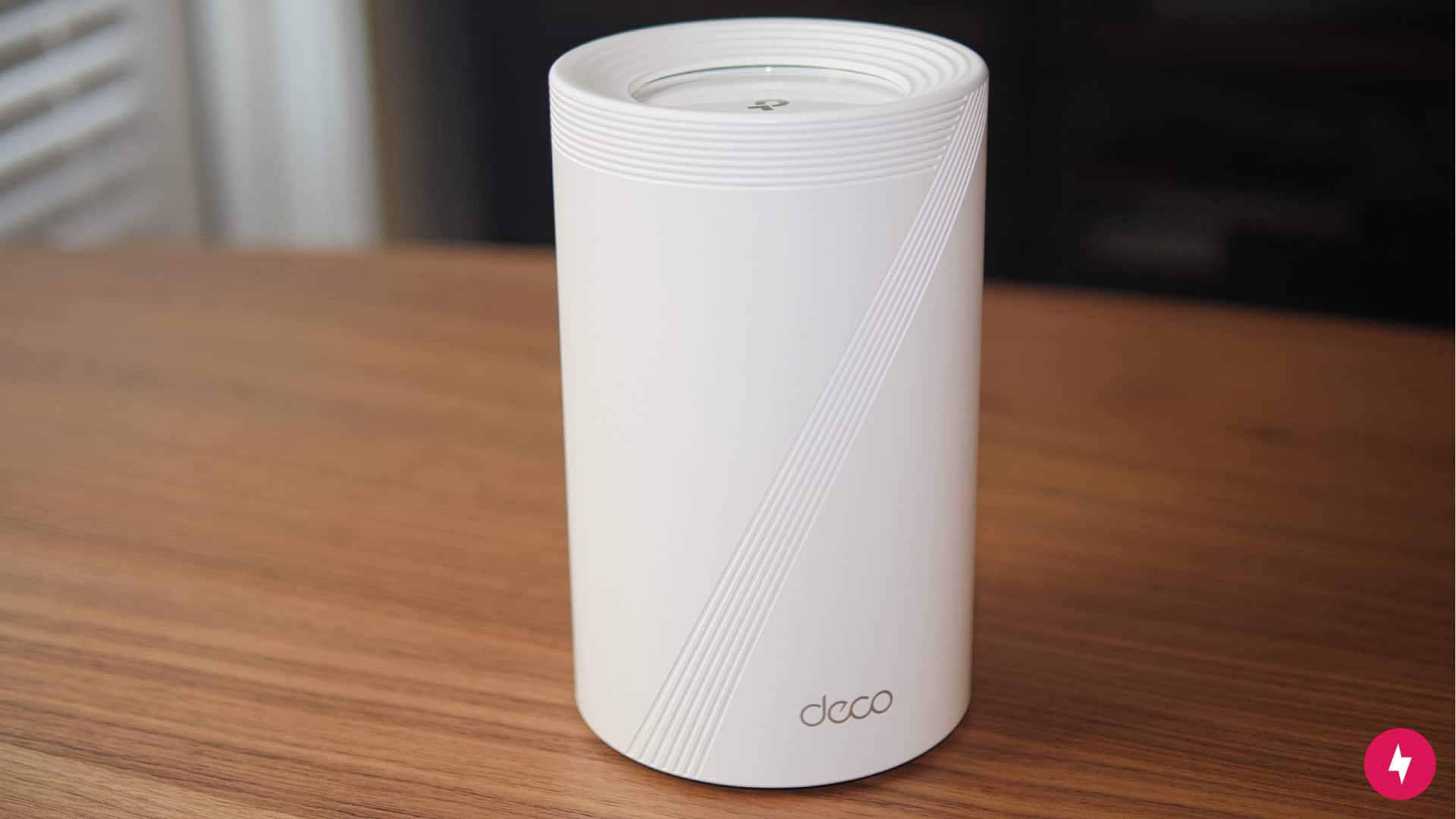
The TP-Link Deco BE63 features a clean and modern all-white design. (Image by Alejandro Medellin)
The TP-Link Deco BE63, also known as the Deco 7 Pro, makes an immediate impression, not with flashing lights or towering antennas, but with its clean, all-white design that disappears into modern spaces. Minimalist to the core, the nodes look more like decor than networking gear, blending seamlessly on a shelf or next to furniture without drawing attention. Under the hood, though, they’re anything but subtle: tri-band Wi-Fi 7 with BE10000 speeds, 320 MHz channels, multi-gig ports, and AI-driven mesh that promises seamless coverage throughout the home.
It’s a rare mix of design and horsepower, a system built to vanish into your space while future-proofing your network.
The TP-Link Deco BE63 isn’t the cheapest Wi-Fi mesh system, but if you want to future-proof your home, it might be worth the investment. (Image by Alejandro Medellin)
The Deco BE63 is built for the Wi-Fi 7 era. It’s a tri-band system that pushes BE10000 speeds across 2.4 GHz, 5 GHz, and 6 GHz bands, with support for extra-wide 320 MHz channels. That leap beyond Wi-Fi 6E means lower latency, smoother streaming, and more bandwidth for dozens of connected devices.
Wired options are robust too: each unit packs one 10 Gbps Ethernet port and two 2.5 Gbps ports, all auto-sensing for WAN or LAN. That flexibility makes it a natural fit for multi-gig internet plans or for hardwiring high-demand devices like gaming PCs and media servers.
The Deco app handles security and management, supporting WPA3 encryption, parental controls, IoT network segmentation, and TP-Link’s AI-driven mesh that adapts as you move through the house. It’s simple on the surface but tuned for households that expect both ease and muscle.
At $449.99 on Amazon for a three-pack, the Deco BE63 is priced higher than most Wi-Fi 7 systems. But Wi-Fi 7 isn’t just a spec bump. The system doubles channel width from 160 MHz to 320 MHz, introduces multi-link operation for lower latency, and pushes throughput further with 4K-QAM modulation. You can also buy it as a two-pack or a single node, depending on your home’s size and bandwidth needs.
TP-Link Deco BE63 Installation: Straightforward App, Painful First Connection
Like other router brands, TP-Link has its own app, called the Deco, to help with setup. (Image by Alejandro Medellin)
If there’s one thing TP-Link gets right, it’s making setup approachable. The Deco app walks you through every step with clear instructions and visuals, which is a big win if you’re a visual learner or just want the process to feel straightforward instead of technical. It’s worth noting that if you’ve used other TP-Link routers, Deco uses a different app, so you won’t use the Tether app for this system.
That said, my setup wasn’t without hiccups. Despite putting my ISP gateway into bridge mode and following the on-screen directions, I had to hard reset my modem a few times before the first node would connect. Once I got that initial connection, though, the rest of the process clicked into place — the remaining nodes paired quickly and the system was up and running as expected.
Unboxing and Initial Setup
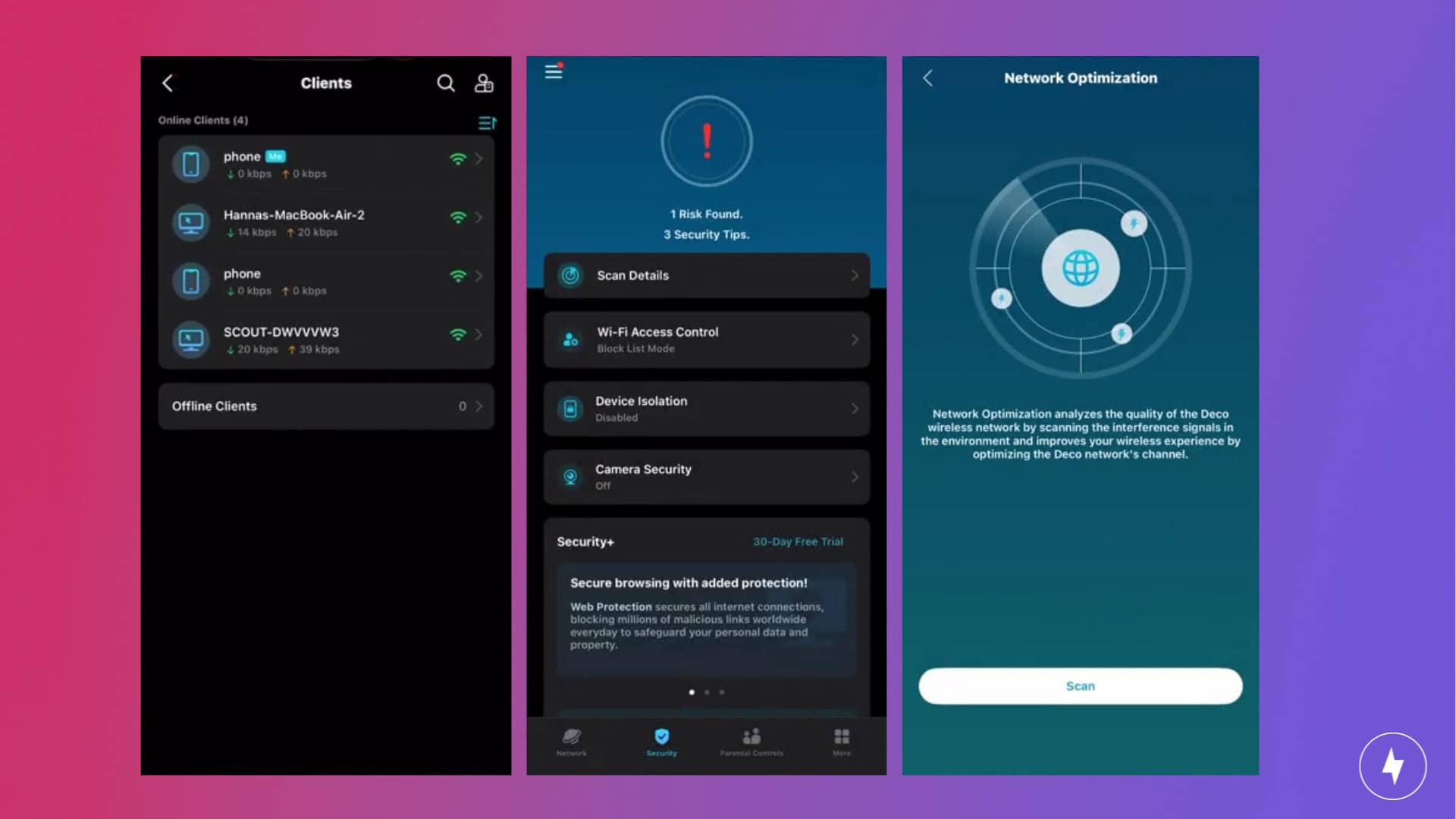
Setting up the TP-Link Deco BE63 wasn’t the easiest process initially. (Screenshot Images by Hanna Shemke)
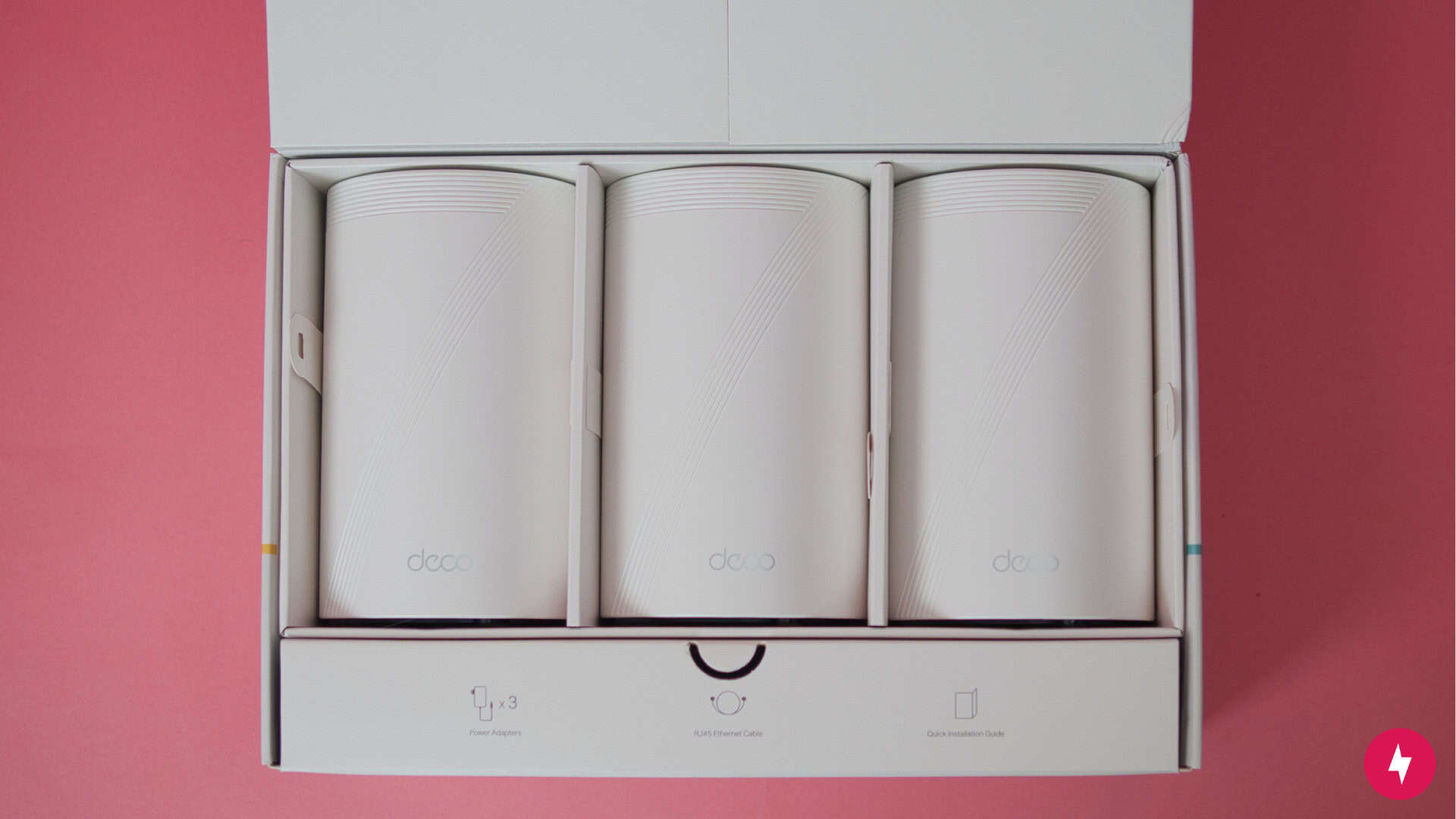
Unboxing the Deco BE63 is refreshingly smooth and feels a notch above your standard networking gear. The packaging uses simple fold-out flaps instead of messy tape or tear strips, so you don’t have to worry about ripping or damaging the box. Inside, everything is neatly organized and thoughtfully laid out, and it looks future-proof and easily blendable into your home setup.
The three nodes sit right on top, cradled in pull tabs that make them easy to lift out, which is a surprisingly nice touch if you’ve ever fumbled with tightly packed electronics, and a small blessing for anyone with long nails (it’s me, hi, I’m the problem, it’s me). Each unit has a clean, all-white cylindrical design that looks almost identical to an Amazon Alexa Echo, making it feel more like a smart home accessory than a blinking piece of networking hardware. It’s minimalist, modern, and subtle enough to blend in with shelves, desks, or entertainment centers without drawing attention. Beneath the nodes, another flap opens to reveal the hardware: three power adapters, an Ethernet cable, and the documentation. And in true TP-Link fashion, you’ll also find a reset pin included, a tiny detail, but one that spares you the annoyance of digging for a paperclip or safety pin when you need it most.
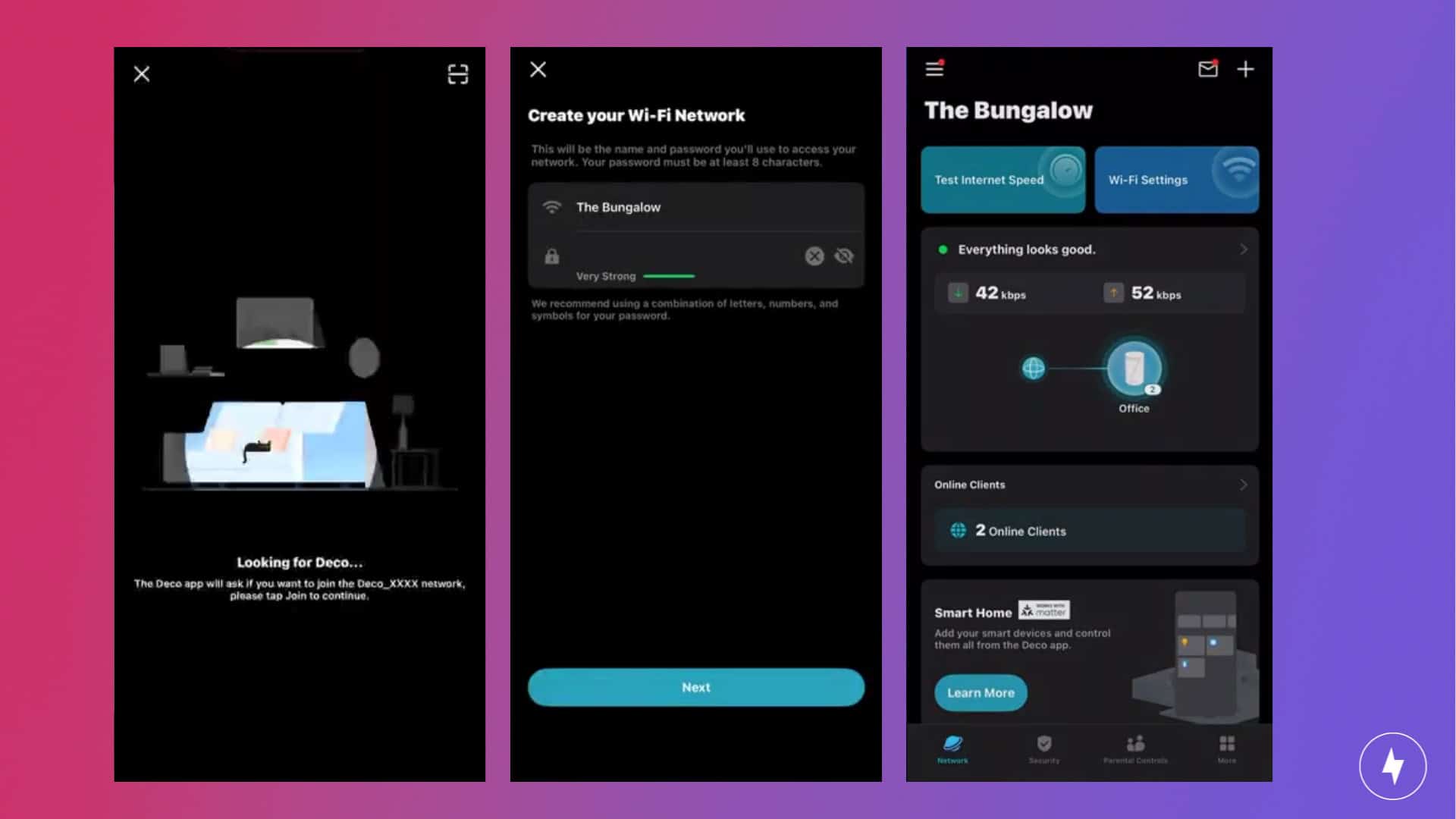
Setup begins in the Deco app, which you can download by scanning the QR code in the quick-start guide. After logging in or creating an account, tapping “let’s begin” kicks off a step-by-step process with visuals that make it approachable even if you’re not networking-savvy. The UX is clean, intuitive, and full of little details that keep you moving in the right direction.
Getting online, however, took me a few tries. Following the standard process (unplugging the modem, connecting the Deco with the Ethernet cable, powering the modem back up, and then plugging in the node), the app initially struggled to detect the first unit. After three modem resets, the LED finally began blinking blue, indicating it was ready to complete setup. From there, things moved quickly: confirm the model, verify the pulsing blue light, select internet type (Dynamic IP in most cases), name the network, and set a password.
Once the primary node was online, the rest of the process felt effortless. The additional nodes only needed to be plugged in around the house, and they connected automatically with no extra steps. The app even provides placement guidance to help you avoid interference from TVs or other large devices, making it easier to optimize coverage without guesswork.
The repeated modem resets were frustrating, but once the system recognized that first node, setup flowed exactly as intended. Within about half an hour, my network was configured and streaming without a hitch.
Navigating the Mobile App
With plenty of features to use, the Deco app is made with users in mind. (Screenshot Images by Hanna Shemke)
The Deco app feels like it was designed with everyday users in mind. The home screen lays out the essentials right away: your network status, the connected devices, and how each node is performing. It’s clean, simple, and doesn’t bury basic tools under layers of menus. Pausing a device, renaming it, or checking which node it’s using takes just a tap.
Where the app really stands out is in its guidance and extras. During setup, the visual prompts and diagrams made placement feel intuitive, even if you’re not used to messing with networking gear. Once you’re online, features like parental controls and device scheduling come baked in through TP-Link’s HomeShield service. The free version covers the basics — content filters, activity logs, and simple scheduling — while a subscription unlocks more advanced protections, such as network scans, security recommendations, and detailed usage reports. It’s a tiered approach that works for both casual users who want peace of mind and those who like to dig deeper.
For smart home households, the Deco app also makes integration painless. You can spin up a separate IoT network to isolate smart devices, link in TP-Link’s own Kasa or Tapo gear without juggling multiple apps, and even run built-in speed tests to keep tabs on performance. It’s not a power-user dashboard with dozens of toggles, but that’s part of the appeal. It strikes the balance between simplicity and control.
Overall, navigating the Deco app is straightforward, approachable, and polished. Whether you just want to check that everything’s running smoothly or dive into parental controls and security, it delivers the right tools without overwhelming you.
TP-Link Deco BE63 Performance: Wi-Fi 7 Speeds That Don’t Flinch Under Load
The router should be placed in a central, open area with no obstructions. (Image by Alejandro Medellin)
Now it’s time for the most important test of all: performance. I tested the Deco BE63 in my two-floor bungalow under both calm and chaotic conditions, from light browsing to streaming from every smart device at once. To get a complete picture, I ran tests in multiple spots around the house: about five feet from the main node, 15 feet away with a wall in between, and upstairs on the second floor.
This setup gave me a clear look at how the BE63 handled distance, interference, and heavy traffic in a real-world environment. With tri-band Wi-Fi 7 and support for 320 MHz channels, the system is built to push higher speeds and lower latency than Wi-Fi 6E, so I was especially curious to see how those promises translated into day-to-day use.
Testing the Router
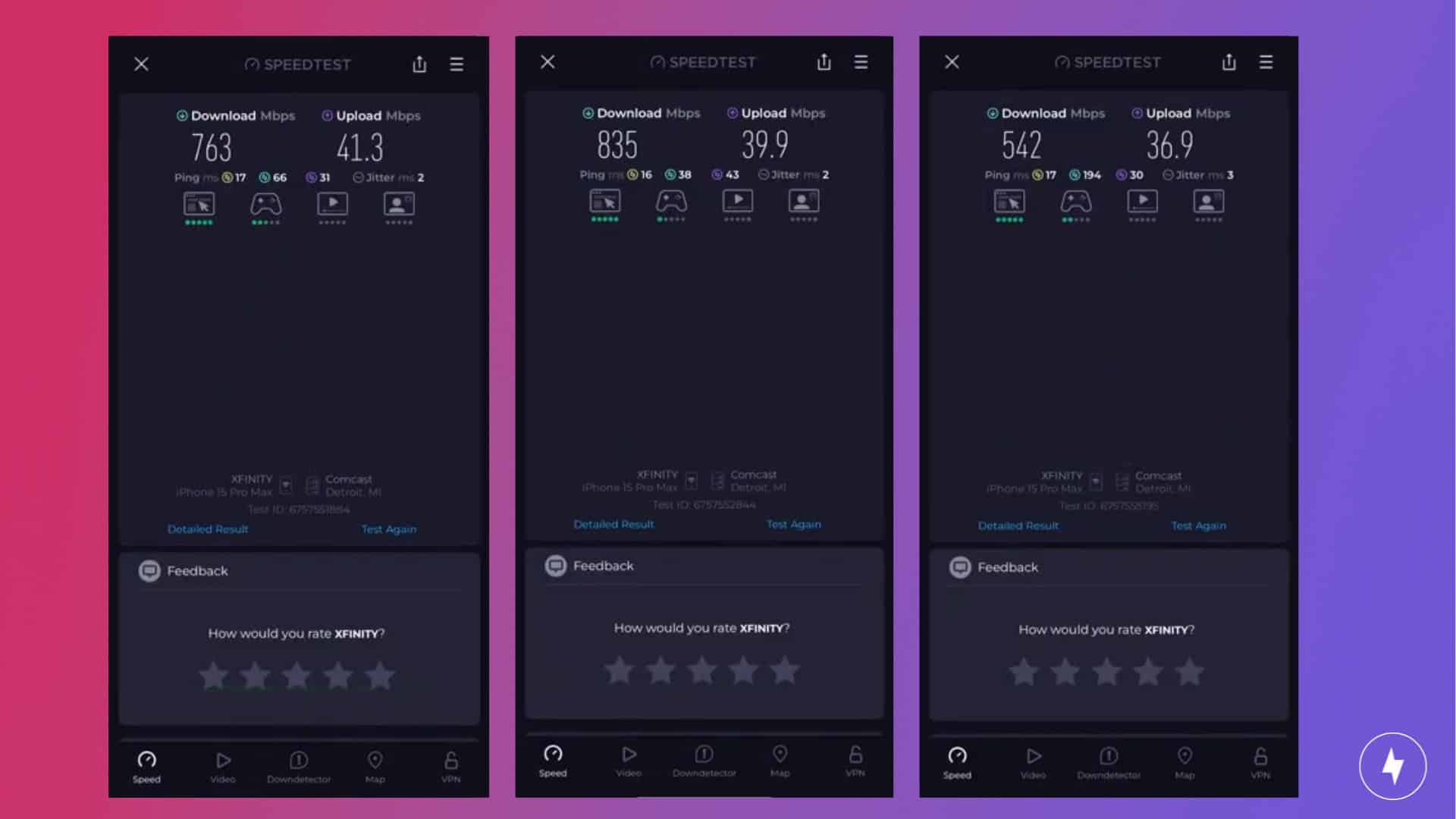
Wireless speed test results performed better at 15 feet away. (Screenshot Images by Hanna Shemke)
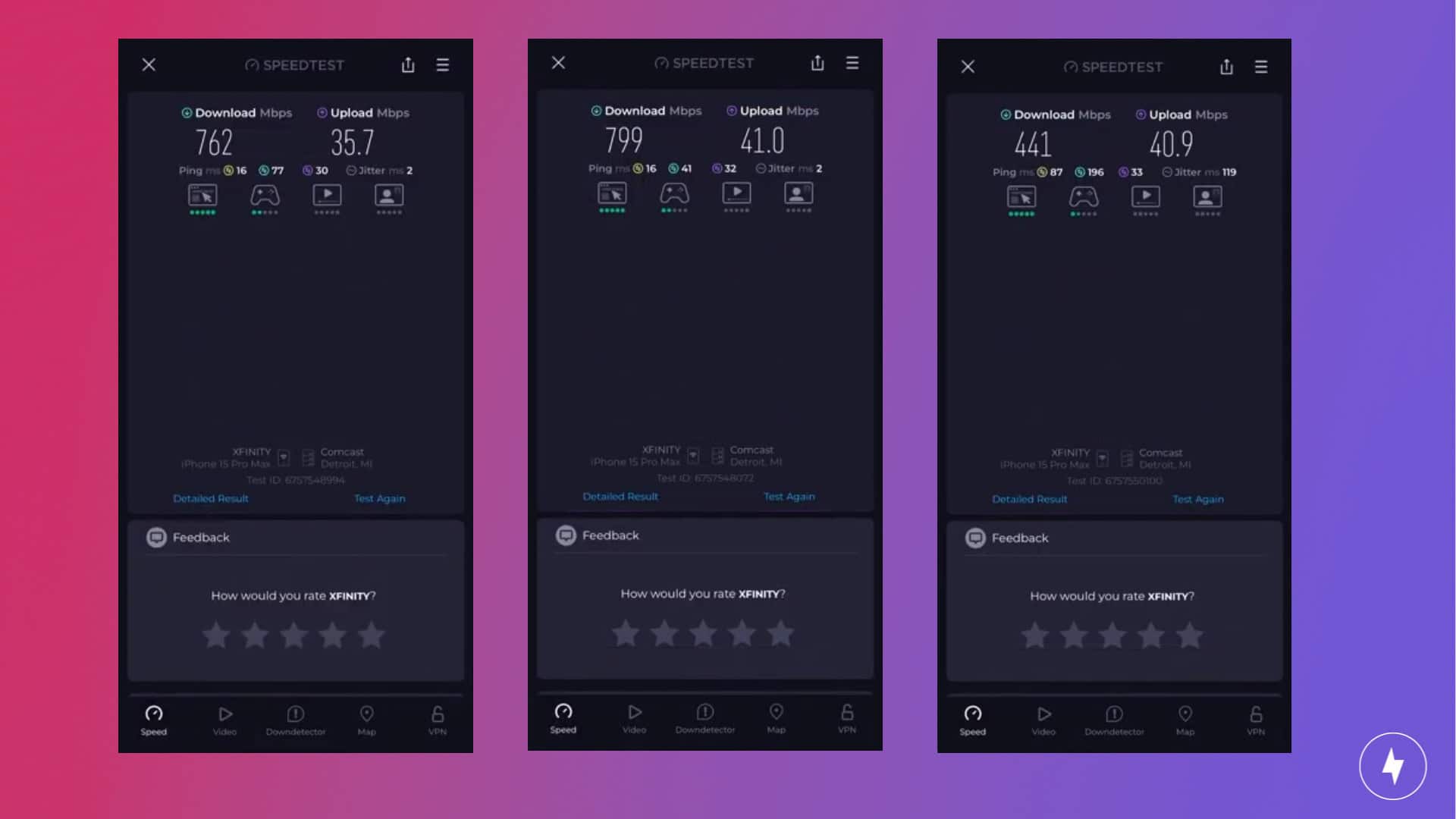
At five feet from the main Deco BE63 node, speeds were rock-solid. In calm conditions with only one device connected, download speeds were 763 Mbps and upload speeds were 41 Mbps. Even when I loaded the network with multiple devices streaming and downloading at once, download speeds held steady at 762 Mbps while uploads dipped to 35 Mbps. That’s essentially no change in downloads and about a 15 percent decrease in uploads, which is impressive given the load.
At 15 feet away, with a wall in between, performance remained just as reliable. In calm conditions, download speeds reached 835 Mbps with uploads at 39 Mbps. Under busy conditions, downloads landed at 799 Mbps and uploads at 41 Mbps. That’s only about a 4 percent dip in downloads and a 5 percent gain in uploads, showing the system barely flinched even with a barrier and multiple devices competing for bandwidth.
The Deco BE63 had to work harder upstairs, and showed a decrease in download speeds. (Screenshot Images by Hanna Shemke)
Upstairs was where the Deco had to work harder, cutting through floors and walls. In calm conditions, download speeds dropped to 542 Mbps, with uploads at 36 Mbps. Once the network was fully loaded, downloads slid further to 441 Mbps while uploads ticked up to 40 Mbps. That’s about a 19 percent decrease in downloads but an 11 percent increase in uploads. While it wasn’t as fast as the tests closer to the system, the speeds were still strong enough to to stream, game, and work comfortably.
Caption: Our team walks you through our hands-on test of the TP-Link Deco BE63.
Taken together, these results show that the Deco BE63 thrives under pressure. Close to the main node, performance stayed remarkably consistent, and even at a distance or under strain, it held its own. The system’s Wi-Fi 7 muscle clearly helps it balance heavy traffic, keeping downloads steady and uploads surprisingly resilient across the house.
Comparing to Competitors
If you want a Wi-Fi 7 mesh system, the TP-Link Deco BE63 offers great performance. (Image by Hanna Shemke)
The TP-Link Deco BE63 sits comfortably in the premium mesh router tier, and its specs back it up. With tri-band Wi-Fi 7, support for 320 MHz channels, and multiple multi-gig ports, it outpaces many Wi-Fi 6E systems that are still common in this price range. At $419.99 for a three-pack, it’s more expensive than popular Wi-Fi 6E options like TP-Link’s Deco XE75, but it’s also far more future-proof.
Compared to the Eero Pro 6E, the BE63 clearly has an edge. The Eero tops out at Wi-Fi 6E, while the Deco pushes into Wi-Fi 7 territory with faster throughput, wider channels, and better long-term value if you plan to keep your system for several years. Even stacked against the newer Eero Pro 7, the BE63 holds its own, offering more multi-gig ports and better range, though Amazon’s router leans on its ecosystem integration as a selling point.
Check out this video for our quick comparison between TP-Link Deco BE63 against similar mesh systems.
Higher-end models like TP-Link’s own Deco BE85 or Netgear’s Orbi RBKE963 push performance even further, but they also come with much steeper price tags. The BE85, for example, adds true 10 Gbps ports and even more raw bandwidth, which is great if your ISP already supports multi-gig speeds, but overkill for most households. The Orbi, meanwhile, is one of the most powerful Wi-Fi 7 mesh systems you can buy, but it more than doubles the BE63’s $449.99 Amazon price tag.
That’s what makes the Deco BE63 such a compelling middle ground. It’s not the cheapest system, and it’s not the most powerful, but it threads the needle with next-gen Wi-Fi 7 performance, a polished app experience, and a premium price that isn’t punishing. For buyers who want speed, stability, and room to grow, it’s a strong value play in a competitive category.
Our Verdict: Wi-Fi 7 Power That Shines, But Not For Bargain Hunters
If you live in a large household with many devices, the TP-Link Deco BE63 is worth buying. (Image by Hanna Shemke)
The TP-Link Deco BE63 makes a strong case as one of the more capable Wi-Fi 7 mesh systems you can buy today. Its clean, minimalist design blends easily into modern homes, and the Deco app keeps management simple once you’re online. Performance was consistently strong across multiple tests, with download and upload speeds holding steady even under strain. For households packed with devices or anyone looking to be future-proof with Wi-Fi 7, the BE63 delivers the horsepower to keep things running smoothly.
Still, the setup wasn’t flawless. Despite the app’s clear, step-by-step guidance, I had to reset my modem multiple times before the first node came online. That hiccup made installation more frustrating than it needed to be. And while the BE63’s investment is competitive for a Wi-Fi 7 system, it’s not budget-friendly. If your home isn’t large or heavily connected, you could likely save money with a solid Wi-Fi 6E mesh system and still get plenty of performance.
The Deco BE63 is best suited for large households with dozens of connected devices, heavy streamers, online gamers, and anyone who wants to stay ahead of the curve with Wi-Fi 7 speeds. On the flip side, if you live in an apartment, a smaller home, or you just want reliable browsing and streaming without the premium price tag, this system is probably more than you need.
Our TP-Link Deco BE63 Quick Recap
Looking for our quick thoughts on whether the TP-Link Deco BE63 makes sense for your household? Watch our video for our team’s thoughts.
Watch to see if we think the TP-Link Deco BE23 is worth the upgrade.
How We Assess Routers
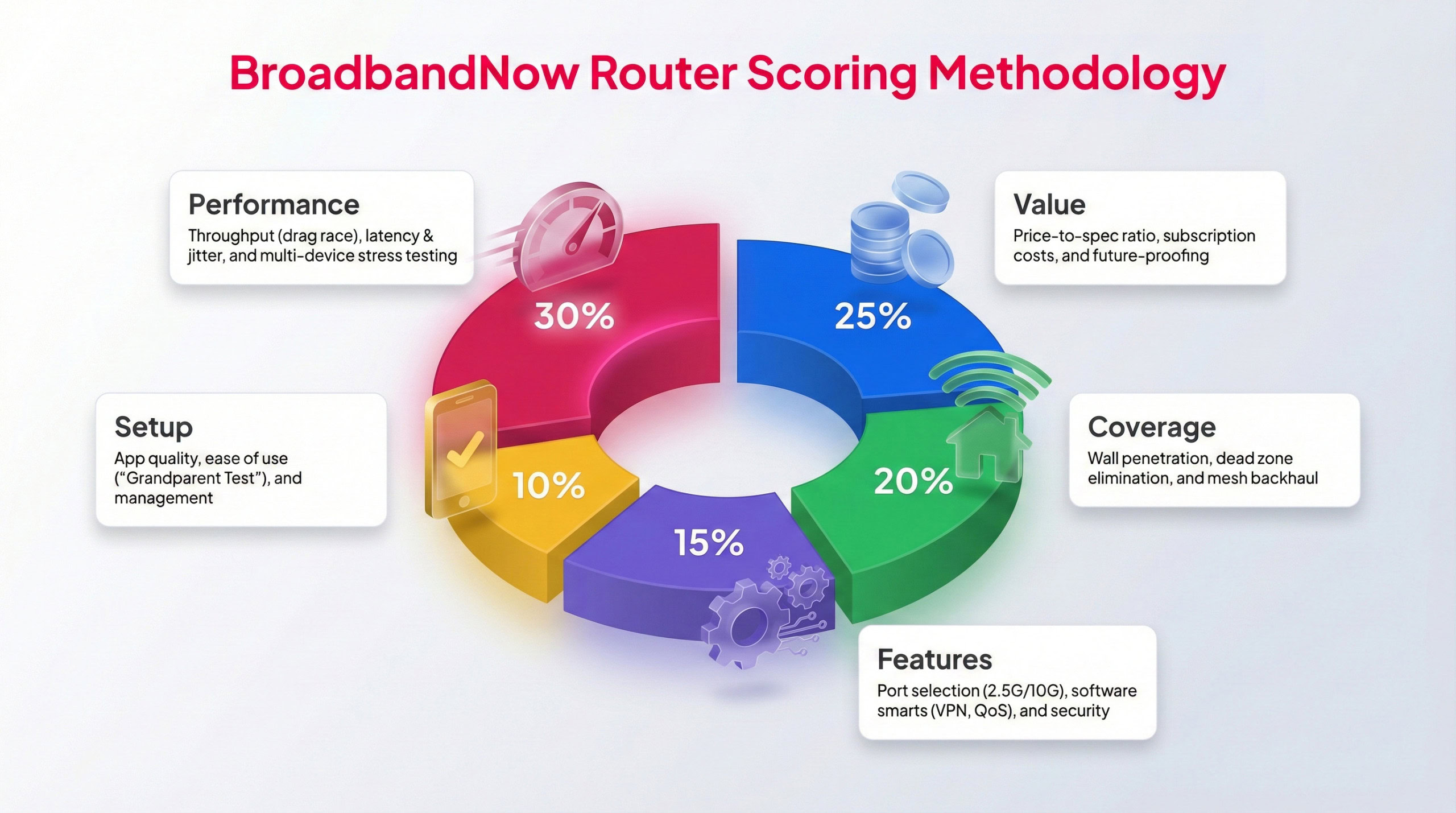
Each router tested by our BBN experts follow this methodology to provide a weighted score.
When our team reviews router equipment, we follow the same evaluation process to keep our reviews consistent. Our broadband experts test each router for one month, evaluating performance hands-on and comparing results with each model’s price and features. That includes using the equipment during peak times, testing under high-bandwidth conditions, and running speed tests at varying distances from the router.
To rate each criterion, we use a 1–5 star rating calculated with a weighted formula. We value performance and value most in routers. Read below for our rankings for five categories and how we determined these scores while testing the TP-Link Deco BE63 in my two-story home.
Performance – 5/5: I tested raw speeds at close range, across rooms, and at long distances (including the usual problem spots), and the results stayed impressively consistent. Even more important: latency stayed low. To push the system to its limits, I ran multiple high-bandwidth activities across several devices while simultaneously kicking off speed tests. The system didn’t fall apart, which tells me the processor can actually handle a busy household, not just look good on a spec sheet.
Value – 5/5: For what you’re paying, the Deco BE63 punches well above its weight. You’re getting a full tri-band Wi-Fi 7 system with modern features that usually show up on much more expensive mesh setups (looking at you, Orbi). Just as important, it includes basic security features, and while upgrades are optional, you’re not forced into a monthly fee just to unlock essential tools. Add in the fact that this is true next-gen Wi-Fi hardware, and the value equation here is hard to argue with.
Coverage – 5/5: The Deco BE63 pushed a strong signal through walls and into tougher areas of the house without major drop-offs. For a mesh system, backhaul performance held up well, and the nodes didn’t suddenly lose half their speed once they were placed farther away. Most importantly, it did what a mesh system is supposed to do: kill dead zones. Even the far corners that usually struggle for a stable connection stayed usable and reliable.
Features – 5/5: You get modern port options that make sense for multi-gig internet, plus Wi-Fi 7 features that improve speed, capacity, and latency. On the software side, it supports WPA3 security, and the network controls are practical rather than buried in menus you’ll never touch.
Setup – 4/5: The Deco app does a great job walking you through setup, and most people should be able to get everything running without breaking a sweat. Changing passwords, creating a guest network, or managing connected devices is all straightforward and intuitive. That said, getting the system online wasn’t completely smooth. It took a few modem resets before everything finally connected. Once it was up and running, though, day-to-day management was painless.
Frequently Asked Questions About the TP-Link Deco BE63
Does the TP-Link Deco BE63 support Wi-Fi 6E or older devices?
Yes, the Deco BE63 is a Wi-Fi 7 system that's fully backward-compatible. That means devices using Wi-Fi 6E, Wi-Fi 6, Wi-Fi 5, or even older standards will still connect without issue.
How many square feet of coverage does a Deco BE63 three-pack provide?
A three-pack of Deco BE63 units can cover up to 7,600 square feet. In real use, that coverage can vary depending on walls, interference, and placement.
Can the Deco BE63 be mixed with other Deco models in the same mesh network?
Yes, all Deco units are compatible, so you can mix the BE63 with other Deco models to expand coverage. Just note that the network will run at the speed of the slowest Deco in the system, so check your specs before updating your setup.
Does the Deco BE63 work with voice assistants like Amazon Alexa or Google Assistant?
Yes, the Deco BE63 supports integration with both Alexa and Google Assistant, letting you manage basic features like pausing Wi-Fi for devices with voice commands.
What security features are included with TP-Link HomeShield, and how much does the subscription cost?
The Deco BE63 includes a free tier of HomeShield with basic protections like parental controls, blocking malicious sites, and limited reporting. There are two subscription options available from HomeShield: Security+ and Advanced Parental Controls. Security+ provides comprehensive, professional network security protection. Advanced Parental Controls is a security tool that helps parents manage what children can access. Security+ costs $35.99 per year or $4.99 per month, while Advanced Parental Controls costs $17.99 per year or $2.99 per month. Both include a free one-month trial, so you can try the features before committing to a plan.
Is the Deco BE63 compatible with fiber internet or cable internet providers?
Yes, the Deco BE63 works with most ISPs, including fiber, cable, and DSL, as long as you connect it to a compatible modem or ONT. It also supports multi-gig speeds, so it can handle today’s fastest plans.
Can I use Ethernet backhaul with the Deco BE63 for faster node-to-node connections?
Can I use Ethernet backhaul with the Deco BE63 for faster node-to-node connections?