What Is a Variable Bitrate? A Complete Guide to VBR vs. CBR
Balance quality, file size, and performance with the right bitrate strategy.

- Bitrate determines audio and video quality by measuring how much data is transmitted per second.
- Variable Bitrate (VBR) adjusts data based on complexity, offering higher quality and smaller file sizes.
- Constant Bitrate (CBR) keeps data use steady, making it ideal for live streaming.
When encoding video or audio, you’re constantly walking a tightrope between flawless quality and manageable file sizes. This is where the battle between Variable Bitrate (VBR) and Constant Bitrate (CBR) begins. While VBR dynamically adjusts data allocation (pumping more bandwidth into complex, fast-moving scenes and dialing it back during simple segments), CBR locks in a rigid, fixed bitrate from start to finish. This fundamental difference dictates how your media looks, sounds, and streams across different platforms.
Choosing the right method directly impacts your content’s quality, storage requirements, and playback performance. While VBR is the gold standard for on-demand platforms like YouTube, CBR’s predictable data flow makes it the undisputed king of live streaming and broadcasting. In this guide, we’ll break down exactly how VBR and CBR work, compare their pros and cons, and help you choose the perfect encoding workflow for your project.
Quick Answer
- Use VBR for YouTube uploads, local recordings, video archiving, and downloadable media where quality and storage efficiency matter most.
- Use CBR for live streaming (Twitch, Zoom, Facebook Live).
Watch: CBR vs. VBR Explained – Which One Is Best?
Looking for the short version? Our video explains the differences between Variable Bitrate (VBR) and Constant Bitrate (CBR), when to use each encoding method, and how your bitrate choice affects quality, file size, bandwidth, and streaming performance.
How Variable Bitrate (VBR) Works
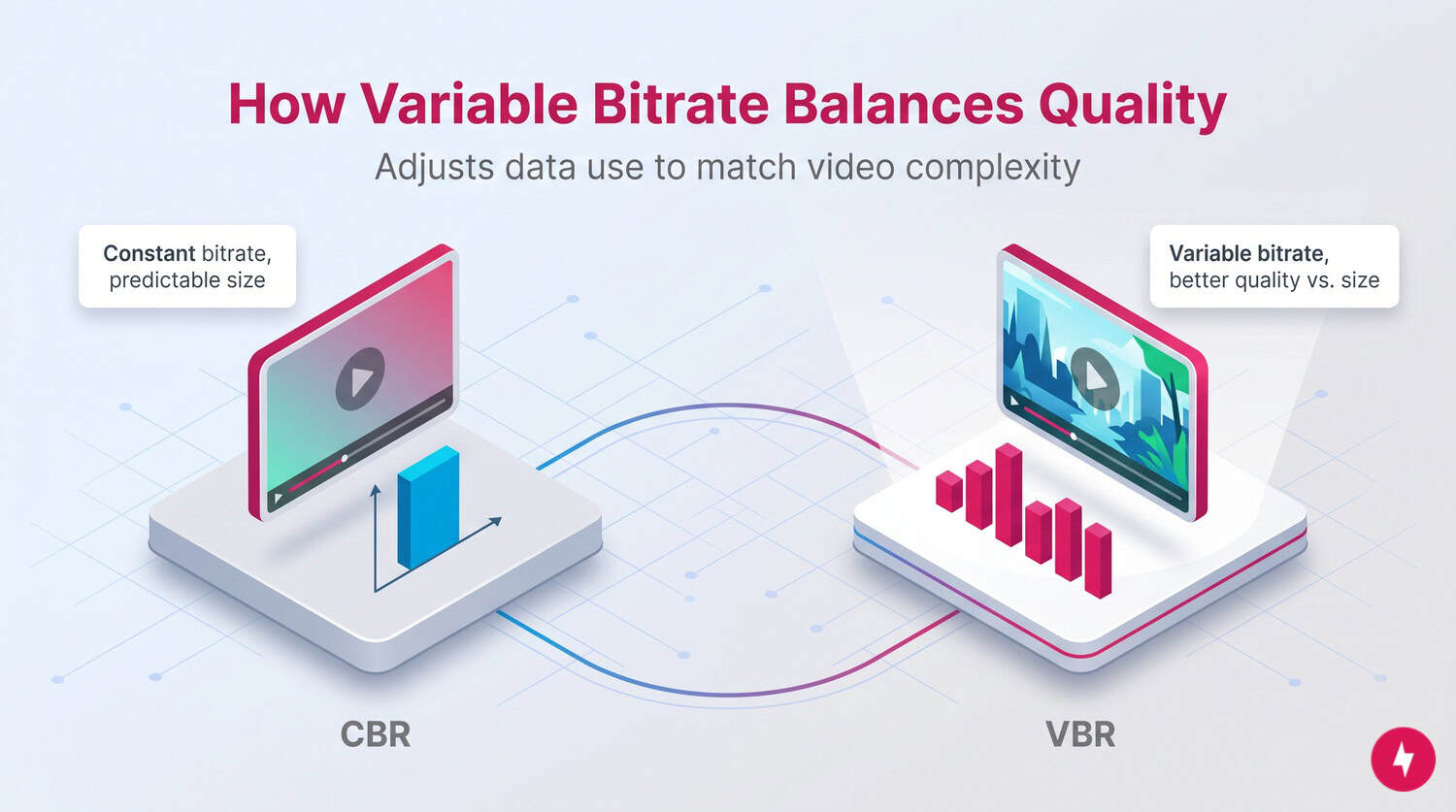
Bitrate is the amount of data processed or transmitted per unit of time in a digital audio or video file. It’s typically measured in kilobits per second (Kbps) for audio and megabits per second (Mbps) for video. The higher the bitrate, the more data is used each second, which translates to higher quality and larger file sizes. It must align with resolution and internet speed to prevent buffering, lag or degraded image quality, especially for HD and 4K content.
Here’s why bitrate matters:
- Quality: A higher bitrate retains more detail during compression, resulting in media that looks and sounds better.
- File size: More bits per second means larger files, which affect upload times, storage requirements, and mobile data usage.
- Streaming performance: Streaming platforms need to balance quality with the viewer’s bandwidth. Too high a bitrate can cause buffering, while too low a bitrate can degrade quality.
The key is choosing the right bitrate type. That’s where variable bitrate (VBR) and constant bitrate (CBR) come into play. These two encoding strategies affect everything from file size to playback quality to buffering times. If you’ve ever wondered why one video looks crystal clear while another one stutters or pixelates, even at the same video resolution, it probably comes down to how it was encoded.
Let’s say you’re watching a video on your phone. If it was encoded at a high bitrate, you’ll likely notice a crisp picture, smooth motion, and rich audio. If the bitrate is too low, you might see pixelation, blurring, or audio dropouts. That’s because bitrate determines how much information compression retains or discards.
Think of CBR like painting every inch of a wall with the exact same amount of paint, whether it’s a smooth surface or an intricate mural. VBR works more like a professional painter, applying extra paint only where additional detail is needed and using less where the surface is simple. This creates a more efficient balance between quality and resource usage.
How Rate Control Affects Bitrate
When you’re encoding audio or video, rate control determines how bitrate is allocated across the duration of the media. It’s the brain behind the bitrate strategy, dictating how much data is used at any given moment based on your chosen encoding mode (VBR or CBR).
Rate control algorithms aim to balance output quality, compression efficiency, and file size while respecting constraints such as bandwidth limits or target bitrates. For example, a well-tuned VBR rate-control setting ensures complex scenes get the bits they need while simpler ones don’t hog unnecessary data. In CBR, rate control must strictly enforce a fixed bitrate even if that means reducing quality in detailed moments to stay within the cap.
Good rate control makes the difference between a video that looks sharp and one that looks seamless. It’s especially critical in live streaming, where inconsistent rate control can lead to buffering, skipped frames, or signal loss. For stored media, advanced rate control ensures the encoder uses bits more wisely, creating smaller files without visible loss in quality.
What Is Variable Bitrate (VBR)
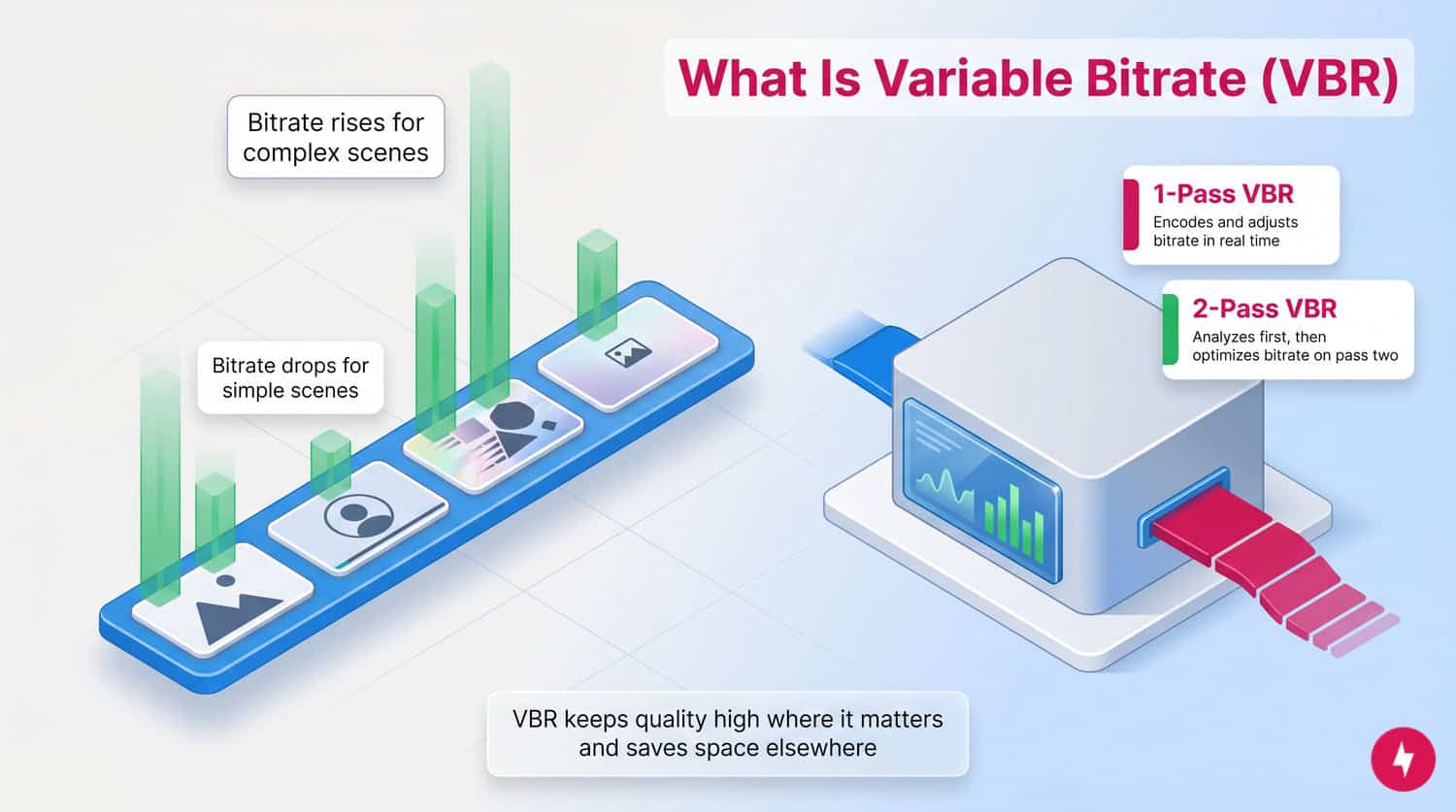
Variable bitrate (VBR) is an encoding method that dynamically adjusts bitrate based on content complexity. Instead of assigning the same number of bits to every second of footage, VBR increases the bitrate during complex scenes (such as fast motion or detailed textures) and decreases it during simple scenes (such as a static background or a talking head). VBR maintains high-quality content where it’s needed and saves space where it’s not.
Most VBR systems analyze media content in advance. With 1-pass VBR, the encoder makes quick decisions on the fly. With 2-pass VBR, the encoder scans the file once to analyze complexity, then encodes it with optimized bitrate distribution on the second pass. This two-step approach yields better results because it allocates data more intelligently, especially in long-form videos or audio files where complexity can vary drastically.
| Pros | Cons |
|---|---|
| Better image and audio quality at the same average bitrate | Longer encoding times, especially with two-pass encoding |
| Smaller file sizes than equivalent CBR encodes | Less predictable final file size |
| Uses storage more efficiently | Higher CPU usage during encoding |
| Excellent for YouTube uploads and downloaded media | Some legacy devices and platforms prefer CBR |
| Allocates bits where they’re needed most | Bitrate fluctuations can cause playback issues on slower networks |
Here are a few instances of how VBR works in common online experiences:
- YouTube uploads: Many creators use VBR to reduce file sizes without sacrificing visual clarity.
- Audio streaming: Services like Spotify often use VBR to balance audio quality and mobile data use.
- Professional film editing: VBR is used in mastering workflows where visual quality is critical.
- Archiving: When storage is limited, but quality still matters, VBR offers a solid compromise.
What Is Constant Bitrate (CBR)

Constant bitrate (CBR) is the more straightforward encoding method: The same number of bits is allocated for every second of media, regardless of what’s happening onscreen or in the audio track. Every moment, whether it’s a black screen or a chaotic fight scene, gets the same data treatment. This uniformity makes CBR ideal for situations where predictability matters more than efficiency. That’s why it’s a staple in live streaming, broadcasting, and legacy hardware systems.
CBR encoders apply a fixed bitrate across the entire file or stream. This simplifies both encoding and playback since the data rate never spikes or dips. But this one-size-fits-all approach can lead to inefficient use of data, wasting bits on simple scenes or underdelivering in high-complexity segments.
| Pros | Cons |
|---|---|
| Predictable file sizes and bandwidth use | Can sacrifice quality during complex scenes |
| Ideal for real-time applications like live streaming | Wastes bandwidth on simple scenes |
| Compatible with nearly all devices and platforms | Less storage-efficient than VBR |
| Easier for hardware encoding or limited processing systems | Doesn’t adapt to content complexity |
| Faster to encode and simpler to configure | Quality may be inconsistent over the course of the video |
Here are a few examples of CBR in real-world uses:
- Twitch streaming: CBR ensures that the bitrate stays within platform limits and prevents sudden data spikes.
- Zoom meetings: Constant bitrate helps maintain stable video and audio feeds during live communication.
- Security footage: CBR makes storage and retrieval easier because each minute uses the same amount of disk space.
- Broadcast TV: Legacy and some modern cable systems use CBR to standardize media delivery.
CBR vs. VBR: Key Differences
The biggest difference between Constant Bitrate (CBR) and Variable Bitrate (VBR) is how they allocate data during encoding. CBR maintains the same bitrate from start to finish, whether a scene is simple or highly detailed. This creates a predictable data stream well-suited for real-time applications like live streaming and video conferencing, where consistent bandwidth matters more than maximizing image quality. VBR adjusts the bitrate based on content complexity. Fast-moving action sequences, detailed textures, and complex audio receive more data, while static scenes and quieter moments use less, improving overall compression efficiency.
The choice between VBR and CBR ultimately depends on use-case priorities. CBR prioritizes stability and predictable bandwidth, making it ideal for real-time applications. VBR prioritizes compression efficiency and quality, making it better suited for stored or downloadable content.
When to Use VBR vs. CBR

The right bitrate strategy depends on how your content will be delivered. The table below outlines the key differences between VBR and CBR to help you better understand what they are and when to use each.
| VBR | CBR | |
|---|---|---|
| File size/storage | Smaller and more efficient | Larger and less efficient |
| Video/audio quality | Optimized by scene and consistent overall | Uniform, may dip in high-complexity scenes |
| Bitrate | Changes throughout the file | Constant |
| Encoding speed | Slower, especially with 2-pass | Faster and more straightforward |
| Live streaming use | Not ideal | Standard |
| Compatibility | May be limited to older devices or platforms | Supported nearly everywhere |
| Best use | Offline media, archiving, YouTube uploads | Live streams, conferencing, and broadcast |
| Data usage | Varies by scene complexity | Consistent regardless of content |
Deciding whether to use VBR or CBR depends on the type of content you’re working with, how it’s delivered, and your priorities around quality, storage, or bandwidth. In general, you’ll use VBR when file size matters, such as hosting video on your own site or saving space on a local drive without compromising fidelity. CBR is a good option if you’re using OBS, Streamlabs, or similar broadcasting software because it ensures your viewers don’t experience buffering or dropped frames due to bitrate fluctuations.
For Live Streaming
Constant Bitrate (CBR) is the preferred choice for live streaming because it delivers a steady data flow throughout the broadcast. Platforms like Twitch, Facebook Live, YouTube Live, and video conferencing services such as Zoom are designed to work with a predictable bitrate, helping reduce buffering, dropped frames, and interruptions during playback. Streaming software like OBS and Streamlabs also recommends CBR because it keeps upload requirements consistent, making it easier to match your stream settings to your available internet bandwidth. With no sudden bitrate spikes during fast-paced gameplay or action scenes, CBR provides a more reliable viewing experience for your audience.
For VOD and Local Recording
Variable Bitrate (VBR) is the better option for video-on-demand (VOD) content, local recordings, and long-term storage. Because VBR automatically allocates more data to complex scenes and less to simpler ones, it produces higher-quality video while using storage more efficiently than CBR. This makes it ideal for YouTube uploads, Plex media libraries, NAS storage, downloadable videos, editing workflows, and archival projects where playback isn’t happening in real time. Although VBR takes longer to encode, especially with two-pass encoding, it typically produces a smaller file with better overall visual quality, making it the preferred choice when compression efficiency is a priority.
| When to use VBR | When to use CBR |
|---|---|
|
|
How Bitrate Affects Internet Data and Storage

Bitrate directly impacts how much internet bandwidth and storage space your audio or video files require. Higher bitrates use more data every second, resulting in sharper video and clearer audio, but they also create larger files that take longer to upload, download, and store. Lower bitrates reduce file size and data usage but can introduce compression artifacts, such as pixelation, blurring, or reduced audio fidelity, if set too low.
The bitrate strategy you choose also affects how content performs over different internet connections. With Constant Bitrate (CBR), bandwidth usage remains consistent throughout playback or streaming, making it easier to estimate upload requirements and reducing the risk of buffering during live broadcasts. Variable Bitrate (VBR), however, adjusts data usage based on scene complexity. During fast-moving action sequences or detailed visuals, VBR may temporarily increase the bitrate to preserve quality before dropping it again during simpler scenes. While this approach produces smaller files and better overall quality, those temporary bitrate spikes can be more demanding on slower internet connections, potentially causing buffering if the available bandwidth can’t keep up.
For stored media, VBR is generally more storage-efficient because it avoids wasting bits on scenes that don’t need them. This means you can often achieve a quality similar to or better than CBR while using less disk space. If you’re uploading videos, building a media library, or archiving content, VBR can help reduce storage requirements without sacrificing visual fidelity. If you’re streaming live, however, CBR’s predictable bandwidth usage makes it the more reliable choice for maintaining a smooth viewing experience.
Internet service providers can also impact real-world performance. During peak congestion, higher- or variable-bitrate streams may be more likely to experience buffering than fixed-rate streams, even when advertised speeds are sufficient.
Audio vs. Video Encoding Differences
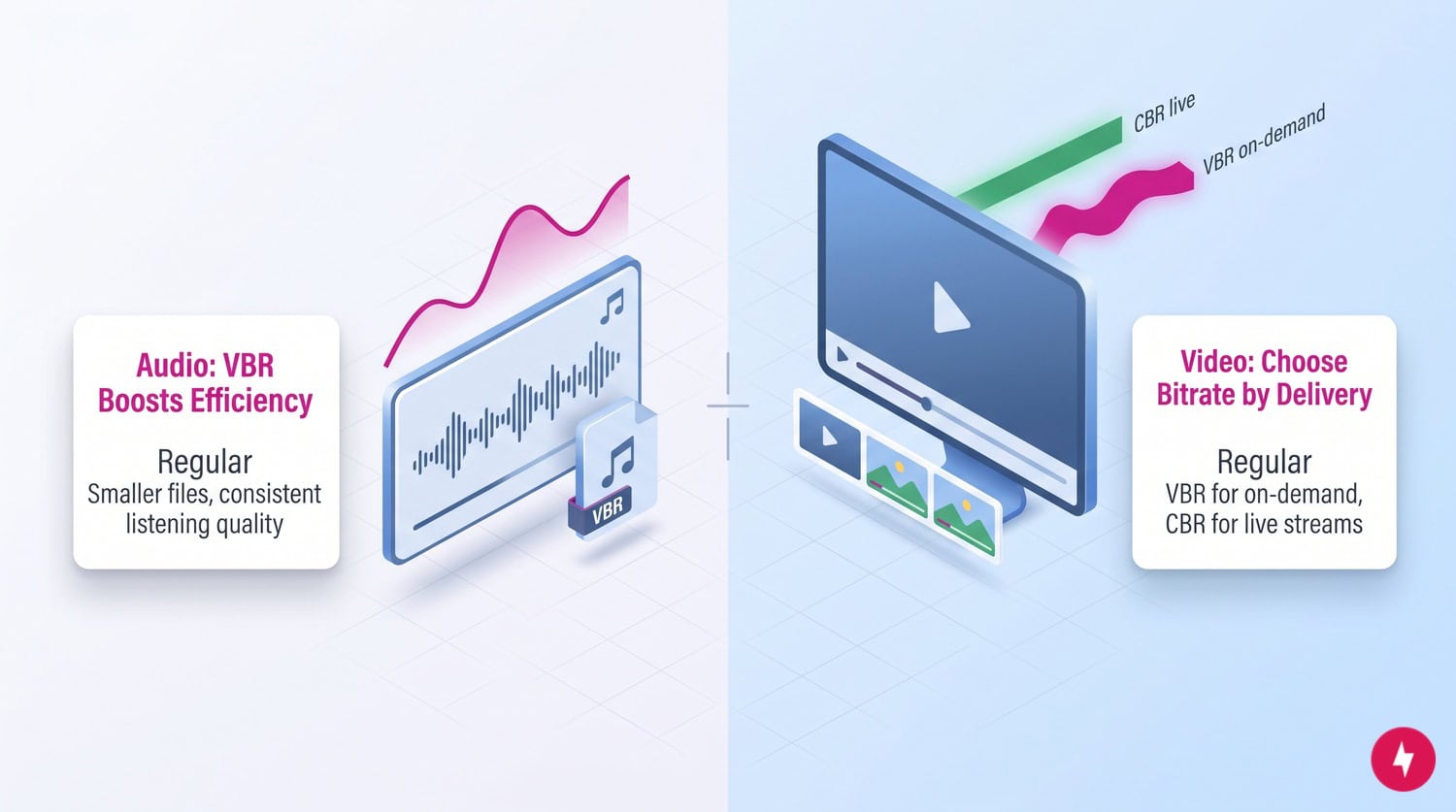
Although the concepts behind VBR and CBR are the same for both audio and video, the best choice often depends on the type of media you’re encoding and how it will be used. Audio files generally require much less data than video, so bitrate fluctuations have a smaller impact on playback. Video files, on the other hand, contain far more information and can vary dramatically in complexity from one scene to the next, making bitrate selection a more significant factor in overall quality and performance.
For audio encoding, Variable Bitrate (VBR) is commonly used for music libraries because it delivers excellent sound quality while reducing file size. Formats like MP3 and AAC often use VBR to allocate more bits to complex passages, such as orchestral music or songs with a wide dynamic range, and fewer bits to simpler sections, such as silence or spoken dialogue. This improves compression efficiency without noticeably affecting the listening experience.
Video encoding requires a different approach because the delivery method plays a much larger role in choosing a bitrate strategy. For on-demand content such as YouTube uploads, downloadable videos, and archived recordings, VBR is typically the preferred option because it produces smaller files while maintaining higher quality in detailed scenes. For live streaming, however, Constant Bitrate (CBR) is generally recommended. Platforms that deliver video in real time benefit from a steady stream of data, which helps maintain consistent bandwidth usage and reduces the risk of buffering or dropped frames during playback.
Here’s a look at how audio vs. video use variable or constant bitrate.
| Audio | Video |
|---|---|
| MP3 commonly uses VBR | Depends on the delivery method |
| Music benefits greatly from VBR | Live video often uses CBR |
| Better storage efficiency | Streaming prioritizes stability |
What Is Constrained VBR (CVBR)?

Constrained Variable Bitrate (CVBR) is a hybrid encoding method that combines the efficiency of Variable Bitrate (VBR) with the predictability of Constant Bitrate (CBR). Like VBR, it adjusts the bitrate based on content complexity, allocating more data to detailed scenes and less to simpler ones. However, unlike standard VBR, CVBR sets a maximum bitrate limit that the encoder cannot exceed. This cap helps prevent large bitrate spikes while still allowing the encoder to optimize quality where it’s needed most.
Because CVBR strikes a balance between quality and bandwidth control, it’s a practical option when network conditions or platform requirements make unrestricted VBR less desirable. Some streaming workflows and content delivery platforms use CVBR to improve visual quality without creating sudden bursts of data that could overwhelm slower internet connections or exceed bitrate limits. It can also be useful when encoding video for viewers with varying connection speeds, as the bitrate ceiling helps maintain a more consistent viewing experience.
CVBR is best suited for situations where you want many of VBR’s compression and quality benefits but still need greater control over bandwidth usage. While it doesn’t offer the completely fixed data rate of CBR, it provides more predictable performance than standard VBR, making it an effective middle ground for creators who need to balance image quality, file size, and network reliability.
Final Verdict: Which Encoding Should You Choose?
There’s no single “best” bitrate strategy; only the one that’s best suited to your workflow. If you’re broadcasting content in real time, Constant Bitrate (CBR) is generally the better choice because it provides predictable bandwidth usage, broad platform compatibility, and a stable viewing experience with fewer buffering issues. That’s why it’s the recommended option for live streaming on platforms like Twitch, YouTube Live, and Zoom, as well as for software like OBS and Streamlabs.
If you’re creating content that will be watched on demand, Variable Bitrate (VBR) is typically the better option overall. By allocating data where it’s needed most, VBR delivers better overall image and audio quality while producing smaller, more storage-efficient files. It’s ideal for YouTube uploads, downloadable videos, local recordings, media servers like Plex, and long-term archives where encoding speed is less important than compression efficiency.
No single option is best. The right choice depends on your delivery method, network conditions, and performance needs.
Frequently Asked Questions About Variable Bitrate
Is VBR 1 pass or 2 pass better?
Two-pass VBR is better when quality and compression efficiency are the top priorities. The first pass analyzes the content to determine where it needs high or low bitrates. The second pass encodes using this data, yielding better results than single-pass VBR. However, it takes more time and computational resources, so a single pass may be sufficient for casual use or short clips.
What is a good bitrate to use?
A good bitrate depends on resolution, frame rate, and delivery method. It’s all about balance: too low, and you lose quality; too high, and you waste bandwidth. For example, a 1080p video uses about 8,000–12,000 Kbps on VBR or about 6,000 Kbps on CBR for streaming, while MP3 audio uses about 160–192 Kbps on VBR and 128 Kbps on CBR.
How do I figure out my bitrate for streaming?
Start by testing your upload speed. To stay stable, keep your bitrate below 75 percent of your total upload bandwidth. For example, with a 10 Mbps upload speed, you shouldn’t exceed 7,500 Kbps. Streaming software like OBS or Streamlabs includes bitrate calculators that estimate bitrate based on your resolution, frame rate, and encoder settings.
What happens if the bitrate is too high?
An excessively high bitrate can overwhelm your system, resulting in dropped frames or stuttering during live streams, excessive storage usage, long upload and rendering times, or viewer buffering or playback issues (especially on mobile or slower connections). High bitrate doesn’t always equal better quality: past a certain threshold, visual gains are negligible. Always optimize for your content and your audience’s bandwidth.
Does VBR save more file space than CBR?
Yes, VBR typically creates smaller files than CBR while maintaining similar or better overall quality. Because it allocates more bits only to complex scenes and fewer bits to simpler ones, it avoids wasting data where it isn’t needed. This more efficient compression makes VBR a popular choice for YouTube uploads, downloadable videos, music libraries, and archived media where storage space is a priority.
Why does my VBR video buffer on slow internet?
VBR adjusts its bitrate based on scene complexity, which means data usage can temporarily spike during fast-moving action sequences or highly detailed visuals. On slower internet connections like DSL, congested Wi-Fi networks, or connections with limited upload or download speeds, these spikes may exceed the available bandwidth and cause buffering or playback interruptions. If you’re streaming live or know your audience may have slower internet, CBR is often the more reliable option because it delivers a predictable amount of data throughout the stream.