For an affordable Wi-Fi 6 router, the TP-Link Archer AX21 meets expectations. (Photo: Alejandro Medellin)
The new Wi-Fi 7 standard may be shiny and new, but it isn’t yet widely supported across a range of devices. Plus, it’s not backward-compatible, which leaves many high-end gadgets still running on Wi-Fi 6 or 6E. That’s why routers with solid Wi-Fi 6 connectivity are arguably the best investment for most users today; they’re often far more affordable, too. With that in mind, I wanted to see if TP-Link’s Archer AX21 could live up to the success of its predecessors while capitalizing on the continued strengths of Wi-Fi 6. Known for its balance of performance and affordability, the Archer series has built a reputation for dependable, no-frills routers. But can the AX21 truly deliver on the promises of Wi-Fi 6 (i.e., faster speeds, lower latency, and seamless support for multiple devices)? In this review, I’ll dive into its specs, ease of setup, price, performance, and overall value to find out if the Archer AX21 deserves a top spot in today’s Wi-Fi 6 market.
For a broader look at the top-performing models across every budget, check out our Best Wi-Fi Routers guide.
What We Like
Faster performance and range than similar routers
Multiple LAN ports
Easy-to-use mobile app
Affordable
What We Don't Like
Struggles to reach gigabit speeds
Lacks a unique design
BroadbandNow Bottom Line
At just $52.21 on Amazon ($89.56 on Walmart), the TP-Link Archer AX21 offers solid Wi-Fi 6 performance and easy setup. But its WAN port limits speeds on higher-end internet plans, as it struggles to reach 1 Gbps.
Our TP-Link Archer AX21 Video Review
Would you rather watch a video of this review than read the entire deep dive? No problem! Check out our video review of the Archer AX21 below:
Watch our review of the TP-Link Archer AX21!
Walking Through Our TP-Link Archer AX21 Experience
Yes, works with Amazon Alexa, Wi-Fi 6 support for smart home devices, and Orthogonal Frequency-Division Multiple Access (OFDMA) to increase reliability
Radio frequencies
2.4 GHz and 5 GHz
Security
SPI Firewall, Access Control, IP & MAC Binding, Application Layer Gateway, Guest Network, OpenVPN Server, PPTP VPN Server, WPA, WPA2, WPA3, and WPA/WPA2-Enterprise (802.1x) encryptions
Ethernet ports
WAN (1) and LAN (4)
Processor, memory, and storage
Dual-core CPU processor, 256 MB RAM, and 16 MB of flash memory
Dimensions
10.2 × 5.3 ×1.5 inches
TP-Link Archer AX21 at First Glance: Performance Over Pizzazz
The TP-Link Archer AX21 isn’t the first product that I’ve reviewed from the brand and certainly won’t be the last. (Photo: Alejandro Medellin)
The TP-Link Archer AX21 claims to tackle serious Wi-Fi demands. The box is packed with buzzwords like dual-band Wi-Fi 6, beamforming technology, and four high-gain antennas — all promising extensive coverage and faster speeds. It reminded me of the TP-Link Archer AX55 with that no-nonsense look. However, it doesn’t quite have the visual appeal of something like the Google Nest Wifi Pro. But let’s be real: This router’s value is in its performance and affordability. With streaming multiple devices being a daily necessity around here (especially during football season — go Lions!), I was pretty eager to see if it could keep up with my lineup of shows, music, and more.
The coverage claims were a big draw. According to TP-Link, the Archer AX21’s high-power front-end module and beamforming tech combine with those four antennas to direct strong signals to every device. It advertises that it can handle both the 2.4 GHz and 5 GHz bands seamlessly, ideal for all my streaming needs — from NFL games to “The Real Housewives of Salt Lake City.” OFDMA technology also promises smooth streaming across multiple devices, which is crucial in my household, where everyone is streaming something different at any given time.
As with many TP-Link products, they make sure to include as many ports as possible. (Photo: Alejandro Medellin)
I also like that the Archer AX21 is a Wi-Fi 6 router. Wi-Fi 6 still has significant value in today’s market. Most high-end laptops and phones aren’t even Wi-Fi 7 compatible yet. So, this feels like a stable choice for households that need reliable internet. The TP-Link Archer AX21 is also EasyMesh compatible, meaning it can easily team up with other TP-Link EasyMesh devices. This lets you create a seamless Wi-Fi network that stretches across your home or office. So, you can enjoy strong, reliable internet no matter where you are — without the headache of juggling multiple networks. Living in a three-level condo, I was looking forward to testing the Archer AX21’s capabilities.
At just $54.99 on Amazon, it’s a serious bargain compared to some of the pricier models out there, such as the Archer BE550 or Google Nest Wifi Pro. It’s a router that aims to deliver the essentials without overkill, balancing affordability with certain advanced capabilities. Just from the box, it’s clear TP-Link wanted the AX21 to be a workhorse for busy households. With all the hype around streaming, coverage, and connectivity, I was curious whether the Archer AX21 would deliver.
TP-Link Archer AX21 Installation: Tether to the Rescue
It’s standard for routers to come with a power adapter and an Ethernet cable. (Photo: Alejandro Medellin)
I’ll admit I was a bit apprehensive about setting up the Archer AX21 — especially after the challenges I faced with the Archer AX55 and Archer BE550. However, TP-Link’s Tether app always comes in clutch, making the setup experience surprisingly seamless. The app consistently provides clear, step-by-step guidance, and the instructions in the printed manual align perfectly with the app. This convenience gives you straightforward options to get the AX21 up and running smoothly — even if you hit a connectivity snag. Knowing I can rely on TP-Link’s app for seamless troubleshooting always gives me peace of mind with its products!
Unboxing and Initial Setup
If you’ve used TP-Link products before, you may already have the Tether app downloaded.
The Archer AX21 is about what you’d expect in terms of design. It’s a bit utilitarian, with four adjustable antennas, four LAN ports, and a USB 2.0 port for connecting to local storage or a printer. I noticed it has a few extra details that give it a slightly more polished look, like the array of heat vents across the top. However, the glossy plastic feels a bit on the cheaper side. The layout is practical; it has an easy-to-find on/off button and well-labeled ports in the back. The latter includes a bright blue WAN port to connect to your modem, making setup as foolproof as possible.
This router is a dual-band model; it gives you a 2.4 GHz band with speeds up to 574 Mbps and a 5 GHz band with speeds up to 1,201 Mbps. Here’s the thing, though: You can only connect to one band at a time. So, when TP-Link says the Archer AX21 offers speeds up to 1,775 Mbps, the reality is closer to 1,200 Mbps — and that’s under ideal conditions in a lab. I get it — TP-Link is playing the same game as everyone else with those big numbers. But it’s something to keep in mind so you know what to expect when you’re browsing and comparing options.
One more thing worth noting is that the Archer AX21 supports Wi-Fi 6, but it isn’t the more advanced Wi-Fi 6E. The latter offers a 6 GHz band. Wi-Fi 6E routers have been around for a while. But, unless you have the very latest tech, like brand-new smartphones or laptops, the extra cost probably isn’t worth it. For everyday use, Wi-Fi 6 does the job well. The Archer AX21 isn’t exactly the prettiest router out there (it’s no Google Nest Wifi Pro) or as slim as the Archer BE550. But it is comparable in size to the Archer AX55. That said, finding the right spot for it on my entertainment center was a bit limited.
Even if you run into connection issues, the app helps you troubleshoot.
Setting up the Archer AX21 was a bit rocky to start. Like with other TP-Link routers I’ve tested and reviewed, this one didn’t connect to my modem or network right off the bat. I followed TP-Link Tether’s step-by-step setup guide and even did a hard reset beforehand, hoping to dodge any setup headaches. I’ve learned the hard way to disable my Xfinity network’s auto-connect feature; otherwise, the Archer AX21 might decide to latch onto it without permission. This is a little quirk I’ve seen before with both the Archer BE550 and Archer AX55.
Even with those precautions, the Archer AX21 gave me a runaround trying to connect to the internet. I’ll be honest: It was frustrating. But TP-Link’s Tether app does a great job of saving the day with its built-in troubleshooting tools and diagnostics. After a few tries — and thanks to some solid guidance from the app — I finally got it connected. From there, things went much more smoothly.
Once everything was up and running, I was able to set up my network and connect all my essentials: smart TV, MacBook Air, iPad Pro, Dell desktop, and Apple Watch. Despite the initial hiccups, the rest of the setup was painless, albeit a bit irritating. When it was all said and done, the Archer AX21 was ready to go, and all my devices were connected.
Navigating the Mobile App
If you have multiple TP-Link products, you can manage all of them in one dashboard.
One thing that consistently makes TP-Link routers stand out is the Tether app. The range of features, hands-on controls, and built-in troubleshooting options give TP-Link an edge; it really enhances my overall opinion of their routers. Yes, setup can be a hassle, and I’ve had my fair share of frustrating first-time connection issues. But Tether always saves the day, making the entire process feel more manageable.
Right on the home screen, you’ll find all the essentials: router status, network connection, and an easy count of connected devices. For quick fixes, the bottom toolbar is a major help, letting you hop directly into network settings or security. Plus, with real-time security monitoring, it’s easy to keep things safe (though some advanced features are tucked behind a paywall). Still, it’s these handy, well-designed features that make TP-Link feel reliable — even with the occasional setup bump.
The parental controls, located in the “More” menu, are top-notch. They let you customize settings based on age or screen-time limits. There’s also a Quality of Service (QoS) feature, perfect for prioritizing specific devices — something that comes in clutch for my roommate and me on our work-from-home days. The dropdown menu on the left even includes live support and access to Tether Lab, where you can try out experimental features. Thanks to this thoughtful design, TP-Link’s app makes router management more intuitive, helping me overlook those initial setup quirks.
TP-Link Archer AX21 Performance: Speedy Coverage With Some Expected Drops
When it comes to testing a router’s performance, speed is the name of the game; this is exactly what I wanted to find out with the Archer AX21. Living in a three-level condo, I was curious to see how this router would handle different distances and obstacles, from my living room to the farthest corner of my basement office. With a mix of devices and varied streaming habits in play, I needed to make sure this router could keep up with my daily demands — despite where I was in my home.
Testing the Router
There was a significant dip in performance the farther away I moved from the TP-Link Archer AX21.
As a dual-band Wi-Fi 6 router, the Archer AX21 had me buzzing with anticipation. I was anxious to see if it could live up to its promises of faster speeds, greater capacity, and reduced network congestion — the dream trio for smooth, reliable internet. Armed with my iPhone 15 Pro Max (Wi-Fi 6 ready, of course), I put this router through a series of speed tests in both calm and busy environments. This way, I could see if it could keep up with the demands of a three-floor condo.
I let the Archer AX21 settle into its groove with some initial speed tests. I used four locations in my condo: five feet from the router, 15 feet away, my basement office, and the far corner of my third-floor bedroom (the ultimate Wi-Fi test zone). At five feet away, the Archer AX21 came out swinging with impressive download speeds of 813 Mbps — not too shabby!
Moving 15 feet back, I saw a 43 percent drop; download speeds were at 463 Mbps. Next, I went down to the basement office, where I expected the Wi-Fi signal to struggle. Sure enough, download speeds dipped another 28 percent to 330 Mbps. Finally, I trekked up to my bedroom on the third floor; download speeds surprised me with a 10 percent jump from the basement at 366 Mbps.
If you live in a multi-level home, you might not get the speeds you’re expecting from the TP-Link Archer AX21.
Then it was time to really crank things up, so I put the Archer AX21 through its paces. I streamed 4K videos on both my smart TVs, downloaded the game “Little Nightmares II” on my desktop, blasted music on my MacBook, and caught up on “Vanderpump Rules” on my iPhone.
I kicked off this busy test just five feet from the router; it still held steady at download speeds of 690 Mbps. Moving 15 feet back, though, the download speeds took a hit. They dropped by 51 percent to 338 Mbps. Next up was the third floor, where I was pleasantly surprised to see only a 2 percent difference: 346 Mbps for downloads.
For the final stretch, I headed down to the basement, where the Archer AX21 had to fight through three floors to reach me. Download speeds dipped another 15 percent to 291 Mbps. Overall, the Archer AX21 performed just as I’d expect from a budget-friendly Wi-Fi 6 router. In a busy environment, speeds dropped drastically, especially the farther I was from the router; this was a given. Still, I was hoping for the router to be able to reach near or at the gigabit level; I was disappointed that it couldn’t achieve my internet plan’s full potential.
Comparing to Competitors
This router isn’t meant for bigger homes, sadly. (Photo: Alejandro Medellin)
The Archer AX21 is a balanced choice in the world of budget-friendly Wi-Fi 6 routers; it delivers a performance that’s on par with pricier options. Compared to the eero 6+, which provides seamless mesh capabilities for small spaces, the Archer AX21 sticks to traditional single-area coverage. But it has plenty of speed for most homes. If gaming is a priority, the Asus RT-AX86U Pro offers specialized QoS and LAN options for dedicated gaming performance, but it’s at a different price point altogether. The Archer AX21 has an edge with TP-Link’s Tether app, which simplifies everything from setup to troubleshooting. For users who want solid, no-nonsense coverage without extra frills, the Archer AX21 is a great fit. But, this may be a router best-suited for smaller homes.
When stacked against higher-end models like the Asus RT-AX86U Pro and even midrange picks like the Archer AX55, the AX21 lacks advanced throughput and gaming optimizations, but it remains the more practical and affordable option for everyday households.
Through TP-Link’s HomeShield plan, many security features are included, such as network security scans, basic Quality of Service (QoS) device prioritization, and simple URL blocking. By comparison, Eero devices require an upgrade to eero Plus to access these features, but TP-Link includes these with the router price to lower the total ownership cost out of the box. You can access more advanced security and parental features, including DDoS prevention, malicious content filtering, real-time IoT security, detailed traffic statistics, and enhanced parental controls.
Here’s a side-by-side comparison of these competing routers to see how they performed in our tests.
Router
BBN Speed Test Ranges
Device Cost
Advance Features Cost
TP-Link Archer AX21
330 Mbps–813 Mbps
$54.99
$17.99–$35.99 per year
Eero 6+
230 Mbps–557 Mbps
$299.99
$99.99 per year
Asus RT-AX86U Pro
505 Mbps–938 Mbps
$149
None — all features included in router price
Our Verdict: Best for Budget-Conscious Households and Small to Medium Homes That Cover the Basics
That’s me, Hanna Shemke — reviewer here at BroadbandNow.com.
The TP-Link Archer AX21 is a solid choice. That is, if you’re looking for an affordable and reliable Wi-Fi 6 router that’s more about getting the job done than flaunting bells and whistles. With fast dual-band speeds, a surprisingly easy-to-use mobile app, and multiple LAN ports, it’s a great value for smaller to mid-sized homes. The Tether app really steals the show here; it simplifies the setup and offers handy features like parental controls and device prioritization through QoS. The latter feature is a blessing when the whole house is streaming or working from home. Plus, it’s hard to beat the price for what you get.
That said, the Archer AX21 isn’t without its limits. The WAN port maxes out at 1 Gbps, which might be a bottleneck for users with faster internet plans. Plus, it lacks some of the advanced features you might find on pricier routers. But, if you’re after a straightforward, well-rounded router that handles daily demands at a great price point, the Archer AX21 is a worthy contender. It checks most of the essential boxes.
How We Assess Routers
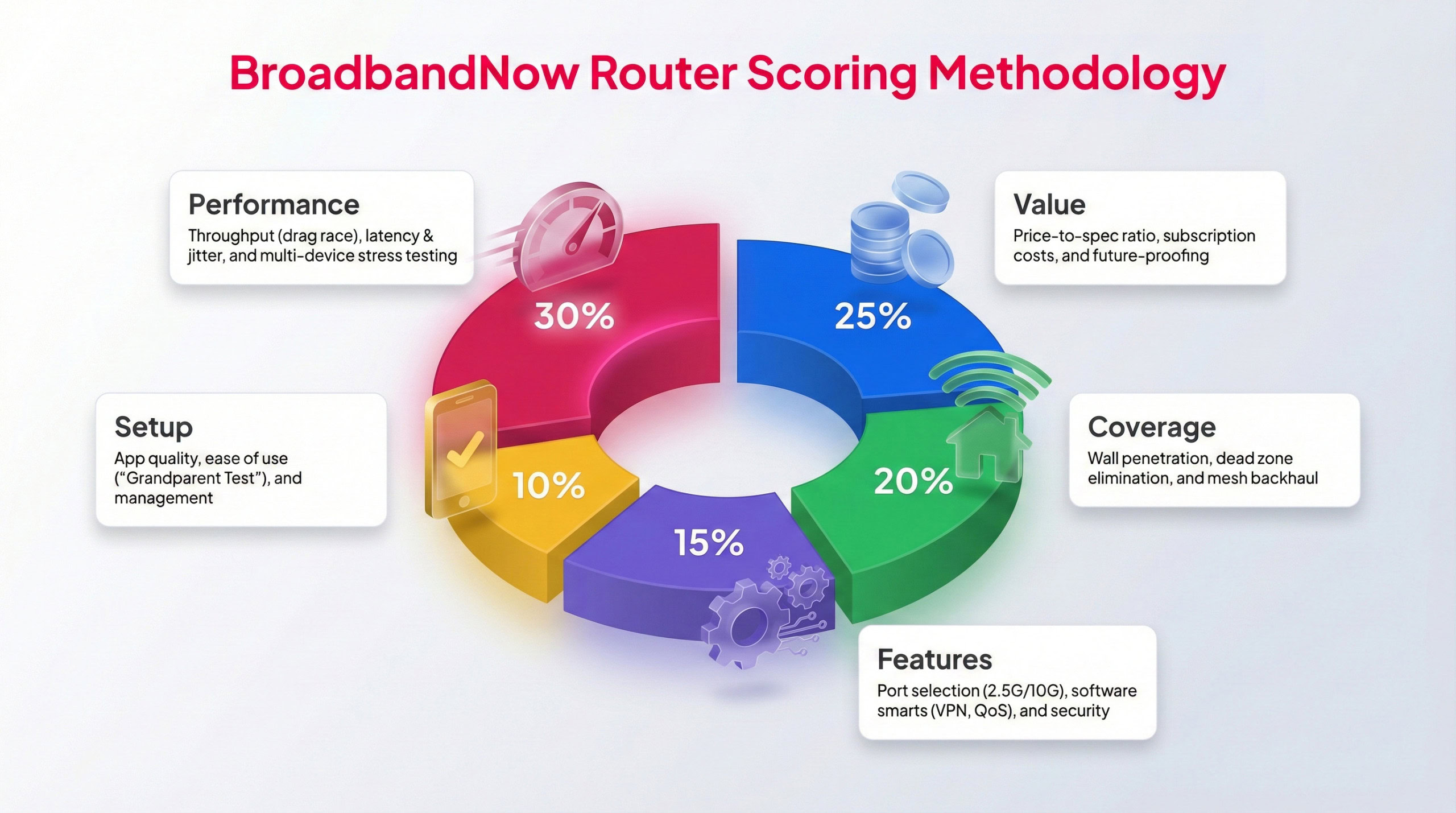
Each BBN expert tests routers following this methodology to provide a weighted score.
We put every router through the same structured, real-world evaluation process to keep our reviews consistent and easy to compare. The TP-Link Archer AX21 was tested over a 30-day period in an active home environment. During that time, our broadband team focused on everyday reliability, how well the features align with its budget-friendly pricing, and how it performs when multiple devices are connected at once. Testing included heavy evening usage, activities such as HD streaming, gaming, and video conferencing, and speed tests conducted in different areas of the home.
We rate each router on a weighted 1–5-star scale, with performance and overall value carrying the most influence. Below, you’ll find our scores across five key categories, along with a breakdown of how the TP-Link Archer AX21 performed during testing in my three-floor condo.
Performance – 3.5/5: I performed several speed tests in the three-floor condo to test out how well the TP-Link Archer AX21 performed. Overall, I found impressive speeds when I was closest to the router, but as I moved far away, they dropped pretty dramatically. While these speeds weren’t horrible — I could still manage a moderate level of tasks — it definitely wasn’t helping me reach my gigabit speed plan from my ISP.
Value – 4/5: The TP-Link Archer AX21 is a budget-friendly Wi-Fi 6 router with performance that would work well for moderate bandwidth households. It’s a no-nonsense router that gives you the basics without pricing you out of your budget. That said, high-bandwidth users or large households might need a router with more power.
Coverage – 3.5/5: I put this router to the ultimate test in my three-floor condo, and while there weren’t many issues close to the router, speed took a major hit the further I moved away. Speeds ended up dropping by about 50%, which begs the question as to whether this router would work well enough for larger homes.
Features – 5/5: The TP-Link Archer AX21 delivers exactly what I’d expect from a budget-friendly Wi-Fi 6 router: potential gigabit speeds, a dual-band radio, smart home connectivity, and must-have security features.
Setup – 3.5/5: I ran into a few snags when trying to get the TP-Link Archer AX21 online that required me to do some hard resets of my modem to get the connection to set up. It proved to be a frustrating experience, but I will say that the TP-Link Tether app did make the rest of the setup smooth once I was able to go through some troubleshooting. For users who aren’t tech-savvy, this could prove pretty challenging.
Frequently Asked Questions About the TP-Link Archer AX21
Can the TP-Link Archer AX21 be wall-mounted?
No, the Archer AX21 isn’t designed with built-in mounting holes or a wall-mount kit. It’s intended for flat placement on a desk, shelf, or entertainment center. If wall-mounting is important, you’ll need third-party brackets or look for a model like the Archer AX55 that includes this feature.
Does the TP-Link Archer AX21 support link aggregation for faster wired speeds?
No, the Archer AX21 doesn’t support link aggregation. This feature is usually reserved for higher-end routers, enabling two LAN ports to combine for faster wired throughput. With the Archer AX21, you’re limited to standard gigabit speeds per port.
How often does TP-Link release firmware updates for the Archer AX21?
TP-Link doesn’t follow a strict schedule for firmware updates on budget models like the Archer AX21. Updates are typically rolled out a few times a year, focusing on security patches and minor performance tweaks. Users can check for updates manually in the Tether app or via the router’s web interface.
Can the Archer AX21 be used in bridge mode or as an access point?
Yes, but not directly out of the box. The Archer AX21 can function as an access point when configured through its advanced settings, though it doesn’t have a dedicated bridge mode. For households with an existing router-modem combo, this setup can help extend Wi-Fi coverage.
Will the Archer AX21 overheat if used continuously?
The Archer AX21 has ventilation slots across the top and sides, which help with heat management. However, because it uses a smaller dual-core CPU and limited RAM, it may run warm under heavy loads (such as multiple 4K streams and gaming simultaneously). Placing it in an open, well-ventilated area is recommended.
How many devices can the AX21 realistically support at once?
While Wi-Fi 6 technology helps handle multiple connections, the Archer AX21 is still a budget-friendly router. It’s best suited for around 15-20 connected devices in an average household. Larger smart homes with dozens of devices may experience congestion and should consider a mesh system or a higher-end model.
Is the Archer AX21 future-proof with Wi-Fi 7 on the horizon?
Not entirely. The AX21 only supports Wi-Fi 6, not Wi-Fi 6E or Wi-Fi 7. That said, most current laptops, phones, and smart devices are still Wi-Fi 6 compatible. For buyers who plan to keep their router for 3-4 years, it remains a reasonable investment, but early adopters of Wi-Fi 7 devices may want to upgrade sooner.
What happens if my internet plan exceeds the Archer AX21’s 1 Gbps port limit?
If your ISP provides a gigabit-plus plan (e.g., 1.2 Gbps or higher), the Archer AX21 will not deliver those full speeds. It will cap out at around 1 Gbps on wired connections and somewhat less on Wi-Fi. In that case, a midrange or high-end Wi-Fi 6E or Wi-Fi 7 router with a 2.5 Gbps WAN port would be a better match.