Best Streaming Apps in 2026
While subscription prices continue to rise, the ability to cancel at any time makes these streaming apps worth it.

Streaming has evolved from online movie libraries to the primary way we consume entertainment, but choosing the right combination of services now requires careful consideration due to rising costs, fragmented content and account-sharing restrictions. This guide compares top streaming apps by pricing and features, helps you find the best match for your budget and preferences — whether that’s affordability, content variety or premium features — and includes tips for optimizing your setup and troubleshooting common issues.
How We Pick the Best Streaming Apps
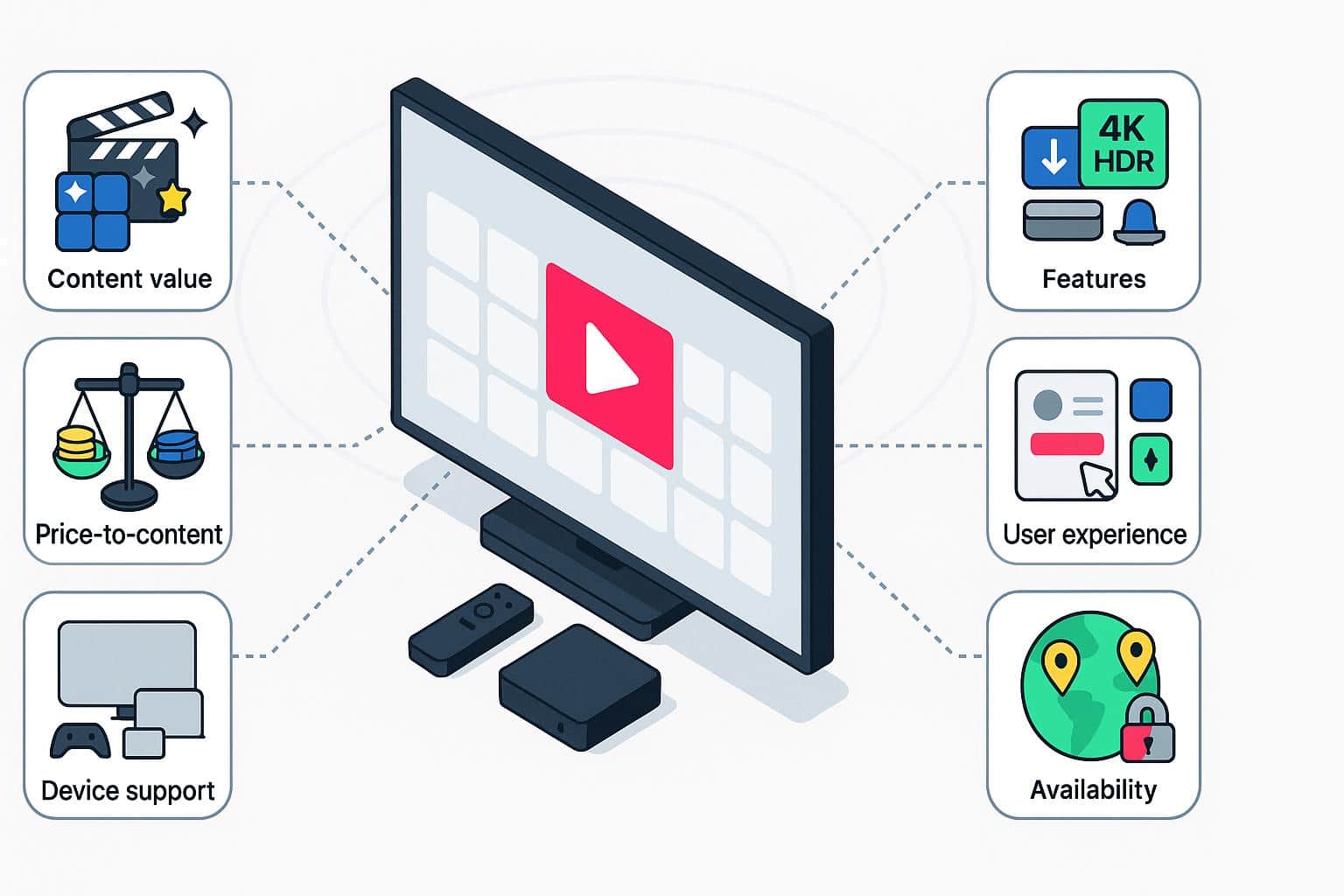
With over a decade in the industry, we’ve had plenty of time to test hands-on all the most popular streaming platforms and see how they’ve evolved over the years. We’ve continuously monitored catalog updates, plan changes, and app performance across devices. Our rankings reflect the current market and feedback from the experiences of everyday viewers.
For each streaming app, we focus on these criteria:
- Content value: Original programming, back catalog size, availability of live channels, and whether the service offers sports and news.
- Price-to-content ratio: We compare monthly pricing, annual discounts, ad-supported and ad-free tiers, and bundle options vs. what you actually get.
- User experience: App stability, ease of navigation, personalization tools like profiles and recommendations, and accessibility features.
- Features: Support for 4K and HDR, offline downloads, simultaneous streams, DVR for live TV, and innovations like multi-viewer co-watching modes.
- Device support: Compatibility across streaming devices like Roku, Fire TV, Apple TV, smart TVs, game consoles, mobile platforms (iOS/Android), and web browsers.
- Availability and limitations: We account for factors like regional availability, travel and roaming rules, and restrictions on account sharing.
Why Streaming Apps Are So Popular
Streaming apps have overtaken cable and satellite as the preferred way to watch TV. Unlike traditional pay-TV bundles, streaming services let viewers watch what they want on their own schedule without signing up for long-term contracts or installing hardware. Streaming offers both on-demand and live TV access, a vast content library, flexible device support and low entry costs, making it an attractive alternative to traditional cable TV.
However, the rise of multiple competing platforms has led to subscription fatigue, with must-watch shows and new movies split across different services. With multiple subscriptions, monthly costs can add up quickly. Since streaming relies on a stable internet connection, outages or slow internet speeds can disrupt the viewing experience. Cable and satellite still offer more consistency and consolidated access, but at a higher cost and with less flexibility.
Streaming services
Pros
- Watch on demand anytime
- Works across devices (TV, phone, tablet, web)
- Flexible, no contracts or equipment fees
Cons
- Subscription fatigue from juggling multiple apps
- Content fragmentation across platforms
- Requires strong internet connection
Cable or satellite TV
Pros
- Reliable live channel lineup
- Bundled channels in one place
- Consistent quality without internet dependency
Cons
- Higher monthly costs and fees
- Less flexibility with fixed programming schedules
- Equipment setup and long-term contracts
Best in Category for Streaming Apps
We’ve highlighted the strongest streaming apps in key categories. These are the leaders for this year:
| Category | Category winner | Why it wins | Runner-up(s) |
|---|---|---|---|
| Best for originals | Netflix | Delivers globally recognized original hits with a wide range of genres and international content | Apple TV, Prime Video |
| Best for families | Disney+ | A family-friendly library with Disney, Pixar and Marvel content, as well as great-value bundle options with other services | Netflix, HBO Max |
| Best for live TV | YouTube TV | Broad channel lineup, unlimited DVR and smooth performance across devices | Hulu + Live TV, Sling TV |
| Best for sports | ESPN Unlimited | The most extensive coverage of live games and exclusive sports programming | Fubo, Peacock |
| Best budget live TV | Sling TV | Flexible, lower-cost channel bundles compared to other live TV options | Philo |
| Best low-cost on-demand | Peacock | Competitive entry price with a mix of originals, NBCUniversal content, sports and movies | Paramount+ |
| Best free service | Tubi | Large ad-supported catalog with no subscription required | Pluto TV, The Roku Channel |
| Best for Apple users | Apple TV | Seamlessly integrates with Apple devices, with premium originals in 4K HDR | Netflix (for ecosystem flexibility) |
Top Streaming Apps
Netflix
Best for: Binge-worthy originals and global hits
Price range: $7.99–$24.99 per month
Standouts:
- Huge library of award-winning originals
- Global catalog with English and foreign language hits
- Profiles for multiple viewers with personalized recommendations
- Downloads for offline viewing
- 4K HDR and Dolby Atmos on Premium plan
| Consider if: You want a huge, diverse catalog of original hit shows and popular films, with a mix of international and U.S. content, plus the flexibility to watch on multiple devices. |
| Skip if: You primarily want live TV, sports or brand-specific franchises. Netflix is one of the priciest on-demand options, so it isn’t the best if you’re trying to save money. |
Hulu
Best for: Next-day network TV and a giant on-demand library
Price range: $11.99–$99.99 per month
Standouts:
- Next-day access to current shows from ABC, FOX, and other major networks
- Large on-demand library mixing originals with licensed TV and movies
- Bundles with Disney+ and ESPN Unlimited for one of the best-value on-demand streaming packages
- Optional add-ons for premium channels (HBO Max, Showtime, Starz)
- Downloads available on ad-free plans
| Consider if: You want to replace network TV content, are looking for a strong mix of streaming originals and licensed content, or plan to bundle with Disney+ and ESPN Unlimited for better value. |
| Skip if: You dislike ads but don’t want to pay premium pricing, or if you are looking to fully replace cable — users prefer YouTube TV’s interface and performance. |
Disney+
Best for: Families, Disney, Pixar, Marvel and Star Wars fans, best-value multiservice bundles
Price range: $11.99–$44.99 per month
Standouts:
- Exclusive home for Disney, Pixar, Marvel, Star Wars, and National Geographic titles
- Kid-friendly interface with customizable children’s profiles and parental controls
- Every title available in 4K Ultra HD, Dolby Vision, and Dolby Atmos at no extra cost
- IMAX Enhanced format for select Marvel films
- Ability to download for offline viewing
- Bundling options with Hulu and ESPN Unlimited for more variety and live sports
| Consider if: You have kids, love Disney-owned franchises, or want a reliable, ad-free 4K experience without hidden costs. |
| Skip if: You don’t care about Disney-owned brands, or you’re looking for network TV, non-Disney originals, or third-party content. |
Amazon Prime Video
Best for: All-around mix of movies and shows with à la carte rentals, plus shopping and gaming perks
Price range: $8.99–$14.99 per month
Standouts:
- Access to a wide library of originals, plus a complete selection of movies and shows to purchase or rent individually
- Exclusive home for Thursday Night Football, plus postseason NFL games and broader live sports offerings (NBA, WNBA, NASCAR, tennis)
- Add-on Prime Channels (HBO, Showtime, Starz, HBO Max) let you add premium networks within the app, some with free trials
- Offline downloads, 4K HDR support and Dolby surround options
| Consider if: You’re looking for value and flexibility with premium channel add-ons, renting the latest blockbuster movies, and streaming live sports all in the same platform. |
| Skip if: You’re not interested in the Amazon ecosystem and prefer a leaner, more focused streaming service with fewer pricing tiers or add-ons. |
HBO Max
Best for: Prestige HBO series, Warner Bros. films, and non-fiction Discovery content
Price range: $10.99–$22.99 per month
Standouts:
- Home to premium HBO Originals and blockbuster Warner Bros. and DC content
- Large non-fiction and lifestyle catalogs from Discovery+
- Full 4K UHD, Dolby Vision and Dolby Atmos support on the Ultimate tier
- Robust accessibility with over 7,000 hours of audio-described content, closed captioning and screen-reader support
| Consider if: You love award-winning, cinematic originals and a mix of scripted and non-fiction content with top-tier picture and sound quality on the Ultimate tier. |
| Skip if: You’re put off by account-sharing restrictions, are looking for live TV beyond news and select sports, or dislike high content turnover. |
Apple TV
Best for: Polished originals with a smaller, curated library
Price range: $12.99 per month
Standouts:
- Highly curated selection of originals
- Seamless integration with the Apple ecosystem, including Siri, AirPlay, and Family Sharing
- 4K HDR, Dolby Vision and Dolby Atmos standard on all titles
- Affordable relative to larger streaming libraries, with consistent ad-free viewing
| Consider if: You want high-quality, prestige content and are already invested in the Apple ecosystem. |
| Skip if: You prefer a large content library with extensive live TV, sports, or niche third-party shows. |
Peacock
Best for: NBCUniversal shows, comedies, and live sports at a low cost
Price range: $7.99–$19.99 per month
Standouts:
- Strong catalog of NBCUniversal originals and classic comedies
- Convenient catch-up viewing with next-day access to NBC network shows
- Live sports coverage including Premier League, WWE, and Olympic content
- Offline downloads available on ad-free tier; 4K HDR supported on many titles
- Flexible ad-supported entry point for casual viewers
| Consider if: You want a low-cost, NBC-centric streaming service with a mix of comedies, live sports, and next-day network access. |
| Skip if: You’re looking for a broad, premium-content library of top-tier originals comparable to Netflix or HBO Max. |
Paramount+
Best for: Star Trek universe and other CBS shows, with some NFL and soccer coverage
Price range: $7.99–$12.99 per month
Standouts:
- Strong catalog of CBS series and Paramount films
- Live local CBS channels available on Premium tier, plus select NFL games and international soccer
- Bundles with Showtime provide access to premium originals and movies
- Offline downloads and 4K HDR on Premium plan
| Consider if: You’re a CBS fan, a Star Trek devotee, or want access to select live sports alongside a strong on-demand library. |
| Skip if: You want ad-free content without subscribing to a higher-tier plan or don’t want to be limited to Paramount and CBS content. |
YouTube TV
Best for: Live TV replacement with unlimited cloud DVR
Price range: $82.99 per month
Standouts:
- Broad coverage of live channels, including local networks, news, and popular cable channels
- Unlimited cloud DVR with up to 9 months of storage
- Optional 4K add-on for higher-resolution streams
- Sports Plus add-on for extra regional and national sports content
- Easy integration across smart TVs, streaming devices, and mobile
| Consider if: You want a complete live TV replacement with flexible DVR options and strong sports coverage. |
| Skip if: You mainly watch on-demand shows or movies and don’t need live TV. YouTube TV is significantly more expensive than on-demand services. |
Fubo
Best for: Sports-centric live TV lineups
Price range: $84.99–$114.99 per month
Standouts:
- Extensive coverage of national and regional sports networks, including niche leagues
- Cloud DVR included, with Pro and Elite plans offering 1000+ hours of storage
- Select live events streamed in 4K, with Pro/Elite tiers supporting multiple streams simultaneously
- Strong international soccer offerings
- Option to add premium channels like NFL RedZone, NBA League Pass, and similar sports content
| Consider if: You’re a sports fan who wants a live TV service built around comprehensive sports coverage, including regional networks and international leagues. |
| Skip if: You primarily watch on-demand movies or shows, or want a lower-cost live TV option with fewer channels and no sports focus. |
Philo
Best for: Budget entertainment and lifestyle reality channels with no sports or news
Price range: $28 per month
Standouts:
- Extremely affordable compared with other live TV services
- Focused on entertainment, lifestyle, reality and DIY channels
- Unlimited cloud DVR included
- Easy-to-use interface with support across smart TVs, streaming devices and mobile
| Consider if: You mainly watch entertainment, lifestyle and reality programming and want a low-cost live TV alternative, or you appreciate straightforward pricing. |
| Skip if: You want local channels, news coverage or sports, or are looking for an extensive on-demand library of premium content. |
Sling TV
Best for: Budget live TV with customizable base packages
Price range: $4.99–$159.99 per month
Standouts:
- Affordable base packages with flexibility to customize via add-ons
- Device deals occasionally available with streaming sticks and smart TVs
- Discounted streaming service offers for subscribers
- Cloud DVR included, with upgrades for extended storage
| Consider if: You want a low-cost live TV option with flexibility to pick channels based on your interests. |
| Skip if: You need full national and local channel coverage, robust sports networks or unlimited simultaneous streams. |
How to Choose the Right Streaming App for You

With so many streaming services available, picking the right ones can feel overwhelming. Here’s how to narrow your choices based on your viewing habits, household needs, and budget:
Consider Your Favorite Genres
What do you watch the most: sports, dramas, comedies, documentaries, anime, or kids’ programming? Services like ESPN Unlimited and Fubo are sports-heavy, Netflix and Apple TV focus on originals, while Disney+ stands out for family content.
Decide Between Live TV or On-Demand
Do you want next-day network access, live sports, or a full live TV replacement? YouTube TV, Sling TV, and Philo cover live network channels. Hulu offers great next-day viewing, while Disney+, Netflix, and Apple TV are purely on-demand.
Budget and Ad Preferences
Are you comfortable watching ads in exchange for lower subscription costs, or do you prefer ad-free content? Many apps offer tiered pricing: Hulu, Disney+, HBO Max and Peacock have ad-supported and ad-free options. Consider student discounts, bundle deals, or annual subscriptions to cut costs.
Check Platform Compatibility
Make sure the apps you pick work on your selected streaming devices like Roku, Apple TV, Fire TV, consoles, mobile, or web. Some services, like Apple TV, integrate seamlessly into their own ecosystem, while others are platform-independent.
Review Account Sharing and Travel Rules
Some apps now restrict how many devices can watch outside your household or apply fees for extra users. Consider travel or roaming restrictions if you often watch away from home.
Free vs. Paid Streaming Services
Streaming services fall into two categories: free, ad-supported apps (also called FAST or AVOD) like Tubi and Pluto TV and paid subscription services like Netflix, Disney+, and Hulu.
Free (ad-supported)
Pros
- No monthly cost
- Broad accessibility on most devices
- Lightweight apps, low barrier to entry
Cons
- Ads interrupt viewing
- Smaller, less curated catalog
- Limited features: no downloads, fewer streams, lower resolution
Paid (subscription)
Pros
- Larger, curated content libraries
- Higher resolution: 4K/HDR available
- Features like offline downloads, multiple streams, personalization
Cons
- Monthly cost can add up
- Catalog may be fragmented across multiple services
- Requires internet connection, sign-ups, and accounts
Mobile-First Streaming Tips
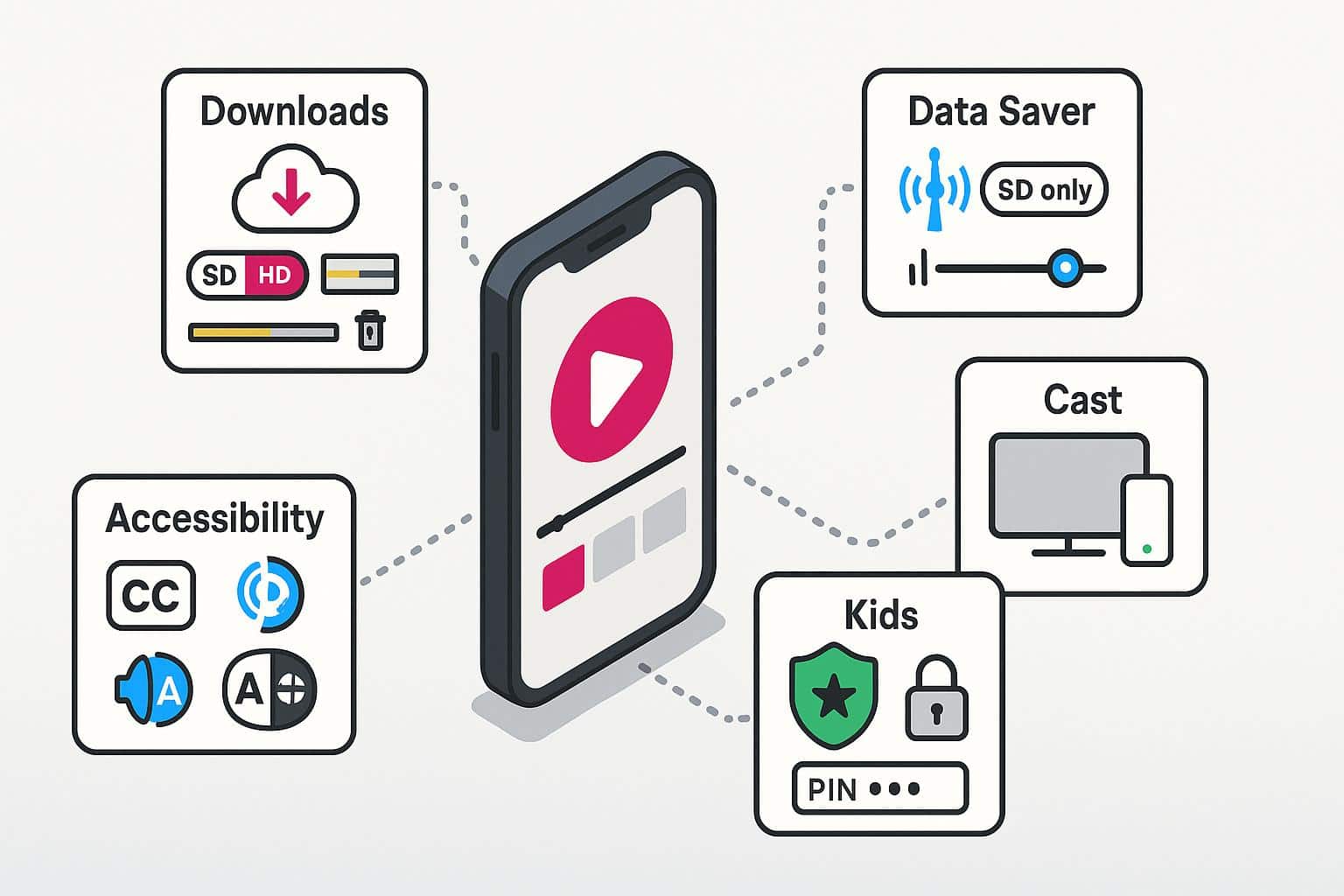
Watching on mobile is convenient, but it’s easy to hit speed bumps with mobile networks and device storage. Streaming smart on your device requires a few strategies:
Downloads for Offline Viewing
Most apps allow you to download shows and movies. To manage device storage:
- Enable downloads within the app settings.
- Choose download quality (standard vs. high) based on available storage.
- Delete watched content regularly to free up space.
Data Usage Controls
Streaming in HD or 4K can quickly consume cellular data. Enable data-saving or “SD only” mode on cellular networks, available in apps like YouTube TV, Hulu, and Peacock. You can also block apps from using cellular data in Settings.
Casting and Cross-Device Viewing
Cast or AirPlay content from your phone to a smart TV or streaming device for a larger-screen experience while maintaining mobile control.
Kid Profiles and Parental Controls
Many services let you create child-specific profiles, set PINs, and filter content by ratings.
Accessibility Features
Mobile streaming apps usually include:
- Closed captions: Customize size, font, and background for better readability.
- Audio descriptions (AD): Hear descriptions of visual elements for movies and shows.
- Screen reader support: This includes high-contrast UI options available in Netflix, Apple TV, and Hulu.
- Language settings: Subtitles and AD tracks can be selected in-app for multiple languages.
Data Usage and Internet Speed for Smooth Streaming
Streaming quality depends heavily on your internet speed and how many devices are using your network at the same time. Understanding typical bandwidth requirements avoids buffering and interruptions.
Typical Streaming Speed Requirements
Below are the minimum requirements. We recommend higher download speeds for the smoothest viewing experience.
- SD (Standard Definition): 3–4 Mbps per stream
- HD (High Definition 1080p): 5–8 Mbps per stream
- 4K UHD/HDR: 15–25 Mbps per stream
Concurrent Streams and Household Usage
Multiply the per-stream speed by the number of devices streaming at once, and add bandwidth for other household activities (video calls, gaming, browsing).
For example, if two people are watching 4K Netflix simultaneously (20 Mbps each) while another device is on a video call (5 Mbps): 20 + 20 + 5 = 45 Mbps minimum recommended for smooth performance.
Optimizing Your Home Wi-Fi
Place your router centrally or consider a mesh Wi-Fi system for consistent coverage across larger homes. Also, use router QoS (Quality of Service) settings to prioritize streaming devices over background tasks.
Tips to Get the Most Out of Your Streaming Apps
Even the best streaming apps are only as good as how you use them. By following strategies like managing watchlists, adjusting video quality, and setting up profiles, you can enjoy a smoother streaming experience while keeping your household safe.
- Match apps to your habits. Choose services based on genres, live vs. on-demand needs, and household size.
- Mix free and paid. Pair paid apps with free, ad-supported services to stretch your budget.
- Watch your wallet. Use trial periods, rotate subscriptions, and only commit to annual plans if you stream year-round.
- Optimize your setup. Check internet speed, manage devices, and use QoS or mesh networks for smooth playback.
- Mobile and accessibility. Download for offline use, set up profiles, enable parental controls, and use captions/audio descriptions as needed.
- Stay informed. Track ad-supported tier growth, bundle deals and sports rights shifts to make smarter choices.
- Troubleshoot proactively. Restart apps, clear cache, adjust quality, and contact support when issues persist.
Pros
- Audit subscriptions periodically to remove services you no longer use
- Customize notifications for new releases or favorite shows
- Check device compatibility to ensure smooth playback on all devices
- Prioritize high-bandwidth streams for main viewing devices using router QoS
Cons
- Forget to cancel unused subscriptions before trial periods or billing cycles
- Rely on default recommendations and forget to explore apps’ full catalogs
- Assume all content is available in your region; check geo restrictions
- Leave streaming apps running in the background unnecessarily
Troubleshooting Common Streaming App Issues
Even the most reliable streaming apps can run into problems. Buffering, login errors, device crashes, and poor playback quality are common frustrations, but most can be resolved with a few simple steps.
First Steps Checklist
- Test your internet speed on the device you’re streaming. Compare Ethernet vs. Wi-Fi to see if a wired connection improves performance.
- Move closer to your router or remove physical obstructions that may weaken Wi-Fi signals.
- Restart your app, device, and router.
- Clear the cache and check for updates to both the app and your device’s operating system.
- Lower playback quality (e.g., from 4K to 1080p) if buffering persists.
- Check device compatibility to ensure the app supports your current hardware.
Advanced Tips
- If Wi-Fi coverage is weak in parts of your home, consider setting up a mesh network for more consistent performance.
- Refer to your internal Wi-Fi setup guide to optimize placement, channels, and settings for streaming devices.
When to Contact Support
- If issues persist after following the above steps, contact the app’s customer support for account-related or content-specific problems.
- If you notice consistent speed issues across multiple apps, contact your internet service provider.
Frequently Asked Questions About Streaming Apps
Can I use streaming apps while traveling internationally?
Most streaming apps are region-locked, so their libraries vary by country. Some titles may not be available abroad, though many services allow downloads for offline viewing while traveling. Check the app’s Help pages for details on international access and content restrictions.
Is it safe to use a VPN with streaming apps?
Using a VPN is generally safe and provides privacy, but it may violate some apps’ terms of service or limit access to certain content. Check your streaming provider’s policies.
What happens to my watch history if I cancel and resubscribe?
Data retention policies vary by service. Some apps keep watch history and recommendations for a limited time after cancellation, while others reset profiles immediately. Check your account settings for more information.
Which streaming apps offer the best accessibility features?
Many services provide closed captions, audio descriptions, customizable text size, and high-contrast UI options. Netflix, Apple TV, Hulu, Disney+, and HBO Max all have dedicated accessibility guides.
Are there streaming apps that let me watch with friends remotely?
Yes. Some apps include native watch-party features like Disney+ GroupWatch, Hulu Watch Party, and Amazon Prime Video Watch Party. Make sure all participants have compatible devices, accounts, and connected profiles for a smooth experience.